jQuery 表單驗證擴展(四):自訂驗證框架的極簡實作
編輯:JQuery特效代碼
寫這幾篇的初衷只是分享寫程式的心得,順便替自己複習。如果文中有問題,歡迎指正。本篇談控制項之間的值比較——也就是「確認密碼要跟上一次輸入一致」這類需求。
一、與第一篇的差異
邏輯上和第一篇的比較功能大同小異,主要改進在樣式處理與程式碼精簡。因為內容不複雜,這篇不會有太長的說明。
二、參數一覽
onFocusText / onFocusClass     取得焦點的提示文字與樣式
onEmptyText / onEmptyClass     輸入為空時的提示文字與樣式
onErrorText / onErrorClass     驗證失敗時的提示文字與樣式
onSuccessText / onSuccessClass 驗證成功時的提示文字與樣式
comType   比較運算子:"==" "!=" ">" ">=" "<" "<="
dataType  比較的資料型別:"text" "number" "date"
comId     被比較的目標控制項 id
targetId  顯示提示訊息的目標元素 id
date 型別尚未處理,留待後續補充。
三、核心程式碼
這裡刻意把驗證範圍限縮在 input 與 textarea(排除 radio/checkbox),大幅簡化了判斷邏輯。
$.fn.extend({
    checkCompare: function (inputArg) {
        if ($(this).is("input") || $(this).is("textarea")) {
            if ($(this).attr("type") != "radio" && $(this).attr("type") != "checkbox") {

                $(this).bind("focus", function () {
                    var value = $(this).val();
                    if (value == undefined || value == "") {
                        addText(inputArg.targetId, inputArg.onEmptyText);
                        addClass(inputArg.targetId, inputArg.onEmptyClass);
                    }
                });

                $(this).bind("blur", function () {
                    var value = $(this).val();
                    if (value == undefined || value == "") {
                        addText(inputArg.targetId, inputArg.onEmptyText);
                        addClass(inputArg.targetId, inputArg.onEmptyClass);
                    } else {
                        var targetValue = $("#" + inputArg.comId).val();
                        var flag = false;
                        switch (inputArg.dataType) {
                            case "text":
                                if (inputArg.comType == "==") { flag = value == targetValue; }
                                else if (inputArg.comType == "!=") { flag = value != targetValue; }
                                break;
                            case "number":
                                if (inputArg.comType == "==") { flag = value == targetValue; }
                                else if (inputArg.comType == "!=") { flag = value != targetValue; }
                                else if (inputArg.comType == ">")  { flag = value >  targetValue; }
                                else if (inputArg.comType == ">=") { flag = value >= targetValue; }
                                else if (inputArg.comType == "<")  { flag = value <  targetValue; }
                                else if (inputArg.comType == "<=") { flag = value <= targetValue; }
                                break;
                            case "date":
                                break;
                        }
                        addMessage(flag, inputArg);
                    }
                });
            }
        }
    }
});
這裡的「精簡」不是刪功能,而是把重複邏輯抽成方法。addMessage/addText/addClass 三個工具函式沿續前幾篇,內容不變,這裡再貼一次方便對照:
function addMessage(flag, inputArg) {
    if (flag) {
        addText(inputArg.targetId, inputArg.onSuccessText);
        addClass(inputArg.targetId, inputArg.onSuccessClass);
    } else {
        addText(inputArg.targetId, inputArg.onErrorText);
        addClass(inputArg.targetId, inputArg.onErrorClass);
    }
}

function addText(targetId, text) {
    if (text == undefined) { text = ""; }
    $("#" + targetId).html(" " + text);
}

function addClass(targetId, className) {
    if (className != undefined && className != "") {
        $("#" + targetId).removeClass();
        $("#" + targetId).addClass(className);
    }
}
四、應用範例
(1)確認密碼:兩次輸入必須相同
取得焦點時提示:
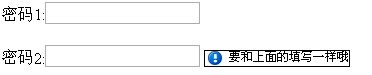
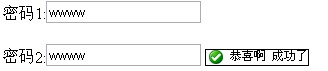
失去焦點驗證失敗:

驗證通過:
$(document).ready(function () {
    $("#txtPass2").checkCompare({
        onFocusText: "要和上面的填寫一樣哦", onFocusClass: "notice",
        onEmptyText: "不允許為空", onEmptyClass: "error",
        onErrorText: "驗證錯誤了,請認真填寫", onErrorClass: "error",
        onSuccessText: "恭喜啊 成功了", onSuccessClass: "correct",
        comType: "==", dataType: "text",
        comId: "txtPass1", targetId: "txtPass2Tip"
    });
});
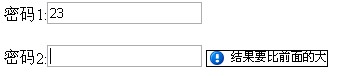
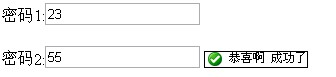
(2)數值比較:後者必須大於前者

$("#txtPass2").checkCompare({
    onFocusText: "結果要比前面的大", onFocusClass: "notice",
    onEmptyText: "不允許為空", onEmptyClass: "error",
    onErrorText: "驗證錯誤了,請認真填寫", onErrorClass: "error",
    onSuccessText: "恭喜啊 成功了", onSuccessClass: "correct",
    comType: ">", dataType: "number",
    comId: "txtPass1", targetId: "txtPass2Tip"
});
對應的 HTML 結構只要兩個文字框加兩個提示用的 <span> 即可。
一個值得注意的坑
程式碼中用 == 比較數字是有風險的。雖然 "10" == 10 會因為型別轉換而為真,但 "10abc" 這類混合輸入的行為就難以預期。正式環境建議在比較前先 parseFloat() 或 parseInt() 轉型,並用 === 做嚴格比較。
表單驗證擴展仍在持續更新中,後續敬請期待。