用 jQuery + EasyDrag 實作可拖曳彈出視窗,並完成選值回傳
編輯:JQuery特效代碼
以前要寫一個客戶端特效,得花一兩天寫 JavaScript,再花一兩天除錯,才能看到雛形。現在只要用 jQuery 與它的外掛,腦海中的效果幾乎都能實現。
這次的實作需求是:從列表頁中挑選要匯出到 Word 的欄位,再把選取結果回傳給後端。為了增加通用性,欄位數目不固定——這張表可能 4 欄,也可能 5 欄。
整体設計
例如有一張這樣的表格,我們要列印除「薪水」以外的所有欄:
姓名/年齡/性別/薪水,資料列如:張三 19 男 10000。
做法分兩步:
- 後端迴圈表格表頭,組出字串
1-Name--2-Age--3-Sex--4-Salary,存進 hiddenfield。 - 前端由 JavaScript 讀取該字串,動態在彈出 Div 中產生對應的 checkbox。
使用者勾選完成後,再把選中的項目組成同格式的字串(例如 1-Name--2-Age--3-Sex)存進另一個 hiddenfield,後端讀取這個字串,就能把表格中對應的欄位匯出到 Word。
彈出視窗的拖曳效果則使用 EasyDrag jQuery Plugin,這個外掛相當輕巧好用。
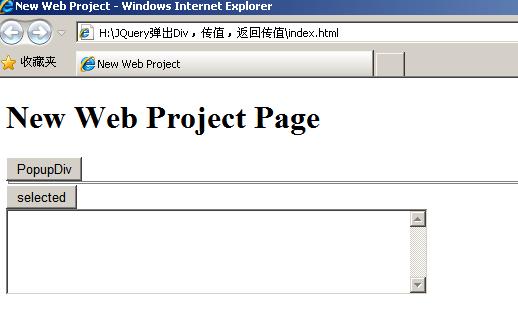
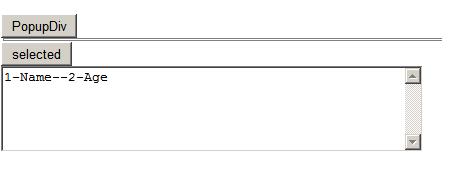
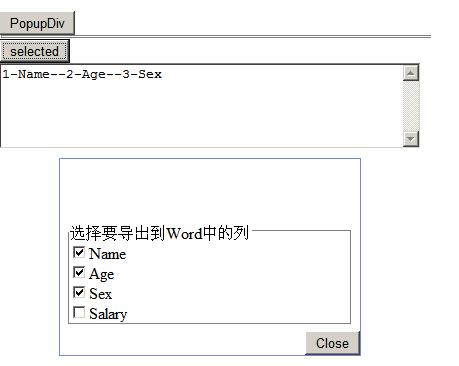
最簡的拖曳寫法
$(document).ready(function () {
    $("#divPanel").easydrag();
});
<div id="divPanel" style="width:300px;height:300px;background:white;
     border:1px solid #000000;position:absolute;left:5px;top:50px">
  <div id="divTitle" style="width:100%;height:25px;background:lavender">Title</div>
  <div style="width:100%"></div>
</div>
EasyDrag 還能指定「只能透過標題列拖曳」,避免使用者誤拖內容區:
$(document).ready(function () {
    $("#divPanel").easydrag();
    $("#divPanel").setHandler("divTitle");
});
完整範例
<!DOCTYPE HTML PUBLIC "-//W3C//DTD HTML 4.01 Transitional//EN" "https://www.w3.org/TR/html4/loose.dtd">
<html xmlns="https://www.w3.org/1999/xhtml">
<head>
<meta http-equiv="Content-Type" content="text/html; charset=utf-8" />
<title>New Web Project</title>
<style type="text/css">
.pop-box {
    z-index: 9999;
    margin-bottom: 3px;
    display: none;
    position: absolute;
    background: #ffffff;
    border: solid 1px #6e8bde;
}
.pop-box h4 {
    color: #ffffff;
    cursor: default;
    height: 18px;
    font-size: 14px;
    font-weight: bold;
    text-align: left;
    padding: 4px 0 2px 8px;
}
.pop-box-body { clear: both; margin: 4px; padding: 2px; }
</style>
<script type="text/javascript" src="script/jquery.js"></script>
<script type="text/javascript" src="script/jquery.easydrag.js"></script>

<script type="text/javascript">
$(document).ready(function () {
    // 由後端傳入的欄位定義字串
    var text = "1-Name--2-Age--3-Sex--4-Salary";
    var tokenGroup = new Array();
    tokenGroup = text.split("--");

    $(".optionDiv").append("<fieldset class='fieldset1'><legend class='legend1'>選擇要匯出到 Word 的欄</legend></fieldset>");

    var obj = new Object();
    for (obj in tokenGroup) {
        var index = Number(obj) + 1;
        var token = new Object();
        token.value = tokenGroup[obj].split("-")[0];
        token.text  = tokenGroup[obj].split("-")[1];

        if (index == 1) {
            $(".legend1").after(
                "<input id='Checkbox" + index + "' value='" + token.value
                + "' type='checkbox' /><label for='Checkbox" + index + "'>"
                + token.text + "</label><br>");
        } else {
            $(".fieldset1").append(
                "<input id='Checkbox" + index + "' value='" + token.value
                + "' type='checkbox' /><label for='Checkbox" + index + "'>"
                + token.text + "</label><br>");
        }
    }
});

// 把勾選結果組回字串
function collectSelected() {
    var select = "";
    $(".fieldset1 input").each(function (i) {
        if (this.checked) {
            select += (select == "" ? "" : "--")
                    + (i + 1).toString() + "-" + $(this).next().text();
        }
    });
    return select;
}

$(document).ready(function () {
    $(".btnSelect").click(function () { $(".selected").val(collectSelected()); });
    $("#btnClose").click(function ()   { $(".selected").val(collectSelected()); });
    $(".pop-box").easydrag();          // 讓彈出視窗可拖曳
});

// 重新載入欄位定義(例如換表之後)
function loadText() {
    var text = $(".hiddenfield1").val();
    var tokenGroup = new Array();
    tokenGroup = text.split("--");

    $(".pop-box-body").html("");
    $(".pop-box-body").append("<fieldset class='fieldset1'><legend class='legend1'>選擇要匯出到 Word 的欄</legend></fieldset>");

    var obj = new Object();
    for (obj in tokenGroup) {
        var index = Number(obj) + 1;
        var token = new Object();
        token.value = tokenGroup[obj].split("-")[0];
        token.text  = tokenGroup[obj].split("-")[1];

        if (index == 1) {
            $(".legend1").after(
                "<input id='Checkbox" + index + "' value='" + token.value
                + "' type='checkbox' /><label for='Checkbox" + index + "'>"
                + token.text + "</label><br>");
        } else {
            $(".fieldset1").append(
                "<input id='Checkbox" + index + "' value='" + token.value
                + "' type='checkbox' /><label for='Checkbox" + index + "'>"
                + token.text + "</label><br>");
        }
    }
}

// 置中彈出並加上遮罩
function popupDiv(div_id) {
    var div_obj = $("#" + div_id);
    var windowWidth  = document.documentElement.clientWidth;
    var windowHeight = document.documentElement.clientHeight;
    var popupHeight  = div_obj.height();
    var popupWidth   = div_obj.width();

    $("<div id='mask'></div>").addClass("mask")
        .width(windowWidth * 0.99)
        .height(windowHeight * 0.99)
        .click(function () { hideDiv(div_id); })     // 點遮罩即可關閉
        .appendTo("body")
        .fadeIn(200);

    div_obj.css({ "position": "absolute" })
        .animate({
            left: windowWidth  / 2 - popupWidth  / 2,
            top:  windowHeight / 2 - popupHeight / 2,
            opacity: "show"
        }, "show");

    loadText();
}

function hideDiv(div_id) {
    $("#mask").remove();
    $("#" + div_id).animate({ left: 0, top: 0, opacity: "hide" }, "slow");
}
</script>
</head>

<body>
<h1>New Web Project Page</h1>

<input class="hiddenfield1" type="hidden" value="1-Name--2-Age--3-Sex--4-Salary">
<input type="button" id="btnPopup" class="btnPopup" value="PopupDiv"
       onclick="popupDiv('pop-div')">

<div class="pop-box" style="width:300px" id="pop-div">
  <h4>Title</h4>
  <div class="pop-box-body"><p></p></div>
  <div class="butonPanel" style="text-align:right;">
    <input value="Close" id="btnClose" onclick="hideDiv('pop-div');" type="button">
  </div>
</div>

<input type="button" id="button1" class="btnSelect" value="selected"><br>
<textarea class="selected" rows="5" cols="50"></textarea>
</body>
</html>
幾個實作重點
- 字串協定:欄位定義與選取結果都用「
序號-名稱,以--分隔」的格式,前端後端往來一致,也方便擴充。 - 兩個 hiddenfield 的分工:一個存「全部可選欄位」,一個存「使用者選中的欄位」,後端各自讀取即可。
- 欄位數不固定的處理:因為 checkbox 是迴圈動態產生的,表格從 4 欄變 5 欄時,前端完全不需要改程式,只要後端給的字串多一項即可。
- 遮罩層:動態插一個
#mask蓋滿視窗,點擊可關閉,關閉時記得remove()清掉,避免残留在 DOM 中。 - 拖曳範圍:透過
setHandler("divTitle")把拖曳手把限制在標題列,內容區仍可正常勾選。