動手模擬 jQuery 實現原理(一):核心選擇器與原型
編輯:JQuery特效代碼
想真正理解 jQuery,最好的方式莫過於親手模擬它的核心機制。本文示範如何實作一個精簡版的 jQuery 核心,支援 id 與標籤兩種選擇器,並提供 css 與 text 的設置方法。
核心程式碼
// # 表示在 jQuery 1.4.2 中對應的行數
// 定義變量 undefined 方便使用
var undefined = undefined;
// jQuery 是一個函數,其實調用 jQuery.fn.init 創建對象
var $ = jQuery = window.$ = window.jQuery
= function (selector, context) {
return new jQuery.fn.init(selector, context);
};
// 用來檢查是否是一個 id
idExpr = /^#([\w-]+)$/;
// 設置 jQuery 的原型對象, 用於所有 jQuery 對象共享
jQuery.fn = jQuery.prototype = {
length: 0,
jquery: "1.4.2",
// 這是一個示例,僅僅提供兩種選擇方式:id 和標記名
init: function (selector, context) {
// Handle HTML strings
if (typeof selector === "string") {
match = idExpr.exec(selector);
if (match && match[1]) {
var elem = document.getElementById(match[1]);
if (elem) {
this.length = 1;
this[0] = elem;
}
}
else {
var nodes = document.getElementsByTagName(selector);
for (var l = nodes.length, j = 0; j < l; j++) {
this[j] = nodes[j];
}
this.length = nodes.length;
}
this.context = document;
this.selector = selector;
return this;
}
},
size: function () {
return this.length;
},
css: function (name, value) {
this.each(
function (name, value) {
this.style[name] = value;
},
arguments
);
return this;
},
text: function (val) {
if (val) {
this.each(function () {
this.innerHTML = val;
},
arguments)
}
return this;
},
each: function (callback, args) {
return jQuery.each(this, callback, args);
}
}
jQuery.fn.init.prototype = jQuery.prototype;
jQuery.each = function (object, callback, args) {
var i = 0, length = object.length;
if (args === undefined) {
for (var value = object[0];
i < length && callback.call(value, i, value) !== false;
value = object[++i])
{ }
}
else {
for (; i < length; ) {
if (callback.apply(object[i++], args) === false) {
break;
}
}
}
}
關鍵概念解析
在 jQuery 中,jQuery 物件其實是一個「類陣列」物件,代表透過選擇器得到的所有 DOM 物件集合。它像陣列一樣有 length 屬性表示元素個數,也能透過下標進行遍歷。
jQuery.each 是 jQuery 用來遍歷這個類陣列、對每個元素進行處理的基本方法,callback 代表處理每個 DOM 物件的函式。一般我們較少直接用這個方法,而是使用 jQuery 物件的 each 方法來遍歷。而 jQuery 物件的 css 與 text 方法,內部實際上也是透過 each 方法對所選元素進行處理。
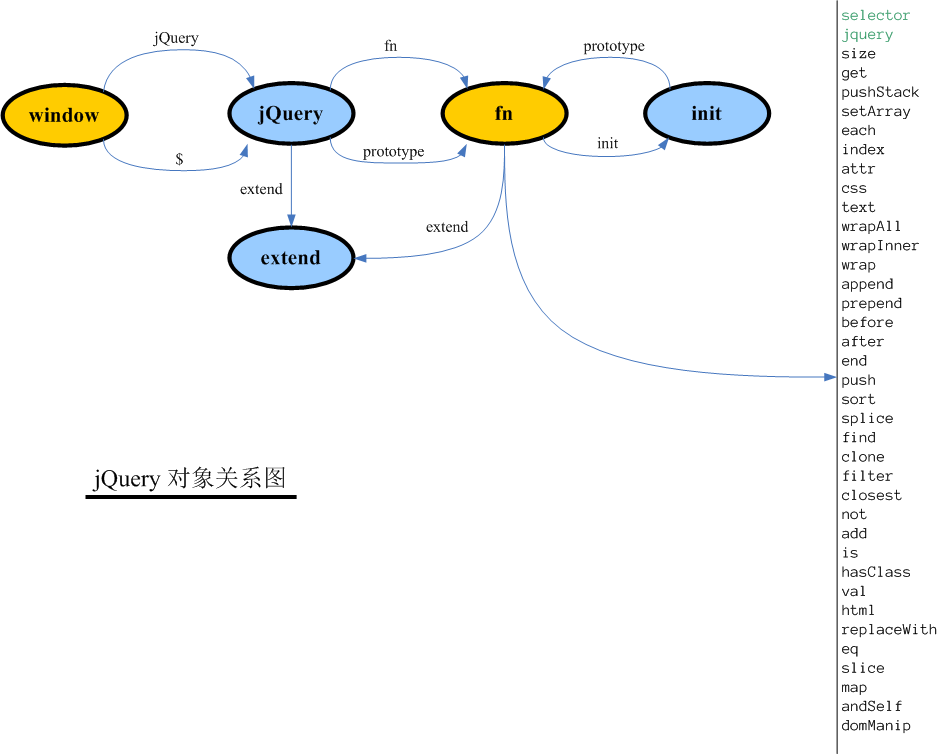
這些函式與物件之間的關係,可參考 jQuery 原型關係圖:
使用範例
// 原型操作
$("h1").text("Hello, world.").css("color", "green");
透過這個精簡核心,我們已能實現選擇、設定文字與樣式等基本操作,為後續更深入的機制(如資料存取與事件處理)打好基礎。
- 上一篇文章: jQuery validate 中文 API 完整手冊
- 下一篇文章: 動手模擬 jQuery 實現原理(二):私有資料存取機制