把「表格長什麼樣」交給設定檔決定
XML 之所以在軟體開發裡長紅不走,理由不難理解:它能讓多語系版本靠一份設定檔搞定,能在跨系統傳輸時用清楚的層級結構組織訊息,能靠 XPath 精準定位節點,也能勝任業務資料的持久化描述。本文要談的是其中一個很實用的切入點——用讀取 XML 設定的方式,對不同類型的資料實體做統一處理,自動產生前端的 table 呈現(改成輸出 div 也是同樣思路,這裡以 table 為例)。
以下程式碼為了聚焦主軸,省略了例外處理與防禦性判斷,重點在於把思路說清楚。
(本文以 C#、LINQ to SQL 情境說明,範例中的類別名稱與命名空間可依自身專案調整。)
第一步:設計列表樣板設定檔
設定檔的結構很直觀:最外層是 ListConfig,底下每個子元素代表一種實體(節點名稱需與實體類別名稱一致),再用 type 屬性區分同一實體的不同呈現樣板;attribute 用來描述 table 或 td 的屬性,而 Column 的 name 對應資料表(或類別屬性)的欄位名稱,元素內容則是欄位標題。
<?xml version="1.0" encoding="utf-8" ?>
<ListConfig>
  <!-- 項目 table 的樣板一:type 標識樣板,attribute 定義 table 或 td 的屬性,
       name 與資料表的欄位名對應 -->
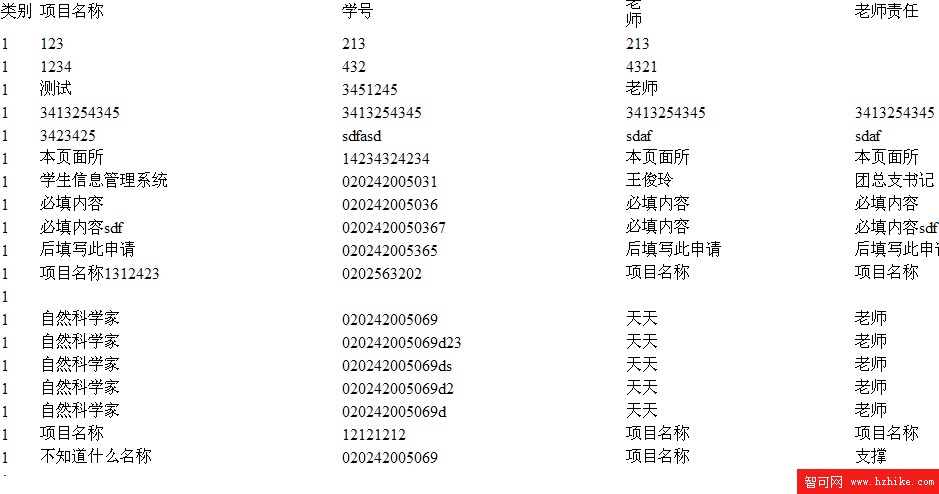
  <Project type="0" attribute="width='100%'">
    <Column name="Sort" attribute="width='35'">類別</Column>
    <Column name="ProjectName" attribute="width='100'">項目名稱</Column>
    <Column name="StudentNum" attribute="width='40'">學號</Column>
    <Column name="Teacher" attribute="width='30'">老師</Column>
    <Column name="TeacherDuty" attribute="width='100'">老師責任</Column>
  </Project>
  <!-- 項目 table 的樣板二:多一個「教育程度」欄 -->
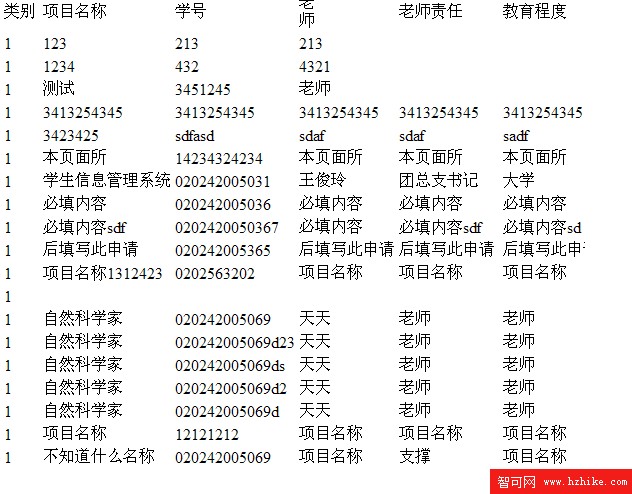
  <Project type="1" attribute="">
    <Column name="Sort" attribute="width='35'">類別</Column>
    <Column name="ProjectName" attribute="width='100'">項目名稱</Column>
    <Column name="StudentNum" attribute="width='40'">學號</Column>
    <Column name="Teacher" attribute="width='30'">老師</Column>
    <Column name="TeacherDuty" attribute="width='100'">老師責任</Column>
    <Column name="EduLevel" attribute="width='100'">教育程度</Column>
  </Project>
  <!-- 項目 table 的樣板三:只保留最核心的三欄 -->
  <Project type="2" attribute="">
    <Column name="ProjectName" attribute="width='100'">項目名稱</Column>
    <Column name="StudentNum" attribute="width='40'">學號</Column>
    <Column name="Teacher" attribute="width='30'">老師</Column>
  </Project>
  <!-- 另一種實體:文章 -->
  <Article type="0" attribute="">
    <Column name="Title" attribute="">標題</Column>
    <Column name="Content" attribute="">內容</Column>
    <Column name="Author" attribute="">作者</Column>
    <Column name="ComeFrom" attribute="">來源</Column>
  </Article>
</ListConfig>
第二步:用泛型與反射完成通用產生器
有了設定檔,程式端只需要一個泛型類別:建構時取得實體型別並載入 XML,對外提供一個方法,接收 IQueryable<T> 與樣板編號,回傳 table 字串。欄位標題與寬度全部來自 XML,欄位值則靠 PropertyInfo 反射取得——完全不需要為每張表寫一遍 HTML 拼接。
public class ConstructEntityList<T> where T : class, new()
{
    private Type tType;
    private XmlDocument document = new XmlDocument();

    public ConstructEntityList()
    {
        // 取得要產生列表的實體型別
        tType = typeof(T);
        // 載入設定檔(實際專案建議改為可設定的相對路徑)
        document.Load(@"D:\PracticeAndTeach\PracticeAndTeach\PATWebSite\Component\ListConfig.XML");
    }

    /// <summary>
    /// 取得實體列表的 table
    /// </summary>
    /// <param name="iqueryable">資料來源</param>
    /// <param name="type">樣板類型</param>
    /// <returns>table 字串</returns>
    public string GetEntityListString(IQueryable<T> iqueryable, object type)
    {
        // 取出該樣板下的欄位節點
        XmlNodeList list = document.SelectNodes(
            string.Format("/ListConfig/{0}[@type={1}]/Column", tType.Name, Convert.ToInt32(type)));

        StringBuilder listBuilder = new StringBuilder();

        // 建立表頭,並套用樣板所定義的 table 屬性
        listBuilder.AppendFormat("<table {0}><tr>",
            document.SelectSingleNode(
                string.Format("/ListConfig/{0}[@type={1}]", tType.Name, Convert.ToInt32(type)))
                .Attributes.GetNamedItem("attribute").Value);

        for (int i = 0; i < list.Count; i++)
        {
            listBuilder.AppendFormat("<td {1}>{0}</td>",
                list.Item(i).InnerText,
                list.Item(i).Attributes.GetNamedItem("attribute").Value);
        }
        listBuilder.Append("</tr>");

        PropertyInfo info;
        // 遍歷資料來源:依 XML 設定決定要讀取哪些屬性,再以反射取值
        foreach (T t in iqueryable)
        {
            listBuilder.Append("<tr>");
            for (int i = 0; i < list.Count; i++)
            {
                info = tType.GetProperty(list.Item(i).Attributes.GetNamedItem("name").Value);
                listBuilder.AppendFormat("<td>{0}</td>", info.GetValue(t, null));
            }
            listBuilder.Append("</tr>");
        }
        listBuilder.Append("</table>");

        return listBuilder.ToString();
    }
}
實際呼叫
呼叫方式非常乾淨,只要指定實體型別、資料來源與樣板編號即可:
// 套用第一種 XML 設定
new ConstructEntityList<Project>()
    .GetEntityListString(from s in patDataContext.Projects select s, ProjectList.Default);

// 套用第二種 XML 設定
new ConstructEntityList<Project>()
    .GetEntityListString(from s in patDataContext.Projects select s, ProjectList.More);
套用第一種設定的輸出結果:

套用第二種設定的輸出結果(多出「教育程度」欄):
這樣做的好處與適用場景
最大的收益是:不需要動任何原始碼,只要修改 XML 設定檔,列表顯示的欄位與樣式就跟著改變。欄位要增刪、標題要換文案、寬度要調整,都在設定檔裡完成,不必重新編譯部署。
典型的落地場景是權限差異的列表。例如專案管理系統中,一般使用者只需要看到項目名稱、項目概述與負責人;管理者則還需要看到專案進度與專案成果。做法很簡單:為這兩種情形各寫一個 XML 區塊,產生列表時傳入對應的樣板編號,顯示內容自動切換,後續要再加第三種視角(例如稽核單位)也只是多一段設定。
實務上可以再往前一步:把樣板編號依登入角色決定、把設定檔路徑外置到組態、並在欄位名稱不存在時加上容錯判斷,這個模式就能安全地撐起中小型系統的大量列表畫面。