為什麼要談這套組合
幾乎每個企業級應用遲早都會遇到同一個需求:把散落在 Java 業務對象裡的資料,輸出成一份排版講究的 PDF。與其把 PDF 當成寫死的報表,不如把它想成業務資料的一種「視圖」——它承載著版面與結構,應該能被輕易調整,並與底層的業務物件保持鬆散的關聯。
本文示範如何用 XML、XStream 與 XSL-FO(Extensible Stylesheet Language Formatting Objects)來解決這個常見問題。我們會先逐一拆解每項技術的角色,替整條流程打好地基,最後再把它們串成一個可運行的採購單範例。
先認識這幾個縮寫
API:應用程式介面;CD:光碟;CSS:層疊樣式表;HTML:超文本標記語言;PDF:可攜式文件格式;XML:可延伸標記語言;XSL:可延伸樣式表語言;XSLT:可延伸樣式表語言轉換;W3C:全球資訊網協會。
用 XStream 序列化資料
XStream 是一個輕巧卻強大的函式庫,能在物件與 XML 之間雙向序列化與反序列化。它的優勢在於靈活、簡單、速度快、記憶體佔用低、開銷小,同時讓你對生成的 XML 保有充分掌控。另一個關鍵特色是它能勝任「深層物件圖」的處理,例如一份 CD 目錄,其中每張 CD 又各自包含曲目資訊。除非你想善用 XStream 的 Java 註解功能,否則完全不必改動既有的業務物件。
用 XSLT 轉換資料
第二塊拼圖是 XSLT。它能將結構化的 XML 文件轉換成 XML、HTML 等多種輸出格式。XSLT 是一套健壯且基於 XML 的語言,內建字串處理與格式化能力,並大量倚賴 XPath 來查詢與選取節點。
轉換規則全寫在 XSLT 樣式表中,它由許多「範本」組成,每個範本定義單一 XML 元素該如何轉換。你可以依元素名稱、元素上下文(/Book/Title 與 /Catalog/Title 不同)或屬性(如 /Book/@Title)來比對範本。
用 XSL-FO 格式化文件
XSL-FO 其實只是一份用於呈現的 XML 結構描述。它與 HTML、CSS 的概念相近,差別在於樣式並非放在外部的 CSS 檔裡,而是直接寫進 FO 文件之中。採用 XML 序列化搭配 XSL-FO,能帶來幾項明顯好處:
關注點分離
透過 XML 序列化與 XSL-FO,把「呈現」(格式化與版面)和「資料」(Java 業務物件)徹底分開。
資料與視圖鬆耦合
負責排版與格式的 XSL-FO 樣式表對 Java 業務物件一無所知,它只認識業務物件的 XML 呈現。正因為資料與呈現分離,你想改動輸出的版面或格式時,完全不必碰底層的 Java 程式碼。
呈現層面的高度彈性
XSL-FO 樣式表在版面與格式化上提供了極大的自由度。它具備與 CSS 相似的一般格式化元素,如字型、字級、粗細、填色與文字修飾,此外還支援:
- 屬性集:透過 XSLT 屬性集在單一文件中共用格式化定義。
- 複雜分頁:可依頁面類型(首頁、末頁、其他)套用不同版面。
- 註腳:為文件加上註解。
- 頁首與頁尾:為各類頁面定義頁首、頁尾。
- 版面優化:設定「keep with next」與間距優化。
- 樣式繼承:格式與樣式可沿結構繼承。
- 目錄與書籤:為 PDF 產生目錄。
- 表格:支援含表頭、表尾與內容的表格。
- 書寫模式:涵蓋由左至右、由右至左、由上至下、由下而上等選項。
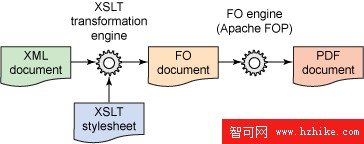
使用 XSL-FO,本質上就是搭配 XSLT,把 XML 文件轉成 FO 文件;接著讓 FO 文件經過 FO 引擎(處理器)轉輸出(此例為 PDF)。圖 1 說明了整個轉換流程。
圖 1. XSL-FO 轉換流程
解決方案架構
本方案的核心目標,是用一套靈活的方式從 Java 業務物件產生 PDF。負責打造 PDF 視圖的技術元件,必須與底層 Java 類完全隔離,而 XStream 生成、後續再轉成 FO 文件的暫時 XML,正好提供了這層隔離。
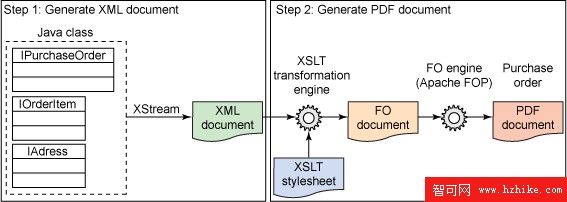
圖 2 說明如何把 Java 業務物件類、XStream 與 XSL-FO 這三個構件組合起來,形成一條打造採購單 PDF 的端到端解決方案。
圖 2. 解決方案架構
圖片看不清楚?請點擊這裡查看原圖(大圖)。
第一步,把承載 IOrderItem 與 IAddress 的 IPurchaseOrder(採購單)業務物件序列化,藉此建立 XML 文件。為了換取最大的靈活性,這裡使用 Java 註解,把類別對應到採購單 XML 中相對應的元素與屬性。
第二步,把採購單 XML 文件轉換成能交由 FO 引擎(處理器)輸出的 FO 文件,這一步靠採購單 XSL-FO 樣式表完成。接著,產生的 FO 文件交由 Apache FOP(FO 引擎的開源實作)處理,最終生成 PDF。
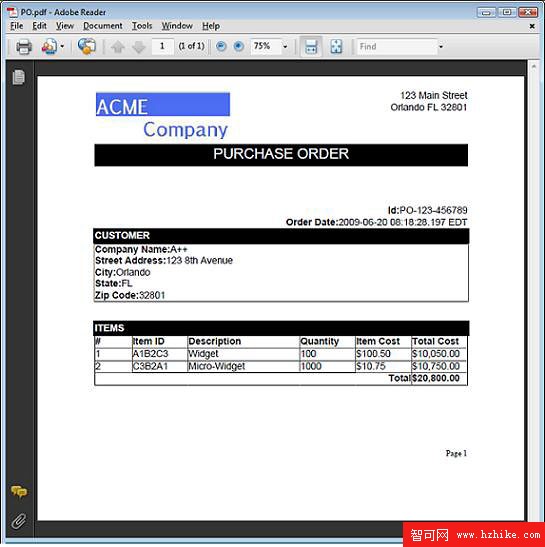
我們的目標是產出圖 3 中的 PDF 文件,而達成它的關鍵,就在於打造這份 XSL-FO 樣式表。
圖 3. 採購單 PDF 文件
類別圖
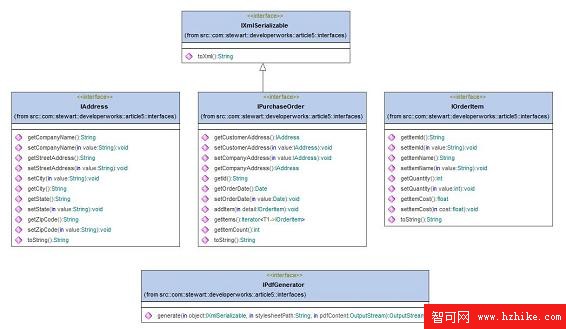
本方案由五個介面及其實作構成,表 1 簡述了每個介面的職責。
表 1. 介面與其實作
IXMLSerializable:供可序列化成 XML 的類別實作。IAddress:地址業務物件的介面。IPurchaseOrder:採購單業務物件的介面。IOrderItem:訂購項業務物件的介面。IPdfGenerator:把任何實作IXMLSerializable的業務物件轉成 PDF 的生成器介面。
圖 4 以 UML 類別圖呈現這些介面。
圖 4. 表 1 介面的 UML 圖
圖片看不清楚?請點擊這裡查看原圖(大圖)。
整套方案由上述介面的實作與一個 Tester 類別組成,圖 5 展示了這些業務物件。
圖 5. 業務物件的 UML 圖
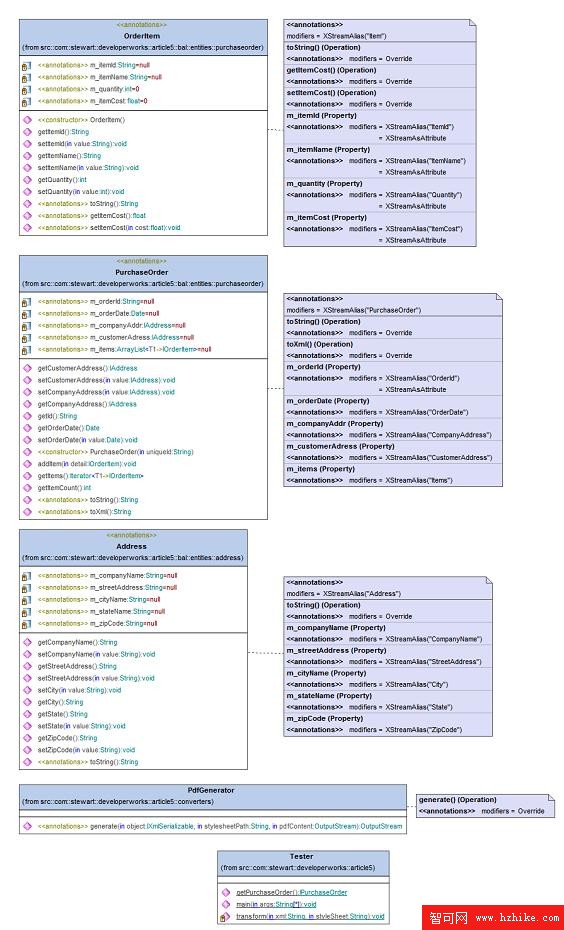
圖片看不清楚?請點擊這裡查看原圖(大圖)。
採購單 XML 結構
表 2 列出由關鍵元件組成的採購單 XML 結構。
表 2. 採購單結構元件
OrderDate:採購單日期字串。CompanyAddress:公司關鍵地址資訊,含公司名稱、街道、城市、州與郵遞區號。CustomerAddress:客戶關鍵地址資訊,欄位同上。Items:所有訂購項,含項目 ID、名稱與訂購數量。
用 XStream 產生採購單 XML
產生採購單 XML 的第一步,就是把採購單類別序列化成 XML。
本方案用註解來掌控 XStream 的 XML 輸出。要客製 XStream 的輸出時,註解是首選:它容易使用,還能讓你在類別層級定義 XML 對應規則,使序列化程式碼不再那麼脆弱。若不用註解,任何對業務物件類別的修改都得同步改動序列化程式碼;改用註解後,因為對應規則與欄位定義綁在同一處,程式碼也更清晰——新增欄位時,對應規則可以直接寫在同一個 Java 原始檔裡。
注意:註解僅在 JDK 1.5 及之後版本可用,本方案正是靠註解來控制 XML 輸出。
先從清單 1 的 PurchaseOrder 類別看起。它實作了 IPurchaseOrder 與 IXmlSerializable。其中 toXML 方法在序列化採購單時扮演關鍵角色,它只包含呼叫 XStream 所需的最精簡程式碼,並自動偵測已啟用的註解。只要 XStream 遇到某個類別中的類別,它就會查找註解以決定序列化方式;若找不到註解,則退回使用預設慣例。
清單 1. PurchaseOrder
class@XStreamAlias("PurchaseOrder")
public class PurchaseOrder implements IPurchaseOrder, IXMLSerializable {
 // private instance variables
 /** The m_orderId. */
 @XStreamAlias("OrderId")
 @XStreamAsAttribute
 private String m_orderId = null;

 /** The m_order date. */
 @XStreamAlias("OrderDate")
 private Date m_orderDate = null;

 /** The m_company addr. */
 @XStreamAlias("CompanyAddress")
 private IAddress m_companyAddr = null;

 /** The m_customerAdress addr. */
 @XStreamAlias("CustomerAddress")
 private IAddress m_customerAdress = null;

 /** The m_items. */
 @XStreamAlias("Items")
 private ArrayList<IOrderItem> m_items = null;

 ...

 // IXMLSerializable method
 public String toXML() {
 XStream xstream = new XStream();
 xstream.autodetectAnnotations(true);
 return xstream.toXML(this);
 }
}
@XStreamAlias 註解告訴 XStream 在序列化與反序列化時該用的元素與屬性名稱;@XStreamAsAttribute 則指示該欄位應作為屬性而非元素輸出。
接著建立 Address 與 OrderItem 類別。它們不必實作 IXMLSerializable,因為不會脫離 PurchaseOrder 被獨立序列化。這兩個類別的源碼可於文章下載中取得,內容很直觀,由私有實例變數與公開的 getter、setter 組成,私有變數一樣以註解控制 XStream 序列化。
呼叫 toXml 後,會產生清單 2 的 XML。
清單 2. 採購單 XML
<PurchaseOrder OrderId="PO-123-456789">
 <OrderDate>2009-06-14 13:05:02.251 EDT</OrderDate>
 <CompanyAddress>
 <CompanyName>ACME Company</CompanyName>
 <StreetAddress>123 Main Street</StreetAddress>
 <City>Orlando</City>
 <State>FL</State>
 <ZipCode>32801</ZipCode>
 </CompanyAddress>
 <CustomerAddress>
 <CompanyName>A++</CompanyName>
 <StreetAddress>123 8th Avenue</StreetAddress>
 <City>Orlando</City>
 <State>FL</State>
 <ZipCode>32801</ZipCode>
 </CustomerAddress>
 <Items>
 <Item ItemId="A1B2C3" ItemName="Widget" Quantity="100" ItemCost="100.5"/>
 <Item ItemId="C3B2A1" ItemName="Micro-Widget" Quantity="1000" ItemCost="10.75"/>
 </Items>
</PurchaseOrder>
產生採購單 FO 文件
接下來,把清單 2 的採購單 XML 轉成 FO 文件。撰寫樣式表時,先替目標輸出建立一份模型會很有幫助,它能指引你寫出 XSLT,對 XSL-FO 開發尤其管用。在定案格式與版面之前,先手寫一份 FO 文件並丟給 Apache FOP 跑一次,確認輸出無誤;等版面定案後,再打造把來源 XML 轉成目標 FO 文件的 XSL-FO 樣式表。
建立 FO 文件
FO 文件由兩大部分組成:
- 頁面版面定義:描述頁面版面,含頁邊距與內容(頁首、頁尾、正文)。
- 頁面序列(內容/資料):包含頁首、頁尾與正文的實際內容,每個頁面序列都必須掛到某個頁面版面上。
先從頁面版面模型開始。圖 6 呈現 FO 頁面的主要區塊:Region-Before、Region-After、Region-Body、Region-Start 與 Region-End。
圖 6. FO 頁面版面模型
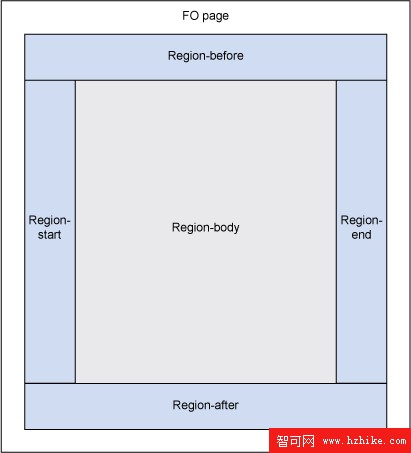
如圖 6 所示,Region-Body 是主要內容區;Region-Before 與 Region-After 通常用來放頁首與頁尾;Region-Start 與 Region-End 則可承載左右兩側的內容。
這些區塊可放入兩種內容:
- 靜態內容:只出現在靜態內容區(例如頁首或頁尾)。
- 流內容:掛在特定頁面版面上、可跨越多頁的內容,也就是文件的主體。
頁面版面定義頁面尺寸與頁邊距,一份文件可以有多個頁面版面。清單 3 是一份基礎的 8.5 × 11 吋頁面定義。
清單 3. 頁面版面範例
<fo:layout-master-set>
 <fo:simple-page-master
 margin-right="1in"
 margin-left="1in"
 margin-bottom="0.5in"
 margin-top="1in"
 page-width="8.5in"
 page-height="11in"
 master-name="standardletter">

 <fo:region-body
 margin-bottom="1in"
 margin-top="1in"/>
 <fo:region-after extent="0.5in"/>
 </fo:simple-page-master>
</fo:layout-master-set>
FO 支援多種可放進靜態或流元素的內容元素:
- 區塊(block):類似 HTML
<div>的內容容器,可含文字或其他 FO 元素。 - 行內(inline):類似 HTML
<span>的內容容器。 - 表格(table):類似 HTML
<table>。 - 清單(list):類似 HTML
<ul>或<ol>的資料清單。 - 外部圖形:圖形或圖像,類似 HTML
<img>。 - 字元:單一字元,用來對個別字元套用特別格式。
- 基本連結:文件連結,類似 HTML
<a>。
為採購單打造樣式表
從處理根節點 PurchaseOrder 開始,產生 layout-master-set 與 page-sequence 元素。清單 4 展示了 PurchaseOrder 元素的範本。
清單 4. PurchaseOrder 範本
<xsl:template match="PurchaseOrder">
 <fo:root xmlns:fo="https://www.w3.org/1999/XSL/Format">
 <!-- Create page layout - including margins -->
 <fo:layout-master-set>
 <!-- Page size and margins -->
 <fo:simple-page-master
 master-name="all"
 page-height="11in"
 page-width="8.5in"
 margin-top="0.25in"
 margin-bottom="0.25in"
 margin-left="1in"
 margin-right="1in">
 <!-- Main content layout -->
 <fo:region-body margin-top="2in"
 margin-bottom="1in" />
 <!-- Header layout -->
 <fo:region-before extent="2in" />
 <!-- Footer layout -->
 <fo:region-after extent="1in" />
 </fo:simple-page-master>
 </fo:layout-master-set>

 <!-- Create page sequence-->
 <fo:page-sequence master-reference="all">
 <!-- Create header -->
 <fo:static-content flow-name="xsl-region-before">
 <!-- Output company address information in header -->
 <xsl:apply-templates
 select="CompanyAddress" />
 <fo:block font-size="18pt"
 font-family="sans-serif"
 line-height="1.5em"
 background-color="black"
 color="white"
 text-align="center"
 >PURCHASE ORDER</fo:block>
 </fo:static-content>
 <!-- Create footer -->
 <fo:static-content flow-name="xsl-region-after">
 <!-- Add page number to footer -->
 <fo:block text-align="end"
 font-size="10pt"
 font-family="serif">
 Page <fo:page-number />
 </fo:block>
 </fo:static-content>

 <!-- Create main document content -->
 <fo:flow flow-name="xsl-region-body">
 <!-- Display order information (date, id)-->
 <xsl:call-template name=
 "DisplayOrderInformation" />

 <!-- Display Customer Address information -->
 <xsl:apply-templates select=
 "CustomerAddress" />

 <!-- Display items-->
 <xsl:apply-templates select="Items" />
 </fo:flow>
 </fo:page-sequence>
 </fo:root>
</xsl:template>
下一步是製作由公司標誌與地址組成的頁首。在 Region-Before 的靜態內容流裡,以一次呼叫把範本套用到所有 CompanyAddress 元素。這個範本會建立一個兩列表格,第一欄放公司標誌,第二欄放公司地址。清單 5 是 CompanyAddress 元素的範本。
清單 5. CompanyAddress 範本
<xsl:template match="CompanyAddress">
<fo:table width="100%">
 <fo:table-column column-width="40%" />
 <fo:table-column column-width="60%" />
 <fo:table-body>
 <fo:table-row>
 <fo:table-cell>
 <fo:block>
 <fo:external-graphic
 src="url(D:\workspace\DwArticle5\resources\CompanyLogo.jpg)" />
 </fo:block>
 </fo:table-cell>
 <fo:table-cell>
 <fo:block>
 <fo:block text-align="right">
 <xsl:value-of select="./StreetAddress" />
 </fo:block>
 <fo:block text-align="right">
 <xsl:value-of select="concat(./City, ' ',
 ./State, ' ',
 ./ZipCode)" />
 </fo:block>
 </fo:block>
 </fo:table-cell>
 </fo:table-row>
 </fo:table-body>
</fo:table>
</xsl:template>
現在可以顯示訂單資訊(也就是 Order ID 與 Order Date)了。DisplayOrderInformation 範本透過下面這行命名並呼叫:
<xsl:call-template name="DisplayOrderInformation" />
先前的範本都能以 <xsl:apply-templates/> 呼叫。具名範本則適合當作能回傳值的程序式例程,或在你不想處理所有子節點、只想從中取資料時使用,它在遞迴情境中也很派上用場。這裡用一個具名範本來顯示訂單資訊,不過其他做法或許更合適。清單 6 是這個具名範本。
清單 6. DisplayOrderInformation 範本
<xsl:template name="DisplayOrderInformation">
 <fo:block text-align="right">
 <fo:inline font-weight="bold">Id:</fo:inline>
 <xsl:value-of select="./@OrderId" />
 </fo:block>
 <fo:block text-align="right">
 <fo:inline font-weight="bold">Order Date:</fo:inline>
 <xsl:value-of select="./OrderDate" />
 </fo:block>
</xsl:template>
把 Items 與 Item 元素轉成一張表格,每個 Item 佔一列,並為每個 Item 加上採購項編號、單項小計與訂單總額。用 <xsl:number/> 產生序號;單項小計則是數量乘以單價。我提供了兩種計算訂單總額的方式——遞迴的具名範本法,以及運用 XSL 範本模式遞迴的替代法。總額的算法是:把每個採購項的數量乘以單價,再把各項加總。
先來看含採購項的表格,清單 7 列出相關範本。
清單 7. Items 與 Item 範本
<!-- Template for Items element-->
<!-- Outputs a TABLE -->
<xsl:template match="Items">
 <fo:block font-weight="bold" background-color="black" color="white"
 padding="2pt">ITEMS</fo:block>

 <fo:table width="100%">
 <!-- Add table column widths -->
 <fo:table-column column-width="10%" />
 <fo:table-column column-width="15%" />
 <fo:table-column column-width="30%" />
 <fo:table-column column-width="15%" />
 <fo:table-column column-width="15%" />
 <fo:table-column column-width="15%" />
 <!-- Add table header row -->
 <fo:table-header>
 <fo:table-row>
 <fo:table-cell border="solid black 1px">
 <fo:block font-weight="bold"
 >#</fo:block>
 </fo:table-cell>
 <fo:table-cell border="solid black 1px">
 <fo:block font-weight="bold"
 >Item ID</fo:block>
 </fo:table-cell>
 <fo:table-cell border="solid black 1px">
 <fo:block font-weight="bold"
 >Description</fo:block>
 </fo:table-cell>
 <fo:table-cell border="solid black 1px">
 <fo:block font-weight="bold"
 >Quantity</fo:block>
 </fo:table-cell>
 <fo:table-cell border="solid black 1px">
 <fo:block font-weight="bold"
 >Item Cost</fo:block>
 </fo:table-cell>
 <fo:table-cell border="solid black 1px">
 <fo:block font-weight="bold"
 >Total Cost</fo:block>
 </fo:table-cell>
 </fo:table-row>
 </fo:table-header>
 <fo:table-body>
 <xsl:apply-templates />
 <!-- Add row for summary. Span all columns and apply bold to total-->
 <fo:table-row>
 <fo:table-cell border="solid black 1px"
 number-columns-spanned="5">
 <fo:block font-weight="bold"
 text-align="right">Total
 </fo:block>
 </fo:table-cell>
 <fo:table-cell border="solid black 1px">
 <fo:block font-weight="bold">
 <!-- Return the number into a variable which is displayed below -->
 <xsl:variable name="total">
 <!-- The following line needs to be uncommented if the mode
 and recursion approach is utilized. -->
 <!--
 <xsl:apply-templates select="Item[1]"
 mode="calculateTotal" />-->
 <!-- The following call-template needs to be commented out if the call-template
 approach is not utilized. -->
 <xsl:call-template name="calculateTotal">
 <xsl:with-param name="nodes" select="Item" />
 </xsl:call-template>
 </xsl:variable>
 <!-- Output value of "total" variable -->
 <xsl:value-of select="format-number($total, '$#,##0.00')"/>
 </fo:block>
 </fo:table-cell>
 </fo:table-row>
 </fo:table-body>
 </fo:table>
</xsl:template>

<!-- Template for Item element-->
<!-- Outputs a TR for each Item -->
<xsl:template match="Item">
<fo:table-row>
 <fo:table-cell border="solid black 1px">
 <fo:block>
 <xsl:number/>
 </fo:block>
 </fo:table-cell>
 <fo:table-cell border="solid black 1px">
 <fo:block>
 <xsl:value-of select="@ItemId" />
 </fo:block>
 </fo:table-cell>
 <fo:table-cell border="solid black 1px">
 <fo:block>
 <xsl:value-of select="@ItemName" />
 </fo:block>
 </fo:table-cell>
 <fo:table-cell border="solid black 1px">
 <fo:block>
 <xsl:value-of select="@Quantity" />
 </fo:block>
 </fo:table-cell>
 <fo:table-cell border="solid black 1px">
 <fo:block>
 <xsl:value-of select="format-number(@ItemCost, '$#,##0.00')" />
 </fo:block>
 </fo:table-cell>
 <fo:table-cell border="solid black 1px">
 <xsl:variable name="total" select="@Quantity * @ItemCost" />
 <fo:block>
 <xsl:value-of select="format-number($total, '$#,##0.00')" />
 </fo:block>
 </fo:table-cell>
 </fo:table-row>
</xsl:template>
如先前所述,要算出訂單總額有兩個主要選擇。清單 8 是其中第一個——具名範本法。calculateTotal 範本會被遞迴呼叫,直到再也沒有 Item 元素為止,內嵌註解說明了它的運作方式。
清單 8. 用於計算的具名範本
<xsl:template name="calculateTotal">
<xsl:param name="nodes" select="/.." />
<xsl:param name="subtotal" select="0" />
<xsl:variable name="total"
 select="$subtotal + ($nodes[1]/@ItemCost * $nodes[1]/@Quantity)" />
<xsl:choose>
 <!-- check if more Item nodes to process and stop and return value if not -->
 <xsl:when test="not($nodes[2])">
 <xsl:value-of select="$total" />
 </xsl:when>
 <!-- recursively call template since there are more Item nodes to process -->
 <xsl:otherwise>
 <xsl:call-template name="calculateTotal">
 <xsl:with-param name="nodes"
 select="$nodes[position() > 1]" />
 <xsl:with-param name="subtotal" select="$total" />
 </xsl:call-template>
 </xsl:otherwise>
</xsl:choose>
</xsl:template>
第二個選擇是使用帶模式的遞迴範本。清單 9 展示了用來算總額的範本。當模式為 calculateTotal 時,它會套用到所有 Item 元素;在套用此模式的範本期間,還得為任何被略過的子節點建立一個空範本。與具名範本類似,範本會被遞迴套用,直到找不到 Item 元素為止。內嵌註解說明了運作方式。
清單 9. Item 範本(calculateTotal 模式)
<xsl:template match="Item" mode="calculateTotal">
<xsl:param name="subtotal" select="0" />
<xsl:variable name="total"
 select="$subtotal + (@ItemCost * @Quantity)" />
<xsl:choose>
<!-- check if more Item nodes to process and stop and return value if not -->
 <xsl:when test="not(following-sibling::Item)">
 <xsl:value-of select="$total" />
 </xsl:when>
 <xsl:otherwise>
<!-- recursively apply template since there are more Item nodes to process -->
 <xsl:apply-templates select="following-sibling::Item[1]"
 mode="calculateTotal">
 <xsl:with-param name="subtotal" select="$total" />
 </xsl:apply-templates>
 </xsl:otherwise>
</xsl:choose>
</xsl:template>
產生 PDF 文件
Apache FOP 的替代方案:目前市面上也有幾套商業 FO 引擎,最受歡迎的三個分別是 RenderX XEP、Antenna House XSL Formatter 與 PTC Arbortext Publishing Engine。
最後一步,是運用你剛完成的 XSL 樣式表,把 XStream 產生的 XML 轉成 PDF。PdfGenerator 類別負責生成 PDF:它套用樣式表,並透過 Apache FOP 輸出文件。
清單 10. PdfGenerator
public class PdfGenerator implements IPdfGenerator {

 public OutputStream generate(IXMLSerializable object, String stylesheetPath,
 OutputStream pdfContent) {
 try {
 // setup XML input source
 String xml = object.toXML();
 StreamSource XMLSource =
 new StreamSource(new ByteArrayInputStream(XML.getBytes()));

 // setup xsl stylesheet source
 File xslFile = new File(stylesheetPath);
 FileInputStream xslFileStream = new FileInputStream(xslFile);
 StreamSource xslSource = new StreamSource(xslFileStream);

 // get transformer
 TransformerFactory tfactory = TransformerFactory.newInstance();
 Transformer transformer = tfactory.newTransformer(xslSource);

 // setup FOP
 FopFactory fopFactory = FopFactory.newInstance();
 FOUserAgent foUserAgent = fopFactory.newFOUserAgent();
 foUserAgent.setProducer(this.getClass().getName());
 Fop fop = fopFactory.newFop(MimeConstants.MIME_PDF, foUserAgent,
 pdfContent);

 // perform transformation
 Result res = new SAXResult(fop.getDefaultHandler());
 transformer.transform(XMLSource, res);
 } catch (FileNotFoundException e) { e.printStackTrace();
 } catch (TransformerException e) { e.printStackTrace();
 } catch (FOPException e) { e.printStackTrace();
 }

 return pdfContent;
 }
}
實作建議
關於這套 XStream 與 XSL-FO 方案,有幾點值得牢記:
- 在 XStream 設定中採用 Java 註解,因為它提供了最大的靈活性與鬆耦合。
- 優先使用模式範本,而非呼叫具名範本,因為 XSLT 天生就為「集合」處理而設計,而非程序式編程。
- 需要時就用遞迴。若刻意迴避遞迴範本,樣式表往往反而寫得更複雜。
- 從宏觀角度審視 XML 結構。結構往往是倉促定案的,而結構設計既難完善又難維護。務必審慎權衡該用屬性還是元素——例如把 Publisher 定義成屬性而非元素,日後就很難替它補上額外資訊。
結語
本文示範了如何用 XStream 與 XSL-FO,輕鬆地從 Java 業務物件打造 PDF。關注點分離讓視圖與業務物件徹底解耦,因此你能改動視圖(PDF 文件)而不必碰 Java 程式碼——關鍵就在於打造一份依呈現需求量身訂做的 XSLT 樣式表。更進一步,同一個 Java 業務物件搭配不同的 XSLT 樣式表,還能產出多種不同的視圖(輸出文件)。本文範例的源碼與素材可於下方下載。
- 上一篇文章: 探索 XUL 內的多線程編程
- 下一篇文章: 擁抱 XOP:以 XML 作為首選的企業編程模型