新的 XML Schema 體系是為了克服 DTD 的局限而生,目的是為 XML 文件提供更豐富的結構語彙。本文從最基本的構造塊——元素——談起,說明 Schema 的靈活性究竟表現在哪裡。
Schema 比 DTD 強在哪
用三段程式碼對照最直觀。先看一份 XML 文件片段:
<InvoiceNo>123456789</InvoiceNo>
<ProductID>J123456</ProductID>
DTD 的描述只能這樣:
<!ELEMENT InvoiceNo (#PCDATA)>
<!ELEMENT ProductID (#PCDATA)>
而 Schema 可以寫成:
<element name='InvoiceNo' type='positive-integer'/>
<element name='ProductID' type='ProductCode'/>
<simpleType name='ProductCode' base='string'>
  <pattern value='[A-Z]{1}\d{6}'/>
</simpleType>
差別在驗證能力。透過 Schema,驗證解析器可以檢查 InvoiceNo 是否為正整數、ProductID 的首字元是否落在 A 到 Z 之間且後接六位阿拉伯數字;而引用 DTD 的解析器只能確認這些元素是字串。注意 Schema 版本用的仍是原封不動的 XML 語法。
命名空間:避免同名衝突
在協作環境中,一個人往往要處理來自多個團體的文件,而不同團體可能用不同方式表示同一個概念,甚至在同份文件裡引用彼此定義的同名元素。Schema 用命名空間來區分這些定義。
一份 Schema 會定義一批新名字:元素名、型別名、屬性名、屬性組名。上面例子定義的名字包括 InvoiceNo、ProductID 與 ProductCode。
我們說 Schema 中定義的名字屬於它的目標命名空間(targetNamespace)。命名空間本身有一個固定且長度不定的名字,必須符合 URL 語法。對上面的片段,你可以把命名空間設為 https://www.SampleStore.com/Account。
這裡最容易誤解的一點是:命名空間的名字雖然以 https:// 開頭,但這個 URL 並不指向任何實際檔案,它只是一個被分配出去的名字。看到它以為能連上什麼,是新手常犯的錯。
Schema 中的定義與宣告也可能引用其他命名空間的名字,我們稱之為來源命名空間。每份 Schema 有一個目標命名空間,但可以有零到多個來源命名空間。命名空間的名字往往很長,因此在 XML 文件中通常透過 xmlns 宣告使用縮寫。
<!-- XML Schema fragment in file schema1.xsd -->
<xsd:schema targetNamespace='https://www.SampleStore.com/Account'
            xmlns:xsd='https://www.w3.org/1999/XMLSchema'
            xmlns:ACC='https://www.SampleStore.com/Account'>
  <xsd:element name='InvoiceNo' type='xsd:positive-integer'/>
  <xsd:element name='ProductID' type='ACC:ProductCode'/>
  <xsd:simpleType name='ProductCode' base='xsd:string'>
    <xsd:pattern value='[A-Z]{1}\d{6}'/>
  </xsd:simpleType>
</xsd:schema>這份片段中,targetNamespace 是 https://www.SampleStore.com/Account,包含的名字有 InvoiceNo、ProductID 與 ProductCode。而 schema、element、simpleType、pattern、string、positive-integer 這些名字屬於來源命名空間 https://www.w3.org/1999/XMLSchema,透過 xmlns 宣告縮寫為 xsd。別名 xsd 沒什麼特別,換成任何名字都行。此例中目標命名空間偶爾也充当來源命名空間,因為要用 ProductCode 去定義其他名字。
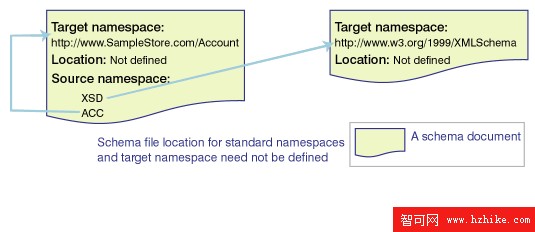
這份片段不需要指定來源結構描述檔案的位置:「模式的模式」位置為人所共知;而 https://www.SampleStore.com/Account 恰好就是本檔定義的目標命名空間,同樣不必另附位置。
引入多個來源命名空間
<!-- XML Schema fragment in file schema1.xsd -->
<schema targetNamespace='https://www.SampleStore.com/Account'
        xmlns='https://www.w3.org/1999/XMLSchema'
        xmlns:ACC='https://www.SampleStore.com/Account'
        xmlns:PART='https://www.PartnerStore.com/PartsCatalog'>
  <import namespace='https://www.PartnerStore.com/PartsCatalog'
          schemaLocation='https://www.ProductStandards.org/repository/alpha.xsd'/>
  <element name='InvoiceNo' type='positive-integer'/>
  <element name='ProductID' type='ACC:ProductCode'/>
  <simpleType name='ProductCode' base='string'>
    <pattern value='[A-Z]{1}\d{6}'/>
  </simpleType>
  <element name='stickyGlue' type='PART:SuperGlueType'/>
</schema>
這裡多了一個命名空間 https://www.PartnerStore.com/PartsCatalog,它既不是 targetNamespace 也不是標準命名空間,因此必須用 import 宣告引入,並由 schemaLocation 屬性指出結構描述檔案的位置。
同時注意 xmlns='https://www.w3.org/1999/XMLSchema' 定義的是預設命名空間。像 schema 與 element 這種未加前綴的名字,都屬於預設命名空間。如果一份 Schema 大量引用某個命名空間的名字,把它設為預設命名空間會方便許多。
實例文件如何引用多份 Schema
一份 XML 實例文件可能引用多份 Schema 中定義的元素,同樣用 xmlns 宣告取得縮寫,並透過 XML Schema 實例命名空間的 schemaLocation 屬性指定檔案位置。要留意:這個 schemaLocation 與上一段 xsd 命名空間裡的同名屬性用途不同,不要混淆。
<?XML version="1.0"?>
<ACC:rootElement xmlns:ACC='https://www.SampleStore.com/Account'
                 xmlns:PART='https://www.PartnerStore.com/PartsCatalog'
                 xmlns:xsi='https://www.w3.org/1999/XMLSchema-instance'
                 xsi:schemaLocation='https://www.PartnerStore.com/PartsCatalog
                                     https://www.ProductStandards.org/repository/alpha.xsd
                                     https://www.SampleStore.com/Account
                                     https://www.SampleStore.com/repository/schema1.xsd'>
  <ACC:InvoiceNo>123456789</ACC:InvoiceNo>
</ACC:rootElement>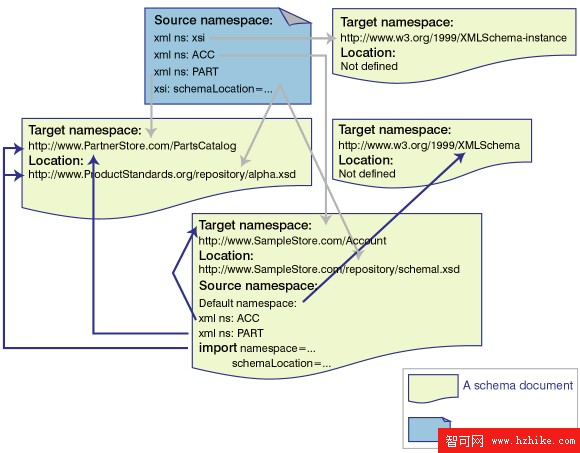
定義元素就是定義名字與內容模型
在 XML Schema 中,元素的內容模型由它的型別決定,因此實例元素的值必須符合該型別。型別分兩種:簡單型別的值不能包含元素或屬性;複雜型別則能產生嵌套子元素的效果,或為元素加上屬性。前面出現的 ProductCode 就是使用者自訂的簡單型別;規格也預定義了一批簡單型別。而衍生的簡單型別,其實是對基底型別取值集合的縮減——ProductCode 的值就是 string 值的子集。
不含屬性、不含子元素:簡單型別
<element name='age' type='integer'/>
<element name='price' type='decimal'/>
帶屬性的元素:必須是複雜型別
想幫 price 加上 currency 屬性?簡單型別的元素不能有屬性,所以必須改成複雜型別。下面用了一個匿名型別——沒有為 complexType 設 name 屬性:
<element name='price'>
  <complexType base='decimal' derivedBy='extension'>
    <attribute name='currency' type='string'/>
  </complexType>
</element>

<!-- 在實例文件中可以寫成:
     <price currency='US'>45.50</price> -->
嵌入其他元素:同樣要是複雜型別
XML 文件裡一個元素可以嵌進另一個元素。這項需求在 DTD 中能直接表示,而在 Schema 中則是透過「元素有一個型別,該型別再宣告子元素與屬性」來達成。
對照如下。XML 文件:
<Book>
  <Title>Cool XML</Title>
  <Author>Cool Guy</Author>
</Book>
DTD:
<!ELEMENT Book (Title, Author)>
<!ELEMENT Title (#PCDATA)>
<!ELEMENT Author (#PCDATA)>
Schema:
<element name='Book' type='BookType'/>
<complexType name='BookType'>
  <element name='Title' type='string'/>
  <element name='Author' type='string'/>
</complexType>
三段程式碼描述的是同一份 XML,但這裡藏著一個關鍵差異:DTD 中的所有元素都是全域的,而上面的 Schema 允許 Title 與 Author 是區域的——只存在於 Book 之內。若要與 DTD 宣告的效果完全一致,這兩個元素必須是全域的,再用 ref 屬性引用:
<element name='Title' type='string'/>
<element name='Author' type='string'/>
<element name='Book' type='BookType'/>
<complexType name='BookType'>
  <element ref='Title'/>
  <element ref='Author'/>
</complexType>
此例中 BookType 是全域的,可用於宣告其他元素。反過來,也可以把型別區域化並宣告為匿名:
<element name='Title' type='string'/>
<element name='Author' type='string'/>
<element name='Book'>
  <complexType>
    <element ref='Title'/>
    <element ref='Author'/>
  </complexType>
</element>
三種 Schema 寫法都能驗證同一份 XML 文件。全域還是區域、具名還是匿名,取決於你想不想讓這個型別被重用。
更精細的內容約束
在最基本的層次上,Schema 和 DTD 一樣可以標示出現次數:1(恰好一次)、*(零或多次)、+(一至多次)。但 Schema 另外提供了 minOccurs 與 maxOccurs 屬性,以及 choice 與 all 元素。
<element name='Title' type='string'/>
<element name='Author' type='string'/>
<element name='Book'>
  <complexType>
    <element ref='Title' minOccurs='0'/>
    <element ref='Author' maxOccurs='2'/>
  </complexType>
</element>
這裡 Title 是可選的(等同 DTD 的 ?),而 Book 中至少要有一位作者、最多兩位。minOccurs 與 maxOccurs 的預設值都是 1。
choice 只允許其中一個子元素出現在實例中。而 all 表達的是另一種約束:組內所有子元素要嘛全部各出現一次,要嘛全不出現,且順序不拘。下面這段要求 Title 與 Author 必須同時出現在 Book 中(順序任意)或同時缺席——這種規則用 DTD 幾乎無法表達:
<xsd:element name='Title' type='string'/>
<xsd:element name='Author' type='string'/>
<xsd:element name='Book'>
  <xsd:complexType>
    <xsd:all>
      <xsd:element ref='Title'/>
      <xsd:element ref='Author'/>
    </xsd:all>
  </xsd:complexType>
</xsd:element>
接下來還有哪些好東西
以上是定義元素所需的最基本概念。Schema 還有幾項更強大的機制值得一看:
- 廣泛的型別繼承支援,可重用既有結構;透過 facets 能衍生新itype型別,表示某型別取值集合的更小子集,例如用枚舉、範圍或模式匹配來限定。
ProductCode就是用 pattern facet 定義的。子型別也可以為基底型別加上更多元素與屬性宣告。 - 可以控制能否定義子型別、以及在具體文件中能否替換為子型別。例如宣告某型別不允許再被細化,或規定在特定上下文中不能用某型別的子型別來替換。
- 除子型別之外,還能定義等價型別,讓一個型別的值由另一個型別的值取代。
- 透過宣告抽象的項目或型別,Schema 提供了一種強制替換機制。
- 屬性組與元素組可以具名定義並重複引用,方便重用。
- 提供 appInfo、documentation、annotation 三個元素為 Schema 添加註解,分別服務應用程式與讀者。
- 可以基於子元素的屬性表達唯一性約束。
想繼續深入,建議直接研讀 W3C 網站上的 XML Schema 規格文件。這份規範已經走過建議標準的階段,你只會愈來愈常需要它。