Dreamweaver 中如何插入 IFrame 框架
編輯:Dreamweaver入門
製作網頁時,我們可以採用各種版面配置方式。今天這篇要介紹如何使用 IFrame 框架來排版。
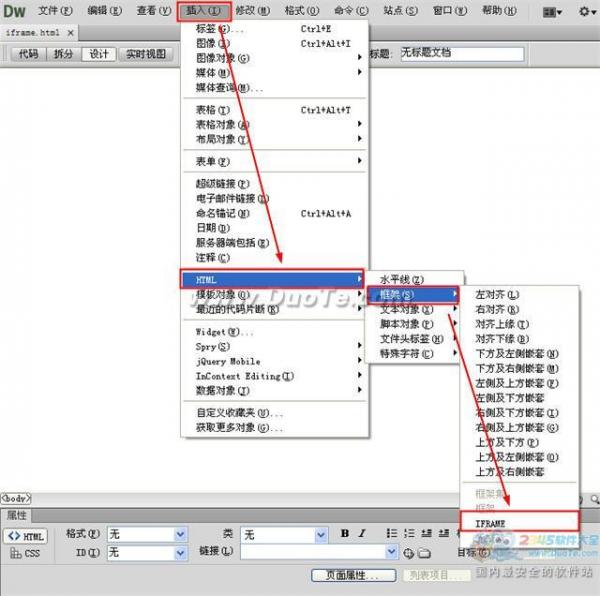
首先在「插入」選單中選擇「HTML」→「框架」下的「IFrame」,如下圖:
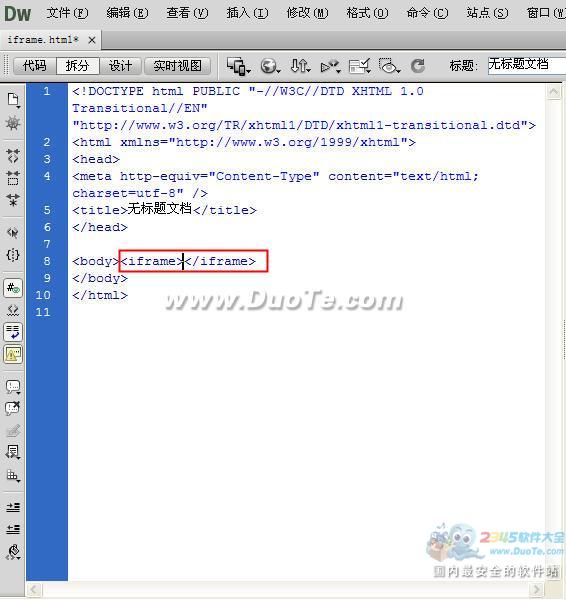
插入 IFrame 後,畫面會跳到拆分模式,此時在程式碼視窗中能看到〈iframe〉〈/iframe〉,代表你已經插入了 iframe 框架。
接著在程式碼中輸入類似〈iframe width="400" height="30" name="main" scrolling="auto" frameborder="1" src="home.html"〉的寫法,代表在這個 iframe 框架中呼叫 home.html 頁面的內容。
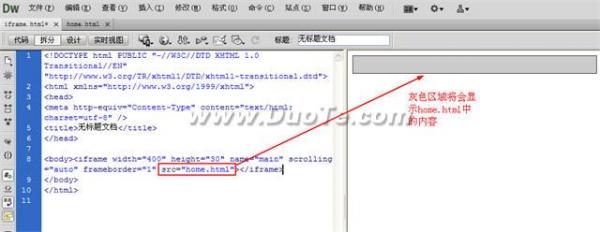
這是插入 iframe 框架後的效果。
- 上一篇文章: 如何在 Dreamweaver 中為 iframe 框架加上連結
- 下一篇文章: 如何在 Dreamweaver 中製作可拖動的表格