什麼是 CSS Reset?
相信不少前端開發者都聽過 CSS Reset 這個說法,它其實就是「重置 CSS」,也就是把瀏覽器為各標籤預設的一整套樣式先歸零。我在談論 HTML 默認樣式時提過,很多標籤元素天生就帶有瀏覽器賦予的預設值,例如 body 的 8px 外边距、標題標籤的字號與粗細、列表項前面的圓點等。如果我們不在項目開始時統一處理,後面每寫一處樣式都要反覆去覆蓋這些默認值,既麻煩又容易出錯。
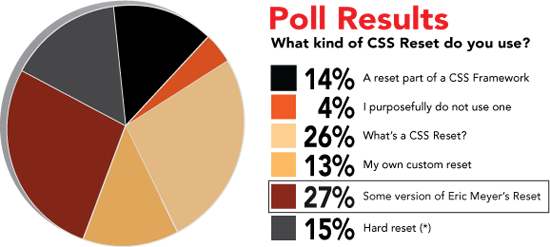
因此,CSS Reset 的核心目標很簡單:抹平不同瀏覽器之間的預設差異,給所有元素一個乾淨、一致的起點。每個人的寫法都不太一樣,國外甚至做過使用比例的調查,可見它在工程實踐中的普及程度。
網路上已經有總結得相當全面的 CSS Reset 寫法,列舉了多種變體。接下來,我用 Firebug(按 F12 開啟開發者工具)觀察了幾個大型網站是怎麼寫的。
淘寶(www.taobao.com)
html {
overflow-x:auto;
overflow-y:scroll;
}
body, dl, dt, dd, ul, ol, li, pre, form, fieldset, input, p, blockquote, th, td {
font-weight:400;
margin:0;
padding:0;
}
h1, h2, h3, h4, h4, h5 {
margin:0;
padding:0;
}
body {
background-color:#FFFFFF;
color:#666666;
font-family:Helvetica,Arial,sans-serif;
font-size:12px;
padding:0 10px;
text-align:left;
}
select {
font-size:12px;
}
table {
border-collapse:collapse;
}
fieldset, img {
border:0 none;
}
fieldset {
margin:0;
padding:0;
}
fieldset p {
margin:0;
padding:0 0 0 8px;
}
legend {
display:none;
}
address, caption, em, strong, th, i {
font-style:normal;
font-weight:400;
}
table caption {
margin-left:-1px;
}
hr {
border-bottom:1px solid #FFFFFF;
border-top:1px solid #E4E4E4;
border-width:1px 0;
clear:both;
height:2px;
margin:5px 0;
overflow:hidden;
}
ol, ul {
list-style-image:none;
list-style-position:outside;
list-style-type:none;
}
caption, th {
text-align:left;
}
q:before, q:after, blockquote:before, blockquote:after {
content:"";
}
百度有啊(www.youa.com)(整體架構基本是模仿 YUI 而來)
body {
font-family:arial,helvetica,sans-serif;
font-size:13px;
font-size-adjust:none;
font-stretch:normal;
font-style:normal;
font-variant:normal;
font-weight:normal;
line-height:1.4;
text-align:center;
}
body, ul, ol, dl, dd, h1, h2, h3, h4, h5, h6, p, form, fieldset, legend, input, textarea, select, button, th, td {
margin:0;
padding:0;
}
h1, h2, h3, h4, h5, h6 {
font-size:100%;
font-weight:normal;
}
table {
font-size:inherit;
}
input, select {
font-family:arial,helvetica,clean,sans-serif;
font-size:100%;
font-size-adjust:none;
font-stretch:normal;
font-style:normal;
font-variant:normal;
font-weight:normal;
line-height:normal;
}
button {
overflow:visible;
}
th, em, strong, b, address, cite {
font-style:normal;
font-weight:normal;
}
li {
list-style-image:none;
list-style-position:outside;
list-style-type:none;
}
img, fieldset {
border:0 none;
}
ins {
text-decoration:none;
}
此外,《超越 CSS》一書也建議在網站開工時先把所有默認樣式重置一遍:
/* Normalizes margin,padding */
body,div,dl,dt,dd,ul,ol,li,h1,h2,h3,h4,h5,h6,pre,form,fieldset,input,p,blockquote,th,td { margin:0;padding:0}
/* Normalizes font-size for headers */
h1,h2,h3,h4,h5,h6 { font-size:100%}
/* Removes list-style from lists */
ol,ul { list-style:none }
/* Normalizes font-size and font-weight to normal */
address,caption,cite,code,dfn,em,strong,th,var { font-size:normal; font-weight:normal }
/* Removes list-style from lists */
table { border-collapse:collapse; border-spacing:0 }
/* Removes border from fieldset and img */
fieldset,img { border:0 }
/* Left-aligns text in caption and th */
caption,th { text-align:left }
/* Removes quotation marks from q */
q:before,q:after { content:''}
那麼,實際寫代碼時究竟該怎麼做 CSS Reset 呢?我個人推薦採用 Eric Meyer 和 YUI 這兩套經典方案。
Eric Meyer 版 Reset:
html, body, div, span, applet, object, iframe,
h1, h2, h3, h4, h5, h6, p, blockquote, pre,
a, abbr, acronym, address, big, cite, code,
del, dfn, em, font, img, ins, kbd, q, s, samp,
small, strike, strong, sub, sup, tt, var,
b, u, i, center,
dl, dt, dd, ol, ul, li,
fieldset, form, label, legend,
table, caption, tbody, tfoot, thead, tr, th, td {
margin: 0;
padding: 0;
border: 0;
outline: 0;
font-size: 100%;
vertical-align: baseline;
background: transparent;
}
body {
line-height: 1;
}
ol, ul {
list-style: none;
}
blockquote, q {
quotes: none;
}
blockquote:before, blockquote:after,
q:before, q:after {
content: '';
content: none;
}
/* remember to define focus styles! */
:focus {
outline: 0;
}
/* remember to highlight inserts somehow! */
ins {
text-decoration: none;
}
del {
text-decoration: line-through;
}
/* tables still need 'cellspacing="0"' in the markup */
table {
border-collapse: collapse;
border-spacing: 0;
}
YUI 版:
body,div,dl,dt,dd,ul,ol,li,h1,h2,h3,h4,h5,h6,pre,form,fieldset,input,textarea,p,blockquote,th,td {
margin:0;
padding:0;
}
table {
border-collapse:collapse;
border-spacing:0;
}
fieldset,img {
border:0;
}
address,caption,cite,code,dfn,em,strong,th,var {
font-style:normal;
font-weight:normal;
}
ol,ul {
list-style:none;
}
caption,th {
text-align:left;
}
h1,h2,h3,h4,h5,h6 {
font-size:100%;
font-weight:normal;
}
q:before,q:after {
content:'';
}
abbr,acronym { border:0;
}
把這幾套方案的思路結合起來,再依據自己網站的實際需求做取捨與微調,你就能寫出一份真正契合項目的 CSS Reset。
- 上一篇文章: 讓 DIV 內的捲軸停在隨機位置
- 下一篇文章: 用 CSS 美化 input file 上傳按鈕的實戰做法
相關文章
-
團隊共用的 CSS 基礎樣式表:reset、字體、色彩與版面工具類 CSS大師Eric Meyer訪談重點整理 CSS Reset入門:常見的幾種全域復位寫法與適用場景 什麼是 CSS Reset?從各大網站實例到 Eric Meyer 與 YUI 的標準寫法 專訪 Eric A. Meyer:七個關於 CSS3 的提問 Yahoo 的做法:用 CSS Reset 統一瀏覽器預設樣式 15 套 CSS Reset 範例:從極簡到完整的重設方案 讓 CSS 程式碼更專業:五個立刻可用的規範化習慣 檢驗你的 CSS 寫得是否標準且合理:10 個實用要點 為什麼要初始化 CSS?一次搞懂 CSS Reset