CSS 定位與居中問題的實作筆記
編輯:CSS特效代碼
定位與居中是 CSS 中經常遇到的課題。對於一個長寬固定的元素,要讓它在父元素中水平垂直居中,可以透過 position 屬性實現;而當元素大小可變時,這種做法就會失效,此時可用 flex 或 table 來居中。以下示範以 position approach 完成的效果:
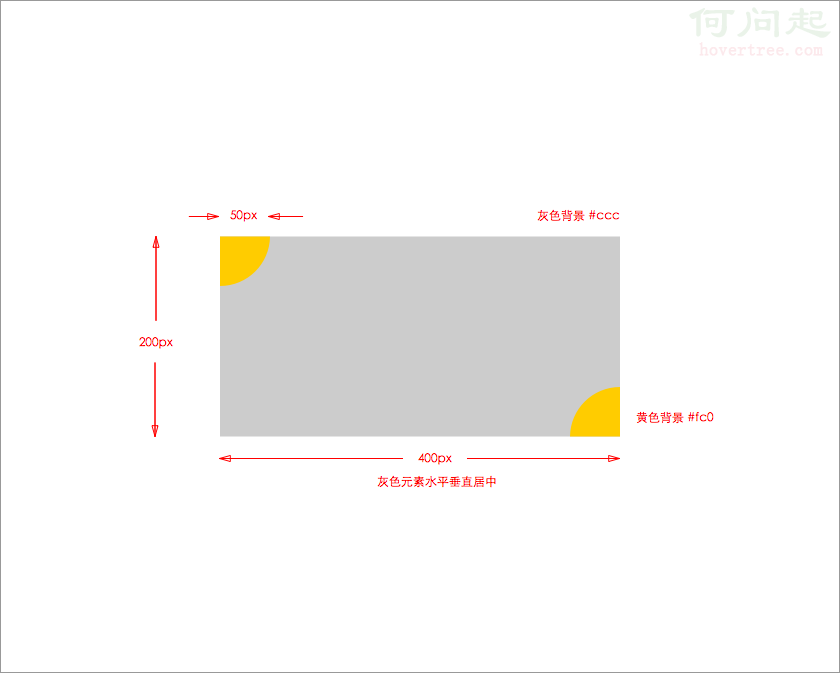
對應的 CSS 程式碼:
.main {
  position: absolute;
  top: 50%; left: 50%;
  width: 400px; height: 200px;
  margin: -100px 0 0 -200px;
  background-color: #ccc;
}
.corner {
  position: absolute;
  width: 50px; height: 50px;
  background-color: #fc0;
}
.top-left { top: 0; left: 0; border-radius: 0 0 50px 0; }
.bottom-right { bottom: 0; right: 0; border-radius: 50px 0 0 0; }
對應的 HTML 程式碼:
<div class="container">
  <div class="main">
    <div class="top-left corner"></div>
    <div class="bottom-right corner"></div>
  </div>
</div>
要讓灰色長方形居中,將它的 position 設為 absolute,並用 top/left 50% 搭配負的 margin 位移即可。一開始我使用的是 relative,卻發現 top:50% 失效——因為 50% 是相對於父元素高度而言,而父元素高度為 0;即便把 body 與父元素高度設為 100% 仍無效。改用 absolute 後,偏移改以頁面為基準,垂直居中便成功實現。最後兩個黃色圓角同理,設為 absolute 後再指定 top、bottom、left、right 即可。
- 上一篇文章: CSS display: box 伸縮盒新屬性解析
- 下一篇文章: 用 CSS3 輕鬆做出多層背景圖片堆疊