如果你收藏了一堆 CSS 最佳實踐卻還沒真正用起來,這個模板就是把它們落地的地方。以下示範如何建立一份有組織、可跨專案重用的樣式起點。
準備工作
建立一個名為 styles 的資料夾,裡面放兩個檔案:reset.css 與 style.css。
/
└── styles/
    ├── reset.css
    └── style.css
把 reset 獨立成一個檔案,是因為它幾乎不需要改動,可以長期跨專案複用。
一、全域樣式重置
以下以 Eric Meyer 的經典 reset 為基礎,移除了 ins、del、table(因為實務上少用),並重新定義了 strong 與 em。存為 reset.css:
html, body, div, span, applet, object, iframe,
h1, h2, h3, h4, h5, h6, p, blockquote, pre,
a, abbr, acronym, address, big, cite, code,
del, dfn, em, font, img, ins, kbd, q, s, samp,
small, strike, strong, sub, sup, tt, var,
b, u, i, center,
dl, dt, dd, ol, ul, li,
fieldset, form, label, legend,
table, caption, tbody, tfoot, thead, tr, th, td {
  margin: 0;
  padding: 0;
  border: 0;
  outline: 0;
  font-size: 100%;
  vertical-align: baseline;
  background: transparent;
}
ol, ul { list-style: none; }
blockquote, q { quotes: none; }
blockquote:before, blockquote:after, q:before, q:after {
  content: '';
  content: none;
}
:focus { outline: 0; }
table { border-collapse: collapse; border-spacing: 0; }
caption, th, td { text-align: left; font-weight: normal; }
strong { font-weight: bold; }
em { font-style: italic; }
注意這份 reset 刻意沒有處理 body。因為每個專案的 body 樣式都不同,把它留給 style.css 才能避免兩處定義互相打架。
關於 :focus { outline: 0 } 這行:它能讓樣式更乾淨,但會移除鍵盤使用者的焦點提示,對無障礙有害。若要在專案中使用,建議另外補上明確的 :focus-visible 樣式。
二、在檔案頂部寫上描述性註釋
建立 style.css 後,第一件事是在最上方寫一段結構性註釋,說明版本、作者與聯絡方式。這對協作與日後接手的人價值很高:
/*
主題名稱: 玫瑰主題
URI: theme-首頁網址
描述: 一句話說明這個主題的用途
作者: 你的姓名
作者 URI: 你的網站
模板: 若有父層主題,在此註明
版本: 1.0.0
*/
我偏好 WordPress 的註釋格式,因為它足夠通用,其他工具也讀得懂。
三、定義可搜尋的目錄表
接著在註釋區加上目錄:
[目錄表]
0 - Reset
1 - Global
2 - Links
3 - Headings
4 - Header
5 - Navigation
6 - Middle
7 - Forms
8 - Extras
9 - Footer
這個做法的成本不到一分鐘,但收益很實際:命名通用、不含動態的 id 與 class、檔案極小,而且順序編號讓後續的搜尋跳躍變得可行。
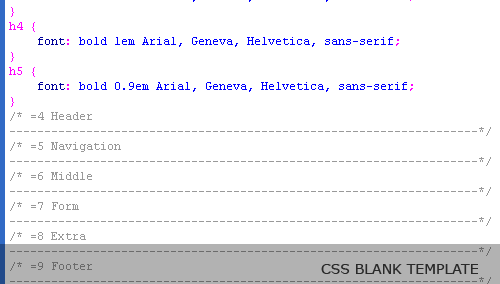
四、用等號標記分隔各區塊
/* =0 Reset
--------------------------------------------------*/
@import url('reset.css');

/* =1 Global
--------------------------------------------------*/

/* =2 Links
--------------------------------------------------*/

/* =3 Headings
--------------------------------------------------*/

/* =4 Header
--------------------------------------------------*/
關鍵在那個 = 符號。CSS 樣式中的宣告幾乎不會出現等號,因此 =7 是一個幾乎不會誤中的搜尋字串。想找表單相關樣式,先看目錄知道它在第 7 區,然後搜尋 =7 就能直接跳過去。這個技巧在樣式表長到上千行時特別有價值。
五、定義最常用的通用類
有些樣式幾乎每個專案都會用到,與其反覆重寫,不如一次定義好。放在 =1 Global 區塊:
/* =1 Global
--------------------------------------------------*/
body {
  line-height: 1;
  font: normal 12px Arial, Helvetica, sans-serif;
  vertical-align: top;
  background: #fff;
  color: #000;
}
.right        { float: right; }
.left         { float: left; }
.align-left   { text-align: left; }
.align-right  { text-align: right; }
.align-center { text-align: center; }
.justify      { text-align: justify; }
.hide         { display: none; }
.clear        { clear: both; }
.bold         { font-weight: bold; }
.italic       { font-style: italic; }
.underline    { border-bottom: 1px solid; }
.highlight    { background: #ffc; }

img.centered {
  display: block;
  margin-left: auto;
  margin-right: auto;
}
img.alignleft  { float: left;  margin: 4px 10px 4px 0; }
img.alignright { float: right; margin: 4px 0 4px 10px; }

.clearfix:after {
  content: ".";
  display: block;
  clear: both;
  visibility: hidden;
  line-height: 0;
  height: 0;
}
.clearfix { display: block; }
html[xmlns] .clearfix { display: block; }
* html .clearfix { height: 1%; }
.clearfix 這段是浮動時代的經典清除方案:用 :after 產生一個看不見的清除元素,再針對不同 IE 版本補上 hasLayout 觸發。今日改用 flex 或 display: flow-root 即可取代整段。
六、定義連結與標題樣式
/* =2 Links
--------------------------------------------------*/
a:link, a:visited { color: #333; }
a:hover           { color: #111; }
a:active          { color: #111; }

/* =3 Headings
--------------------------------------------------*/
h1 { font: bold 2em   "Times New Roman", Times, serif; }
h2 { font: bold 1.5em "Times New Roman", Times, serif; }
h3 { font: bold 1.2em Arial, Geneva, Helvetica, sans-serif; }
h4 { font: bold 1em   Arial, Geneva, Helvetica, sans-serif; }
h5 { font: bold 0.9em Arial, Geneva, Helvetica, sans-serif; }
這兩組樣式幾乎不會有專案不需要,先寫好可以省下每個專案的開場工。
總結
這份模板真正的價值不在程式碼本身,而在結構:reset 獨立、註釋完整、目錄可搜尋、區塊以等號標記。當樣式表長大,這些約定會決定它是否還能被維護。建議把它存成自己的起手範本,每個新專案複製一份再往上疊。
來源:acomment
- 上一篇文章: 拋開 table:用純 CSS 做一張乾淨的語義化表單
- 下一篇文章: 用 CSS 打造對齊完美的搜尋框:button + 單張背景圖