HTML5 Canvas 自訂擴充:用 prototype 加上圓角矩形與虛線繪製
編輯:HTML5詳解
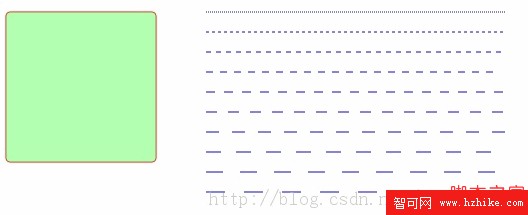
Canvas 2D 的原生 API 雖然完整,卻有兩個明顯的缺口:它沒有 roundRect() 這種直接畫圓角矩形的方法,也沒有 setLineDash() 之前可用的虛線支援。所幸 JavaScript 的 prototype 機制允許我們替 CanvasRenderingContext2D 擴充方法,把這兩個常用功能補上去,之後就能像原生 API 一樣自在呼叫。
擴充元件:fishcomponent.js
下面的兩個方法直接掛在 prototype 上,全域可用:
/**
 * 繪製圓角矩形
 * @param radius  圓角半徑,預設 5
 * @param fill    是否填滿
 * @param stroke  是否描邊,預設 true
 */
CanvasRenderingContext2D.prototype.roundRect =
function (x, y, width, height, radius, fill, stroke) {
    if (typeof stroke == "undefined") stroke = true;
    if (typeof radius === "undefined") radius = 5;

    this.beginPath();
    this.moveTo(x + radius, y);
    this.lineTo(x + width - radius, y);
    this.quadraticCurveTo(x + width, y, x + width, y + radius);
    this.lineTo(x + width, y + height - radius);
    this.quadraticCurveTo(x + width, y + height, x + width - radius, y + height);
    this.lineTo(x + radius, y + height);
    this.quadraticCurveTo(x, y + height, x, y + height - radius);
    this.lineTo(x, y + radius);
    this.quadraticCurveTo(x, y, x + radius, y);
    this.closePath();

    if (stroke) this.stroke();
    if (fill)   this.fill();
};

/**
 * 繪製虛線
 * @param pattern 虛線節距(px),預設 5
 */
CanvasRenderingContext2D.prototype.dashedLineTo =
function (fromX, fromY, toX, toY, pattern) {
    if (typeof pattern === "undefined") pattern = 5;

    var dx = (toX - fromX);
    var dy = (toY - fromY);
    var distance = Math.floor(Math.sqrt(dx * dx + dy * dy));
    var dashlineInterval = (pattern <= 0) ? distance : (distance / pattern);
    var deltaY = (dy / distance) * pattern;
    var deltaX = (dx / distance) * pattern;

    this.beginPath();
    for (var dl = 0; dl < dashlineInterval; dl++) {
        if (dl % 2) {
            this.lineTo(fromX + dl * deltaX, fromY + dl * deltaY);   // 畫一段
        } else {
            this.moveTo(fromX + dl * deltaX, fromY + dl * deltaY);   // 跳一段
        }
    }
    this.stroke();
};
兩個方法的實作思路
圓角矩形的做法是把四個直角換成四段二次貝茲曲線。先用 moveTo 落在上邊的起點,接著「直線—曲線」交替繞一圈,最後 closePath() 封口。這裡的關鍵是 quadraticCurveTo(控制點, 終點):把控制點放在矩形真正的角上,終點放在提前 radius 的位置,畫出來就是漂亮的圓角。
虛線則更單純:先算出兩點的直線距離,再依 pattern 切成若干段,用迴圈讓 moveTo 與 lineTo 奇偶交替。偶數次移動畫筆(留下線條),奇數次抬筆(留出空隙),一實一虛就構成虛線。若 pattern 小於等於 0,程式會退化為一整條實線。
在頁面中呼叫
<!DOCTYPE html>
<html>
<head>
<meta http-equiv="X-UA-Compatible" content="Chrome=IE8">
<meta http-equiv="Content-type" content="text/html;charset=UTF-8">
<title>Canvas Rounded Rectangle Demo</title>
<script src="fishcomponent.js"></script>
<link href="default.css" rel="stylesheet" />
<script>
window.onload = function () {
    var canvas = document.getElementById("text_canvas");
    canvas.width  = canvas.parentNode.clientWidth;
    canvas.height = canvas.parentNode.clientHeight;

    if (!canvas.getContext) {
        console.log("Canvas not supported. Please install an HTML5 compatible browser.");
        return;
    }

    var context = canvas.getContext('2d');

    // 畫一個填滿的圓角矩形
    context.strokeStyle = "red";
    context.fillStyle   = "rgba(100,255,100,0.5)";
    context.roundRect(50, 50, 150, 150, 5, true);

    // 畫十條節距遞增的虛線
    context.strokeStyle = "blue";
    for (var i = 0; i < 10; i++) {
        var delta   = i * 20;
        var pattern = i * 2 + 1;
        context.dashedLineTo(250, 50 + delta, 550, 50 + delta, pattern);
    }
};
</script>
</head>
<body>
<h1>HTML5 Canvas Dash-line Demo</h1>
<pre>Dash line and Rounded Rectangle</pre>
<div id="box_plot">
<canvas id="text_canvas"></canvas>
</div>
</body>
</html>
順帶一提
這個示範也示範了一個實用習慣:把畫布尺寸綁定到父容器的 clientWidth/clientHeight,畫布就能自適應版面,不必寫死像素值。另外,現代瀏覽器已原生支援 ctx.roundRect() 與 ctx.setLineDash(),上面的做法在需要相容舊環境、或想理解底層原理時特別有價值——知道圓角是怎麼用曲線拼出來的,之後調整整形或做動畫都會更有底氣。
熱門推薦