用 HTML5 Canvas 做一個會走動的時鐘
編輯:HTML5詳解
完成效果:
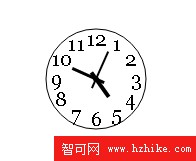
用 Canvas 做時鐘是很好的練習題,一次涵蓋了畫圓、畫文字、座標變形與定時重繪四件事。
實現代碼
<!DOCTYPE Html>
<Html>
<head>
<title>Html5時鐘</title>
</head>
<body>
<canvas id = "canvas"></canvas>
<script>
var Clock = function (canvas, options) {
this.canvas = canvas;
this.ctx = this.canvas.getContext("2d");
this.options = options;
};

Clock.prototype = {
constructor: Clock,
drawCircle: function () {
var ctx = this.ctx;
ctx.strokeStyle = "black";
ctx.arc(this.canvas.width / 2, this.canvas.height / 2, 50, 0, 2 * Math.PI, false);
ctx.stroke();
},
drawNum: function () {
var ctx = this.ctx;
var angle = Math.PI * 2 / 12;
for (var i = 1; i <= 12; i += 1) {
ctx.font = "20px Georgia";
ctx.textAlign = "center";
ctx.textBaseline = 'middle';
ctx.fillText(String(i),
this.canvas.width / 2 + Math.cos(3 * Math.PI / 2 + angle * i) * 40,
this.canvas.height / 2 + Math.sin(3 * Math.PI / 2 + angle * i) * 40);
}
},
drawPointer: function () {
var ctx = this.ctx;
var that = this;
var date, hour, minute, second;
date = new Date();
hour = date.getHours();
if (hour > 12) {
hour = hour % 12;
}
minute = date.getMinutes();
second = date.getSeconds();

var b = minute * Math.PI / 30;
var c = second * Math.PI / 30;
var a = hour * Math.PI / 6 + Math.PI / 6 * minute / 60;
var minuteAngle = Math.PI * 2 / 3600;
var secondAngle = Math.PI * 2 / 60;
var hourAngle = Math.PI * 2 / 12 / 3600;

ctx.beginPath();
ctx.save();
ctx.translate(that.canvas.width / 2, that.canvas.height / 2);
ctx.arc(0, 0, 3, 0, 2 * Math.PI, false);
ctx.fill();
ctx.closePath();
ctx.beginPath();
a += hourAngle;
ctx.rotate(a);
ctx.fillRect(-2, -22, 4, 30);
ctx.closePath();
ctx.beginPath();
b += minuteAngle;
ctx.rotate(b - a);
ctx.fillRect(-1.5, -26, 3, 35);
ctx.closePath();
ctx.beginPath();
c += secondAngle;
ctx.rotate(c - b);
ctx.fillRect(-1, -30, 2, 40);
ctx.closePath();
ctx.restore();
},
rePaint: function () {
this.drawPointer();
this.drawCircle();
this.drawNum();
},
tik: function () {
var that = this;
var ctx = this.ctx;
this.rePaint();
window.timer = setInterval(function () {
ctx.clearRect(0, 0, that.canvas.width, that.canvas.height);
that.rePaint();
}, 1000);
}
};

var options;
var clock = new Clock(document.getElementById("canvas"), options);
clock.tik();
</script>
</body>
</Html>
三個關鍵設計
- 時針要含分鐘:
a = hour * π/6 + π/6 * minute/60。只算小時的話,指針會在整點才跳一格,看起來很假。加上分鐘比例後才會平滑前進。 - 用 rotate 而非三角函數算指針:
translate到圓心後,每次rotate再fillRect。這裡刻意讓每次旋轉的角度是「相對前一支指針」的差值(b - a、c - b),因為rotate是累加的。 - 每秒重繪:
tik()用setInterval每秒清空並重畫。清空這步不能省,否則指針會留下殘影。
把檔案存起來用瀏覽器打開,就會看到一個持續走動的圓形時鐘。想再進一步的話,可以嘗試:改用 requestAnimationFrame 讓秒針平滑掃動、加上漸層或陰影讓錶盤更有質感,或把指針改成 lineCap = 'round' 的線條。
- 上一篇文章: HTML5 如何判斷使用者是否正在看你的頁面
- 下一篇文章: HTML5 五個簡單實用卻常被忽略的 API