用 iframe 在網頁中嵌入天氣預報並附效果圖
編輯:HTML和Xhtml
想在自己的網站加入即時天氣資訊,最省事的方式就是透過 iframe 嵌入第三方提供的天氣代碼。以下示範 CSS 與 HTML 的寫法。
CSS
*{margin:0;padding:0;list-style-type:none;}
a,img{border:0;}
body{font:12px/180% Arial, Helvetica, sans-serif, "新宋體";}
.demo{width:800px;margin:0 auto;}
.demo div{margin:40px 0 0 0;}
HTML
<div class="demo">
<div>
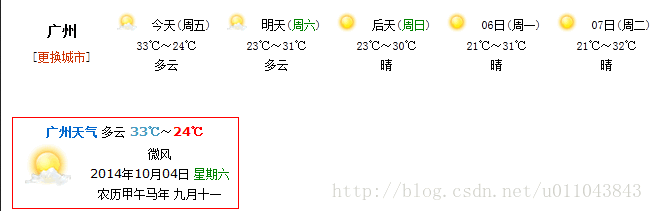
<iframe name="weather_inc" src="https://i.tianqi.com/index.php?c=code&id=2&num=5" width="650" height="70" frameborder="0" marginwidth="0" marginheight="0" scrolling="no"></iframe>
</div>
<div>
<iframe name="weather_inc" src="https://i.tianqi.com/index.php?c=code&id=7" style="border:solid 1px red" width="225" height="90" frameborder="0" marginwidth="0" marginheight="0" scrolling="no"></iframe>
</div>
<div>
<iframe name="weather_inc" src="https://i.tianqi.com/index.php?c=code&id=9" width="800" height="60" frameborder="0" marginwidth="0" marginheight="0" scrolling="no"></iframe>
</div>
<div>
<iframe name="weather_inc" src="https://i.tianqi.com/index.php?c=code&id=11" width="500" height="15" frameborder="0"></iframe>
</div>
<div>
<iframe name="weather_inc" src="https://i.tianqi.com/index.php?c=code&id=13" width="650" height="221" frameborder="0" marginwidth="0" marginheight="0" scrolling="no"></iframe>
</div>
<div>
<iframe name="weather_inc" src="https://i.tianqi.com/index.php?c=code&id=19" width="800" height="120" frameborder="0" marginwidth="0" marginheight="0" scrolling="no"></iframe>
</div>
</div>
不同 id 對應不同尺寸與樣式的天氣元件,可依版面需求挑選。以下為部分效果:
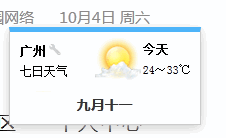
這是我在實際專案中做出的成果:
- 上一篇文章: HTML 列表標籤 dl、ul、ol 的用法與巢狀組合
- 下一篇文章: X-UA-Compatible 屬性詳解:釐清 IE8 相容性設定
熱門推薦