如何在網站中嵌入天氣預報?iframe 實作与城市代碼查詢
編輯:前端技巧
很多網站——尤其是社區型、地緣型的網站——會希望在頁面上放一個天氣預報。做法比想像中簡單:用一個 iframe 嵌入天氣服務提供的頁面即可。
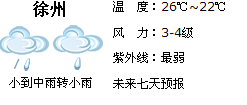
基本寫法
<iframe src="https://www.weather.com.cn/weather/101190801.shtml"
        width="245" height="110"
        marginwidth="0" marginheight="0" hspace="0" vspace="0"
        frameborder="0" scrolling="no"></iframe>
這個連結指向「中國天氣」網對應城市的預報頁。各參數的作用:
width/height— 嵌入區域的尺寸,可依版面調整。marginwidth/marginheight/hspace/hspace— 移除內外邊距,讓內容緊貼邊緣。frameborder="0"— 隱藏 iframe 的邊框線。scrolling="no"— 隱藏捲軸,讓嵌入區域看起來就像原生內容。
換城市怎麼辦?
關鍵在那串數字 101190801——這是中國天氣網的城市代碼。要顯示其他城市,只要把這串數字替換掉即可。
怎麼查到別的城市代碼?最簡單的方法是直接搜尋該城市的天氣頁面,然後看網址:
搜尋「上海天氣」,找到 https://www.weather.com.cn/weather/101020100.shtml
                                            ^^^^^^^^^^
                                            這段就是上海的代碼
把 101190801 換成 101020100,iframe 就會顯示上海的預報。同理,廣州、深圳、成都等城市都能用這個方法查到對應代碼。
現代化改寫
原範例中的 marginwidth、marginheight、hspace、vspace、frameborder、scrolling 全都是已被淘汰的 HTML 屬性,在 HTML5 中不再建議使用。同樣的效果請改用 CSS:
<iframe
  src="https://www.weather.com.cn/weather/101190801.shtml"
  title="北京天氣預報"
  width="245"
  height="110"
  loading="lazy"
  referrerpolicy="no-referrer"
  style="border:0; display:block;">
</iframe>
幾處關鍵改動:
- 改用 https — 如果你的網站走 HTTPS,嵌入 http 資源會被瀏覽器判定為混合內容而直接阻擋。
- 加上
title— iframe 必須有 title 才能被螢幕閱讀器正確朗讀,這是無障礙的硬性要求。 border:0取代frameborder="0"— 樣式交給 CSS。loading="lazy"— 延後載入,不佔用首屏的頻寬與解析時間。
更好的替代方案
iframe 嵌入有幾個天生的缺點:無法自訂外觀(除非對方提供調整參數)、多一次完整的頁面載入、無法與你的設計稿整合、 SEO 上不友善。因此如果條件允許,建議改用下列方式:
- 官方 API — 中國氣象局等單位有開放的資料介面,用
fetch取回 JSON 後自行渲染,外觀完全可控。 - 第三方天氣 API — 有許多服務提供免費額度,回傳 JSON,能自由設計樣式。
- 官方提供的嵌入程式碼 — 若對方有提供專門的嵌入片段(通常基於 script 而非 iframe),優先採用,因為它通常支援外觀調整。
用 API 自行渲染的示意:
fetch('https://api.example.com/weather?city=beijing')
  .then(r => r.json())
  .then(data => {
    document.querySelector('.weather').textContent =
      data.city + ':' + data.temp + '°C,' + data.condition;
  });
總結:iframe 是五分鐘就能上線的速成方案,適合臨時或簡單需求;若天氣模組是網站的長期配置,投資一次接 API 會得到更好的結果。