表格單元格交錯著色的實現思路與代碼
編輯:關於JavaScript
【摘要】以空間換時間,循環確定著色。
【環境】jQuery
效果展示
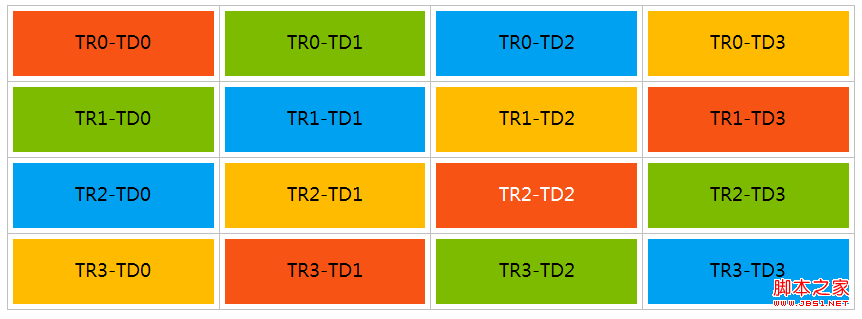
問題描述
要對下面這個表格中的單元格進行交錯著色。表格的 HTML 標簽與內容是固定的:
復制代碼 代碼如下:
<div id="tablecontainer" align="center">
<table style="border-collapse:collapse;" cellspacing="0">
<tbody>
<tr>
<td><a href="https://www.yunyun.com/">TR0-TD0</a></td>
<td><a href="https://www.yunyun.com/">TR0-TD1</a></td>
<td><a href="https://www.yunyun.com/">TR0-TD2</a></td>
<td><a href="https://www.yunyun.com/">TR0-TD3</a></td>
</tr>
<tr>
<td><a href="https://www.yunyun.com/">TR1-TD0</a></td>
<td><a href="https://www.yunyun.com/">TR1-TD1</a></td>
<td><a href="https://www.yunyun.com/">TR1-TD2</a></td>
<td><a href="https://www.yunyun.com/">TR1-TD3</a></td>
</tr>
<tr>
<td><a href="https://www.yunyun.com/">TR2-TD0</a></td>
<td><a href="https://www.yunyun.com/">TR2-TD1</a></td>
<td><a href="https://www.yunyun.com/">TR2-TD2</a></td>
<td><a href="https://www.yunyun.com/">TR2-TD3</a></td>
</tr>
<tr>
<td><a href="https://www.yunyun.com/">TR3-TD0</a></td>
<td><a href="https://www.yunyun.com/">TR3-TD1</a></td>
<td><a href="https://www.yunyun.com/">TR3-TD2</a></td>
<td><a href="https://www.yunyun.com/">TR3-TD3</a></td>
</tr>
</tbody>
</table>
</div>
實現
3.1、CSS
復制代碼 代碼如下:
<style type="text/css">
.tableitem0 {
    background: none repeat scroll 0 0 #F65314;
    color: #FFFFFF;
}
.tableitem1 {
    background: none repeat scroll 0 0 #7CBB00;
    color: #FFFFFF;
}
.tableitem2 {
    background: none repeat scroll 0 0 #00A1F1;
    color: #FFFFFF;
}
.tableitem3 {
    background: none repeat scroll 0 0 #FFBB00;
    color: #FFFFFF;
}
#tablecontainer td {
    padding: 5px;
}
.tableitem {
    width: 15%;
}
.tableitem a {
    display: block;
    font-size: 18px;
    height: 35px;
    margin: 0 auto;
    padding: 15px 20px;
    text-align: center;
    border-bottom:none;
}
.tableitem a:hover, .tableitem a:visited {
    color: #FFFFFF !important;
}
.tableitem a:hover, .tableitem a:active{
    opacity: 0.8;
}
</style>
3.2、JS 代碼
復制代碼 代碼如下:
<script type="text/javascript">
function setTableStyle(){
    $("#tablecontainer tr").each(function(i){// 獲得所有的 tr,each 遍歷並逐個操作
        var tr = $(this);// 得到本次循環裡的這個 tr
        setTableItemStyle(tr,i%4);// 每行四個單元格,四種顏色循環交錯著色
    });
}
function setTableItemStyle(tr,base){
    //【重點】:以空間換時間,循環確定著色
    var tableitem = ["tableitem0","tableitem1","tableitem2","tableitem3","tableitem0","tableitem1","tableitem2"];
    for(var i = 0; i < 4;i ++){
        var td = tr.children("td").eq(i);
        var td_a = td.find("a");
        td.addClass("tableitem");
        //【重點】:base 確定起始顏色,i 確定本次需要著色的單元格
        td_a.addClass(tableitem[base + i]);
    }
}
$(function(){
    setTableStyle();
});
</script>
實現要點在於「以空間換時間」:預先把顏色類名排進一個足夠長的數組,通過 i % 4 算出每行起始顏色 base,再用 base + i 定位到具體的顏色類,從而形成整齊美觀的斜向交錯效果。
- 上一篇文章: JS 獲取地址欄參數值的兩種實用方法
- 下一篇文章: 用 JavaScript 隱藏 IE 工具欄、導航欄的實現代碼