JavaScript 拖拽滑塊驗證效果實作(二)
編輯:關於JavaScript
逛註冊頁時常會遇到這樣的驗證:驗證碼不先顯示,而是給你一條滑塊,必須把它拖到最右端,驗證碼才露出來。文字描述總顯得抽象,直接看圖:
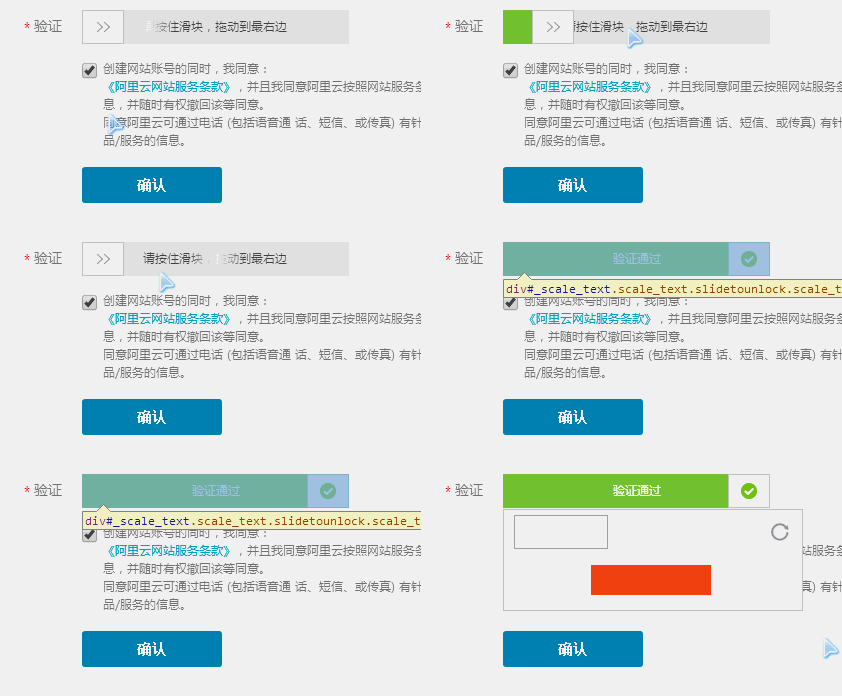
這是某註冊頁的截圖。效果大致是:拖動滑塊過程中,若沒拖到最右側,松手後它會自動回到初始位置;一旦拖到底,滑塊變成對勾,中間文字也隨之改變。這個案例裡驗證碼輸入框並未真正彈出(可能已改版),我們暫不深究,重点放在滑塊本身的交互上。
下面是自制的效果:
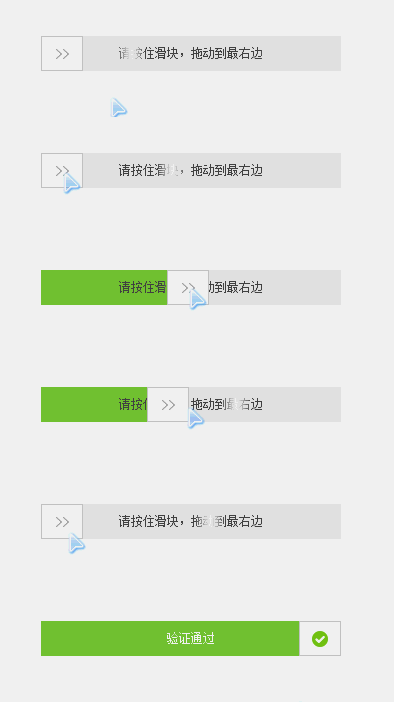
GIF 看起來有點卡,實際運行要順暢不少。拖拽的基本原理在〈JavaScript 實現 PC 網頁裡的拖拽效果〉一文中已有詳細說明,掌握之後實現這樣的滑塊驗證只是順手的事。
CSS
#drag_wrap {
  width: 300px; height: 35px;
  position: relative; background: #e8e8e8;
  margin: 100px auto;
}
#drag_bg {              /* 拖動過程中填充的進度色 */
  width: 0; height: 35px;
  background: #7ac23c;
  position: absolute; top: 0; left: 0;
}
#drag_box {             /* 滑塊本體 */
  width: 40px; height: 33px;
  border: 1px solid #ccc;
  background: #fff url(images/rt.png) no-repeat center center;
  position: absolute; top: 0; left: 0;
  cursor: move; z-index: 2;
}
#drag_txt {
  width: 100%; height: 100%;
  text-align: center; position: absolute; z-index: 1;
  background: transparent; color: #9c9c9c;
  line-height: 35px; font-size: 12px;
}
#drag_txt span { cursor: default; }

/* 提示文字的流光效果 */
#drag_txt .startTxt {
  background: -webkit-gradient(linear, left top, right top,
    color-stop(0, #4d4d4d), color-stop(.4, #4d4d4d),
    color-stop(.5, #fff), color-stop(.6, #4d4d4d), color-stop(1, #4d4d4d));
  -webkit-background-clip: text;
  -webkit-text-fill-color: transparent;
  -webkit-animation: slidetounlock 3s infinite;
}
@-webkit-keyframes slidetounlock {
  0%   { background-position: -200px 0; }
  100% { background-position: 200px 0; }
}

.yseTxt { background: none; color: #fff; }   /* 驗證通過後的文字樣式 */
HTML
<div id="drag_wrap">
  <div id="drag_bg"></div>
  <div id="drag_box"></div>
  <div id="drag_txt">
    <span class="startTxt">請按住滑塊,拖動到最右邊</span>
  </div>
</div>
JavaScript
window.onload = function () {
  drag("drag_box", "drag_wrap", "drag_bg", "drag_txt");
};

function drag(obj, parentNode, bgObj, oTxt, endFn) {
  var obj = document.getElementById(obj);
  var parentNode = document.getElementById(parentNode);
  var bgObj = document.getElementById(bgObj);
  var oTxt = document.getElementById(oTxt);
  var aSpan = oTxt.getElementsByTagName("span")[0];

  obj.onmousedown = function (ev) {
    var ev = ev || event;

    // 非標準:IE 全局捕獲
    if (obj.setCapture) { obj.setCapture(); }

    var disX = ev.clientX - this.offsetLeft,
        disY = ev.clientY - this.offsetTop;
    var oWidth = obj.offsetWidth;
    var pWidth = parentNode.offsetWidth;

    document.onmousemove = function (ev) {
      var ev = ev || event;
      var left = ev.clientX - disX;

      if (left <= 0) {
        left = 0;                                  // 左邊界
      } else if (left >= pWidth - oWidth) {
        left = pWidth - oWidth;                    // 右邊界:拖到底
        obj.style.background = "#fff url(images/yes.png) no-repeat center center";
        aSpan.innerHTML = "驗證通過";
        aSpan.className = 'yseTxt';
        // 此處應發起 ajax 請求向服務端二次校驗
      }

      obj.style.left = bgObj.style.width = left + 'px';
    };

    document.onmouseup = function (ev) {
      var ev = ev || event;
      document.onmousemove = document.onmouseup = null;

      // 磁性吸附:未拖到底則回弹
      var L = ev.clientX - disX;
      if (L < pWidth - oWidth) {
        startMove(obj, { left: 0 });
        startMove(bgObj, { width: 0 });
      }

      endFn && endFn();

      if (obj.releaseCapture) { obj.releaseCapture(); }
    };

    return false;
  };
}

// 通用運動框架
function startMove(obj, json, endFn) {
  clearInterval(obj.timer);
  obj.timer = setInterval(function () {
    var bBtn = true;
    for (var attr in json) {
      var iCur = 0;
      if (attr == 'opacity') {
        iCur = Math.round(parseFloat(getStyle(obj, attr)) * 100) || 100;
      } else {
        iCur = parseInt(getStyle(obj, attr)) || 0;
      }
      var iSpeed = (json[attr] - iCur) / 5;
      iSpeed = iSpeed > 0 ? Math.ceil(iSpeed) : Math.floor(iSpeed);
      if (iCur != json[attr]) { bBtn = false; }

      if (attr == 'opacity') {
        obj.style.filter = 'alpha(opacity=' + (iCur + iSpeed) + ')';
        obj.style.opacity = (iCur + iSpeed) / 100;
      } else {
        obj.style[attr] = iCur + iSpeed + 'px';
      }
    }
    if (bBtn) {
      clearInterval(obj.timer);
      if (endFn) { endFn.call(obj); }
    }
  }, 30);
}

// 獲取計算樣式
function getStyle(obj, attr) {
  if (obj.currentStyle) {
    return obj.currentStyle[attr];
  } else {
    return getComputedStyle(obj, false)[attr];
  }
}
參數說明
· obj:拖拽對象,即滑塊
· parentNode:拖拽活動範圍,一般傳父容器
· bgObj:拖動時填充顏色的元素
· oTxt:需要變化文案的元素
· endFn:回調函數,可選
最後提醒一句:前端滑塊只能提升操作體驗,真正的防刷必須由服務端校驗並下發一次性 token,否則滑塊很容易被繞過。
- 上一篇文章: jQuery validate 與 form 插件的三種提交方式
- 下一篇文章: JavaScript 拖拽應用實例:可拖動進度條