寫給新手:用 JavaScript 表單操作做一個簡單計算器
編輯:關於JavaScript
這是一個很適合入門的小練習:只用原生 JavaScript 加上表單元素,做出一個能加、減、乘、除、取餘的計算器。它涵蓋了 DOM 取值、Number() 型別轉換、switch 分支判斷等基礎知識點。
完整代碼
<!DOCTYPE html PUBLIC "-//W3C//DTD XHTML 1.0 Transitional//EN" "https://www.w3.org/TR/xhtml1/DTD/xhtml1-transitional.dtd">
<html xmlns="https://www.w3.org/1999/xhtml">
<head>
<meta http-equiv="Content-Type" content="text/html; charset=utf-8" />
<title>寫給新手:js簡單計算器</title>
<style type="text/css">
body{
font-size:12px;
color:#333;
}
#jsq input{/*輸入框樣式*/
border:#ccc 1px solid;
border-right:#e2e2e2 1px solid;
border-bottom:#e2e2e2 1px solid;
height:18px;
line-height:18px;
padding:3px;
}
#jsq span{
color:#999
}
#jsq input.btn{/*按鈕樣式*/
border:#e6e6e6 1px solid;
background-color:#e2e2e2;
width:30px;
height:24px;
text-align:center;
line-height:16px;
cursor:pointer;
margin:0 3px;
color:#999;
}
#jsq input.btn:hover{/*按鈕懸浮樣式*/
border:#e2e2e2 1px solid;
background-color:#f2f2f2;
color:#333;
}
</style>
<script type="text/javascript">
function imyeah(type){ //計算函數
var result=0;
num1 = Number(document.jisuanqi.num1.value); //Number()可以吧字符串強制轉換成數字
num2 = Number(document.jisuanqi.num2.value);
if(num1=="" || num2==""){return false;} //如果沒輸入計算數則不執行
switch(type){ //判斷要執行的計算符號
case 0:result=num1+num2;break; //計算“+”
case 1:result=num1-num2;break; //計算“-”
case 2:result=num1*num2;break;
case 3:result=num1/num2;break;
case 4:result=num1%num2;break;
}
document.jisuanqi.jieguo.value=result; //顯示計算結果
}
</script>
</head>
<body>
<form name="jisuanqi" id="jsq" action="" method="get">
<p> 第一個數:
<input type="text" size="10" name="num1" value="" />
</p>
<p> 第二個數:
<input type="text" size="10" name="num2" value="" />
</p>
<p> 計算結果:
<input type="text" size="10" name="jieguo" onClick="imyeah(0)" value="+" onfocus="this.select()" />
<span>左鍵"+",右鍵"選中復制"</span>
</p>
<p>
<input type="button" class="btn" value="–" onClick="imyeah(1)"/>
<input type="button" class="btn" value="×" onClick="imyeah(2)"/>
<input type="button" class="btn" value="÷" onClick="imyeah(3)"/>
<input type="button" class="btn" value="%" onClick="imyeah(4)"/>
</p>
</form>
</body>
</html>
要點說明
Number() 的轉換:表單讀出來的值一律是字串,直接相加會變成字串拼接,所以必須先轉成數字。Number("123abc") 會得到 NaN,這一點和 parseInt 的寬鬆解析不同,值得留意。
用 switch 分派運算:傳入 type 為 0 到 4,分別對應加、減、乘、除、取餘。這種「一個函數 + 參數分支」的寫法,比寫五個幾乎一樣的函數要整潔。
onfocus="this.select()":輸入框獲得焦點時自動全選,方便直接改數字,是個小而實用的小細節。
運行效果如下:
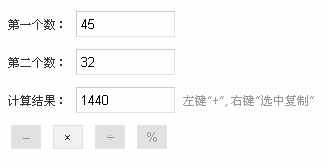
這個例子唯一的不足是沒有做除零判斷,也沒有攔截非數字輸入。你可以把它當作起點,試著加上 isNaN 檢查與除零提示,就算是完整的練習了。
相關文章
-
動手做一個 JavaScript 計算器(上):架構設計與核心邏輯全解析 JavaScript 表單操作大全:刷新、彈窗、取值與動態行 條件判斷與分支:if、else if、switch 完整說明 JavaScript 實作:按 Enter 直接跳到下一個表單欄位 jQuery 操作單選框、多選框、下拉選單的常用語法彙整 jQuery 取值賦值完全手冊:表單元素操作一本通 取消 radio 選取的三種做法 jQuery 表單域選擇器用法完全解析 用 JavaScript 透過 DOM 操作單選鈕、複選框與下拉選單的完整指南 jQuery 操作 text、radio、checkbox、select 的實現代碼