用 JavaScript 打造實用計算器:連續運算、求余與錯誤提示一次到位
編輯:關於JavaScript
下面這個計算器比常見的入門版本更完整一些:支援加減乘除的連續運算、求余,還會在除數為零時給出提示。整個界面純用 CSS 排版,邏輯則靠幾個狀態標志位來控制。
先看一下界面:
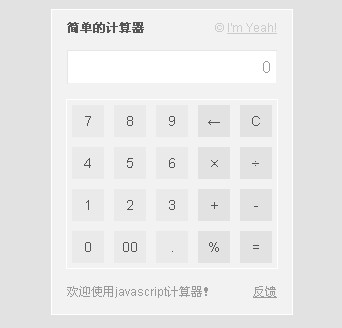
功能上,它是一台標準計算器:可以連續做加減乘除,也能求余。如果被除數為零,下方會冒出紅色提示:
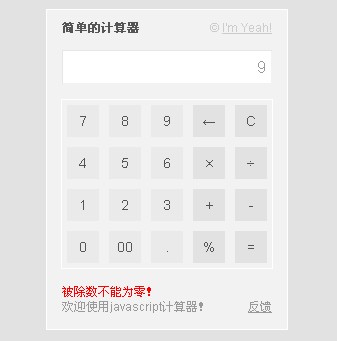
對新手來說,這份代碼裡可以學到的東西不少:狀態標志的設計、鍵盤與按鈕的分派、定時清除提示、以及 onfocus="this.blur()" 這種阻止鍵盤輸入的小技巧。
JavaScript 部分
var num = 0, result = 0, numshow = "0";
var operate = 0; //判斷輸入狀態的標志
var calcul = 0;  //判斷計算狀態的標志
var quit = 0;    //防止重復按鍵的標志

function command(num) {
    var str = String(document.calculator.numScreen.value); //獲得當前顯示數據
    str = (str != "0") ? ((operate == 0) ? str : "") : ""; //當前值不為0且狀態為0則保留
    str = str + String(num);      //追加字符
    document.calculator.numScreen.value = str; //刷新顯示
    operate = 0;  //重置輸入狀態
    quit = 0;     //重置防止重復按鍵的標志
}

function dzero() {
    var str = String(document.calculator.numScreen.value);
    str = (str != "0") ? ((operate == 0) ? str + "00" : "0") : "0";
    document.calculator.numScreen.value = str;
    operate = 0;
}

function dot() {
    var str = String(document.calculator.numScreen.value);
    str = (str != "0") ? ((operate == 0) ? str : "0") : "0";
    for (i = 0; i <= str.length; i++) { //判斷是否已經有一個點號
        if (str.substr(i, 1) == ".") return false; //有則不再插入
    }
    str = str + ".";
    document.calculator.numScreen.value = str;
    operate = 0;
}

function del() { //退格
    var str = String(document.calculator.numScreen.value);
    str = (str != "0") ? str : "";
    str = str.substr(0, str.length - 1);
    str = (str != "") ? str : "0";
    document.calculator.numScreen.value = str;
}

function clearscreen() { //清除數據
    num = 0; result = 0; numshow = "0";
    document.calculator.numScreen.value = "0";
}

function plus()   { calculate(); operate = 1; calcul = 1; } //加法
function minus()  { calculate(); operate = 1; calcul = 2; } //減法
function times()  { calculate(); operate = 1; calcul = 3; } //乘法
function divide() { calculate(); operate = 1; calcul = 4; } //除法
function persent(){ calculate(); operate = 1; calcul = 5; } //求余

function equal() {
    calculate(); //等於
    operate = 1;
    num = 0; result = 0; numshow = "0";
}

function calculate() {
    numshow = Number(document.calculator.numScreen.value);
    if (num != 0 && quit != 1) { //判斷前一個運算數是否為零以及防重復按鍵
        switch (calcul) {
            case 1: result = num + numshow; break; //+
            case 2: result = num - numshow; break; //-
            case 3: result = num * numshow; break;
            case 4:
                if (numshow != 0) { result = num / numshow; }
                else {
                    document.getElementById("note").innerHTML = "被除數不能為零!";
                    setTimeout(clearnote, 4000);
                }
                break;
            case 5: result = num % numshow; break;
        }
        quit = 1; //避免重復按鍵
    } else {
        result = numshow;
    }
    numshow = String(result);
    document.calculator.numScreen.value = numshow;
    num = result; //存儲當前值
}

function clearnote() { //清空提示
    document.getElementById("note").innerHTML = "";
}
HTML 與樣式部分
<!DOCTYPE html PUBLIC "-//W3C//DTD XHTML 1.0 Transitional//EN" "https://www.w3.org/TR/xhtml1/DTD/xhtml1-transitional.dtd">
<html xmlns="https://www.w3.org/1999/xhtml">
<head>
<meta http-equiv="Content-Type" content="text/html; charset=utf-8" />
<title>寫給新手:js表單操作(四) 簡單計算器(二)</title>
<style type="text/css">
body {
    font-size:12px;
    font-family:Arial, Georgia, "Times New Roman", Times, serif;
    color:#555; text-align:center; background-color:#e2e2e2;
}
h6 { margin:0; font-size:12px; }
#calculator {
    width:240px; height:auto; overflow:hidden; margin:10px auto;
    border:#fff 1px solid; padding-bottom:10px; background-color:#f2f2f2;
}
#calculator div { clear:both; }
#calculator ul { padding:0; margin:5px 14px; border:#fff 1px solid; height:auto; overflow:hidden }
#calculator li {
    list-style:none; float:left; width:32px; height:32px; margin:5px;
    display:inline; line-height:32px; font-size:14px; background-color:#eaeaea;
}
#calculator li.tool { background-color:#e2e2e2; }
#calculator li:hover  { background-color:#f9f9f9; cursor:pointer; }
#calculator li:active { background-color:#fc0; cursor:pointer; }
#calculator li.tool:active { background-color:#d8e8ff; cursor:pointer; }
#calcu-head { text-align:left; padding:10px 15px 5px; }
span.imyeah { float:right; color:#ccc; }
span.imyeah a { color:#ccc; }
.screen {
    width:200px; height:24px; line-height:24px; padding:4px;
    border:#e6e6e6 1px solid; border-bottom:#f2f2f2 1px solid; border-right:#f2f2f2 1px solid;
    margin:10px auto; direction:ltr; text-align:right; font-size:16px; color:#999;
}
#calcu-foot { text-align:left; padding:10px 15px 5px; height:auto; overflow:hidden; }
span#note { float:left; width:210px; height:auto; overflow:hidden; color:red; }
span.welcome { clear:both; color:#999; }
span.welcome a { float:right; color:#999; }
</style>
<script language="javascript">
//此處插入上面的 js 代碼
</script>
</head>
<body>
<div id="calculator">
  <div id="calcu-head"><h6>簡單的計算器</h6><span class="imyeah">I'm Yeah!</span></div>
  <form name="calculator" action="" method="get">
    <div id="calcu-screen">
      <!--使用 onfocus="this.blur();" 避免鍵盤輸入-->
      <input type="text" name="numScreen" class="screen" value="0" onfocus="this.blur();" />
    </div>
    <div id="calcu-btn">
      <ul>
        <li onclick="command(7)">7</li><li onclick="command(8)">8</li><li onclick="command(9)">9</li>
        <li class="tool" onclick="del()">←</li><li class="tool" onclick="clearscreen()">C</li>
        <li onclick="command(4)">4</li><li onclick="command(5)">5</li><li onclick="command(6)">6</li>
        <li class="tool" onclick="times()">×</li><li class="tool" onclick="divide()">÷</li>
        <li onclick="command(1)">1</li><li onclick="command(2)">2</li><li onclick="command(3)">3</li>
        <li class="tool" onclick="plus()">+</li><li class="tool" onclick="minus()">-</li>
        <li onclick="command(0)">0</li><li onclick="dzero()">00</li><li onclick="dot()">.</li>
        <li class="tool" onclick="persent()">%</li><li class="tool" onclick="equal()">=</li>
      </ul>
    </div>
    <div id="calcu-foot">
      <span id="note"></span>
      <span class="welcome">歡迎使用 javascript 計算器!</span>
    </div>
  </form>
</div>
</body>
</html>
設計上的幾個巧思
三個標志位各司其職:operate 表示「剛按完運算符」,用來決定下一次數字是接續輸入還是重新開始;calcul 記住目前是哪一種運算;quit 防止連續按等號時重複累加。
顯示框加了 onfocus="this.blur()",滑鼠點上去也無法用鍵盤打字,所有輸入都必須走按鈕,避免狀態錯亂。
除零判斷裡用 setTimeout(clearnote, 4000) 讓提示四秒後自動消失,這比彈 alert 干擾性小得多,是個值得學的細節。
如果想再進一步,可以考慮把狀態收進一個對象裡避免全域變量污染,或改用 try/catch 處理異常輸入。這份代碼勝在直觀,很適合當作理解「狀態機」概念的入門材料。
- 上一篇文章: 寫給新手:用 JavaScript 表單操作做一個簡單計算器
- 下一篇文章: JavaScript 中兩個感嘆號 !! 到底做了什麼