用 JavaScript 做一個打字練習小遊戲
編輯:關於JavaScript
這是一個以 JavaScript 搭配 jQuery 實作的字母打字遊戲:字母圖片會從畫面上方落下,玩家在落地前敲對應按鍵即可得分。功能清單如下:
- 可選擇遊戲時間,並顯示倒數計時
- 可選擇同時出現的字母個數(難度)
- 統計並即時更新得分
- 以鍵盤上下鍵操作的菜單
- 下落動畫與命中判定
先看一下效果(美工是硬傷,請多包容):
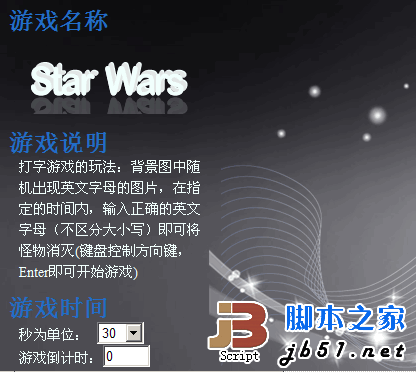
主要代碼
//-------全局變量-------
var data = {
    "10": ["<img src='images/A.gif'/>"], "11": ["<img src='images/B.gif'/>"],
    "12": ["<img src='images/C.gif'/>"], "13": ["<img src='images/D.gif'/>"],
    "14": ["<img src='images/E.gif'/>"], "15": ["<img src='images/F.gif'/>"],
    "16": ["<img src='images/G.gif'/>"], "17": ["<img src='images/H.gif'/>"],
    "18": ["<img src='images/I.gif'/>"], "19": ["<img src='images/J.gif'/>"],
    "20": ["<img src='images/K.gif'/>"], "21": ["<img src='images/L.gif'/>"],
    "22": ["<img src='images/M.gif'/>"], "23": ["<img src='images/N.gif'/>"],
    "24": ["<img src='images/O.gif'/>"], "25": ["<img src='images/P.gif'/>"],
    "26": ["<img src='images/Q.gif'/>"], "27": ["<img src='images/R.gif'/>"],
    "28": ["<img src='images/S.gif'/>"], "29": ["<img src='images/T.gif'/>"],
    "30": ["<img src='images/U.gif'/>"], "31": ["<img src='images/V.gif'/>"],
    "32": ["<img src='images/W.gif'/>"], "33": ["<img src='images/X.gif'/>"],
    "34": ["<img src='images/Y.gif'/>"], "35": ["<img src='images/Z.gif'/>"]
};
var datas = new Array(); //隨機出現的 class 樣式以數組中偶數存儲,圖片以奇數存儲
var now = new Date();
var Image;      //隨機出現圖片
var Divs;       //隨機出現層
var count = 0;  //積分系統
var key;        //鍵盤的值
var amounts = 1;    //出現字母圖片的個數
var gametime = 30;  //控制游戲的時間
var gametimes;      //時間為 0
var gametimess = 30;//顯示時鐘變量
var time1;      //setInterval 變量
var time2 = 5000;   //設定 setInterval 的時間
var time3;
var tab;        //用來記錄、傳遞 tabindex 焦點位置的值

//--------這樣寫為了兼容 FF 浏覽器-------
var plug = {
    addEvent: function(o, e, f) {
        if (o.addEventListener) { o.addEventListener(e, f, false); }
        else if (o.attachEvent) { o.attachEvent("on" + e, f); }
    }
}
plug.addEvent(window, "load", function() { Focus(); }); //兼容 FF 浏覽器

//------1. 控制游戲時間函數--------
function Gametime() {
    for (gametimes = gametime; gametimes >= 0; gametimes--) {
        window.setTimeout('Show(' + gametimes + ')', (gametime - gametimes + 2) * 1000);
    }
}

function Show(gametimes) {
    if (gametimes == 0) {
        clearInterval(time1); //停止游戲
        alert("游戲結束!你的得分為:" + count);
        $("#main").empty();          //清除 main 中的 div
        $(".gameapply").empty();
        $("#select1").empty();
        $("#select2").empty();
        count = 0;                   //得分清空為 0
        Score();                     //讓分數框顯示為 0
        Focus();                     //重新生成菜單選項
    }
}

//---------2. 動畫效果---------
function fun() {
    datas.length = 0;
    for (var i = 0; i < amounts; i++) {
        Image = parseInt(Math.random() * 26) + 10; //隨機出現字母圖片
        datas.push(Image);   //圖片以數組中偶數存儲,從零開始
        Divs = parseInt(Math.random() * 8) + 1;    //隨機出現層的 class 樣式
        datas.push(Divs);    //樣式以數組中奇數存儲
        var time = parseInt(Math.random() * 2000) + 3000; //完成動畫的時間
        if (time < 5000) {
            var $divs = $("<div class='divPop" + Divs + "'>" + data[Image] + "</div>");
            $("#main").append($divs);
            //-----JQ 動畫函數-----
            $(".divPop" + Divs).animate({
                "top": $(window).height() - $(".divPop" + Divs).height() - $(".divPop" + Divs).position().top
            }, time, function() { $("#main").empty(); });
        }
    }
}

//--------3. 設定字母圖片出現的時間------
function sets() {
    time1 = setInterval(fun, time2);
}

//---------5. 判斷函數---------
function select(key) {
    if (key == 13) {
        switch (tab) {
            case 0: case 1:
                Gametime(); Gametimeselect();
                time3 = setInterval(countdown, 1000);
                sets(); $("#select").hide(2000);
                break; //開始游戲
            case 2: alert("可以在左側設置游戲選項"); break;
            case 3: case 4:
                window.opener = null; window.open('', '_self'); window.close(); break; //退出游戲
        }
    }
    for (var j = 0; j < datas.length; j = j + 2) {
        if (key == datas[j] + 55) {
            $(".divPop" + datas[j + 1]).hide();
            delete datas[j]; //避免重復字母,命中後刪除
            count += 10;
            Score();
            break;
        }
    }
}

//---------4. 綁定鍵盤(兼容 FF)---------
document.onkeydown = function keydown(e) {
    e = e || window.event;
    var key = e.charCode || e.keyCode;
    select(key);
}

//---------7. 游戲時間選項---------
function Gametimeselect() {
    var option = document.getElementById("select1");
    for (var i = 0; i < option.length; ++i) {
        if (option[i].selected) { gametime = option.options[i].text; gametimess = gametime; }
    }
}

//-----8. 顯示游戲時間-------
function countdown() {
    var timeshows = document.getElementById("timeshow");
    if (timeshows) { //如果網頁速度很慢,定時器運行時控件可能還沒加載
        if (gametimess < 0) { clearInterval(time3); }
        else { timeshows.value = gametimess; gametimess--; }
    }
}

//--------9. 游戲難度選項---------
function Gameselectamount() {
    var option = document.getElementById("select2");
    for (var i = 0; i < option.length; ++i) {
        if (option[i].selected) { amounts = option.options[i].text; }
    }
}

//---------10. 游戲得分-----------
function Score() {
    var sum = document.getElementById("sum");
    sum.value = count;
    if (count == 0) { sum.value = count; } //初始化文本框分數為 0
}

//---------6. 游戲菜單-------
function Focus() {
    var $selects = $("<div id='select'><table id=\"tables\">\
<tr><td><input class=\"inputs\" type=\"text\" value=\"游戲開始\"/></td></tr>\
<tr><td><input class=\"inputs\" type=\"text\" value=\"游戲選項\"/></td></tr>\
<tr><td><input class=\"inputs\" type=\"text\" value=\"退出游戲\"/></td></tr>\
</table></div>");
    $(".gameapply").append($selects);
    for (var i = 30; i <= 300; i = i + 30) { $("#select1").append('<option>' + i + '</option>'); }
    for (var j = 1; j <= 9; j++) { $("#select2").append('<option>' + j + '</option>'); }

    $(".inputs:first").trigger("focus").addClass("input1");
    tab = 1; //第一個焦點沒法輸入 Enter,所以要調用鍵盤輸入事件
    var tabIndex = 1;
    $("#tables").find("tr").each(function(r) {
        $(this).find("input").attr("tabindex", r + 1); //tabindex 為焦點位置的值
    });
    //響應 input 的鍵盤上下操作
    $("#tables .inputs").bind("keydown", function(e) {
        tabIndex = parseInt($(this).attr("tabindex"));
        switch (e.which) {
            case 38: tabIndex -= 1; tab = tabIndex; break; //向上
            case 40: tabIndex += 1; tab = tabIndex; break; //向下
            default: return;
        }
        if (tabIndex > 0 && tabIndex < 4) {
            $(".inputs[tabindex=" + tabIndex + "]").focus().addClass("input1");
            for (var i = 0; i <= 4; i++) {
                if (i == tabIndex) { break; } else { $(this).removeClass("input1"); }
            }
            keydown();
            return false;
        }
        return true;
    });
}
幾個值得留意的設計
字母與位置的映射:用 10 到 35 代表 A 到 Z,鍵盤按下時 datas[j] + 55 剛好等於該字母的大寫 ASCII 碼,比對相當乾脆。命中後立刻 delete datas[j],避免同一個字母連續得分。
用 setTimeout 排定倒數:Gametime() 一次把所有秒數的 Show 呼叫都排進佇列,倒數顯示就不需要額外的計時器。
鍵盤事件兼容:寫成 function keydown(e) { e = e || window.event; ... },並用 charCode || keyCode 取值,同時兼顧了 Firefox 與 IE。
可以改進的地方
作者自己也提到,代碼寫得比較趕,沒有太多優化。最明顯的問題是字母出現的間隔偏長(time2 = 5000),遊玩節奏顯得拖沓;另外用 $("#main").empty() 在動畫回調裡清空整個容器,如果同時有多個字母在場會互相干擾。想練習的話,可以試著把每個下落元素獨立管理,用一個計時器統一驅動,並在命中時只移除該元素——這樣改完會順暢很多。