javascript拖拽應用實例(二)
編輯:關於JavaScript
經常在網站別人的網站的注冊頁中看到一個拖拽驗證的效果,就是它的驗證碼剛開始不出來,而是有一個拖拽的條,你必須將這個拖拽條拖到底,驗證碼才出來,說了感覺跟沒說一樣,你還是不理解,好吧,我給個圖你看看:
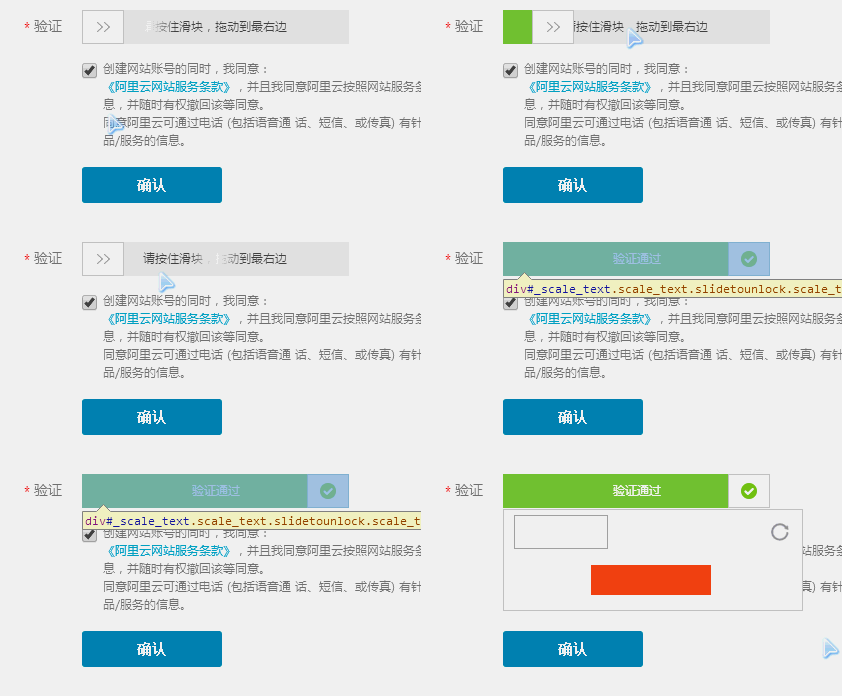
這個是在萬網的注冊頁中所截的圖,大概的效果就是,當拖動那個拖拽框時,如果拖拽框沒有拖到最右邊,則拖拽框會移動到初始位置,如果拖動到最右邊,則拖拽框顯示為對勾,中間的文字也變了,但是我試了一下,他的驗證碼的框沒有出來,不知道是改了還是怎麼的,我沒有繼續點擊確定往下進行,那不是我們要講的重點,我就在他的代碼中把那個驗證的框手動顯示出來了,也就是gif最後的幾幀中的畫面,這樣講,應該懂我要講的是什麼意思吧,沒錯,我們今天要實現的就是這個拖拽驗證的效果,拖拽後的驗證框我們就不做了
看看我們做的效果:
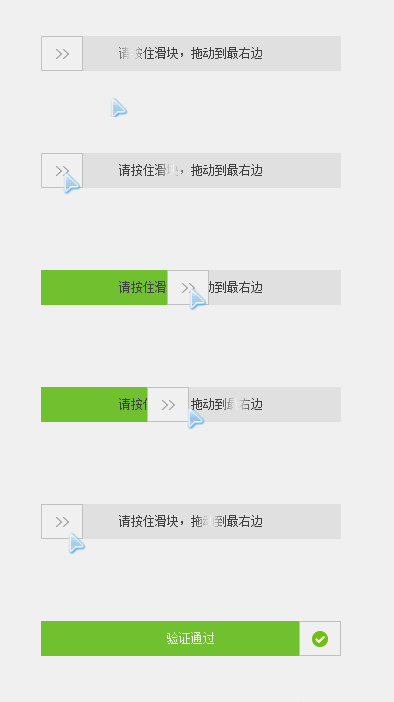
gif圖感覺有點卡,實際效果要流暢一些,看看效果基本上無差吧,具體實現原理我就不講了,如果還不知道怎麼實現的同學,可以出門往左轉,找到我寫的一篇 :javascript實現PC網頁裡的拖拽效果 ,裡面寫的比較清楚,掌握拖拽的基本原理,實現這樣的效果
那就是小菜一碟了,哈哈,那我就把代碼貼出來給大家看看,僅供參考:
css:
#drag_wrap{
  width:300px;
  height:35px;
  position:relative;
  background:#e8e8e8;
  margin:100px auto;
}
#drag_bg{
  width:0;
  height:35px;
  background:#7ac23c;
  position:absolute;
  top:0;
  left:0;
}
#drag_box{
  width:40px;
  height:33px;
  border:1px solid #ccc;
  background:#fff url(images/rt.png) no-repeat center center;
  position:absolute;
  top:0;
  left:0;
  cursor:move;
  z-index:2;
}
#drag_txt{
  width: 100%;
  height: 100%;
  text-align: center;
  position: absolute;
  z-index: 1;
  background: transparent;
  color: #9c9c9c;
  line-height: 35px;
  font-size: 12px;
}
#drag_txt span{
  cursor: default;
  z-index: 0;
}
#drag_txt .startTxt{
  background: -webkit-gradient(linear,left top,right top,color-stop(0,#4d4d4d),color-stop(.4,#4d4d4d),color-stop(.5,#fff),color-stop(.6,#4d4d4d),color-stop(1,#4d4d4d));
  -webkit-background-clip: text;
  -webkit-text-fill-color: transparent;
  -webkit-animation: slidetounlock 3s infinite;
  -webkit-text-size-adjust: none;
}
@-webkit-keyframes slidetounlock {
  0% {
    background-position: -200px 0
  }

  100% {
    background-position: 200px 0
  }
}
.yseTxt{
  background:none;
  color:#fff;
}
html:
<div id="drag_wrap">
    <div id="drag_bg"></div>
    <div id="drag_box"></div>
    <div id="drag_txt" ><span class="startTxt">請按住滑塊,拖動到最右邊</span></div>
  </div>
JavaScript:
window.onload = function(){

    drag("drag_box","drag_wrap","drag_bg","drag_txt");

    function drag(obj,parentNode,bgObj,oTxt,endFn){
      var obj = document.getElementById(obj);
      var parentNode = document.getElementById(parentNode);
      var bgObj = document.getElementById(bgObj);
      var oTxt = document.getElementById(oTxt);
      var aSpan = oTxt.getElementsByTagName("span")[0];
      obj.onmousedown = function(ev){
        var ev = ev || event;

        //非標准設置全局捕獲(IE)
        if(obj.setCapture){
          obj.setCapture()
        };

        var disX = ev.clientX - this.offsetLeft,
          disY = ev.clientY - this.offsetTop;
        var oWidth = obj.offsetWidth,
          oHeight = obj.offsetHeight;
        var pWidth = parentNode.offsetWidth,
          pHeight = parentNode.offsetHeight;
        document.onmousemove = function(ev){
          var ev = ev || event;

          var left = ev.clientX - disX;
          //左側
          if(left <= 0){
            left = 0;
          }else if(left >= pWidth - oWidth){//右側
            left = pWidth - oWidth;
            obj.style.background = "#fff url(images/yes.png) no-repeat center center";
            aSpan.innerHTML = "驗證通過"; //這裡應該有ajax操作
            aSpan.className = 'yseTxt';
          };
          obj.style.left = bgObj.style.width = left + 'px';


        };
        document.onmouseup = function(ev){
          var ev = ev || event;
          document.onmousemove = document.onmouseup = null;
          //磁性吸附
          var L = ev.clientX - disX;
          if(L < pWidth - oWidth){
            startMove(obj,{left:0});
            startMove(bgObj,{width:0});
          };
          endFn && endFn();
          //非標准釋放全局捕獲(IE)
          if(obj.releaseCapture){
            obj.releaseCapture()
          };

        };
        return false;
      };
    }
    //這裡是一個運動函數
    function startMove(obj,json,endFn){
      clearInterval(obj.timer);
      obj.timer = setInterval(function(){
        var bBtn = true;
        for(var attr in json){
          var iCur = 0;
          if(attr == 'opacity'){
            if(Math.round(parseFloat(getStyle(obj,attr))*100)==0){
              iCur = Math.round(parseFloat(getStyle(obj,attr))*100);
            }else{
              iCur = Math.round(parseFloat(getStyle(obj,attr))*100) || 100;
            }
          }
          else{
            iCur = parseInt(getStyle(obj,attr)) || 0;
          }
          var iSpeed = (json[attr] - iCur)/5;
          iSpeed = iSpeed >0 ? Math.ceil(iSpeed) : Math.floor(iSpeed);
          if(iCur!=json[attr]){
            bBtn = false;
          }
          if(attr == 'opacity'){
            obj.style.filter = 'alpha(opacity=' +(iCur + iSpeed)+ ')';
            obj.style.opacity = (iCur + iSpeed)/100;
          }
          else{
            obj.style[attr] = iCur + iSpeed + 'px';
          }
        }
        if(bBtn){
          clearInterval(obj.timer);
          if(endFn){
            endFn.call(obj);
          }
        }
      },30);
    }
    //這裡是獲取css樣式函數
    function getStyle(obj,attr){
      if(obj.currentStyle){
        return obj.currentStyle[attr];
      }else{
        return getComputedStyle(obj,false)[attr];
      }
    }

  }
參數說明:
這裡給了5個參數,obj,parentNode,bgObj,oTxt,endFn
obj:表示拖拽對象
parentNode:表示拖拽對象活動區域,一般設為父級
bgObj:表示拖拽時的背景顏色變化的對象
oTxt:表示文本變化對象
endFn:返回函數,非必填
以上就是本文的全部內容,希望對大家的學習有所幫助。
小編推薦
熱門推薦