Vue 學習筆記 3:前言
相比 1.x,Vue 2 除了引入 Virtual DOM,最讓人一時不習慣的改動就是移除了 props 的雙向綁定。過去用 .sync 或 twoWay 修飾符就能搞定的事,現在必須自己動手。
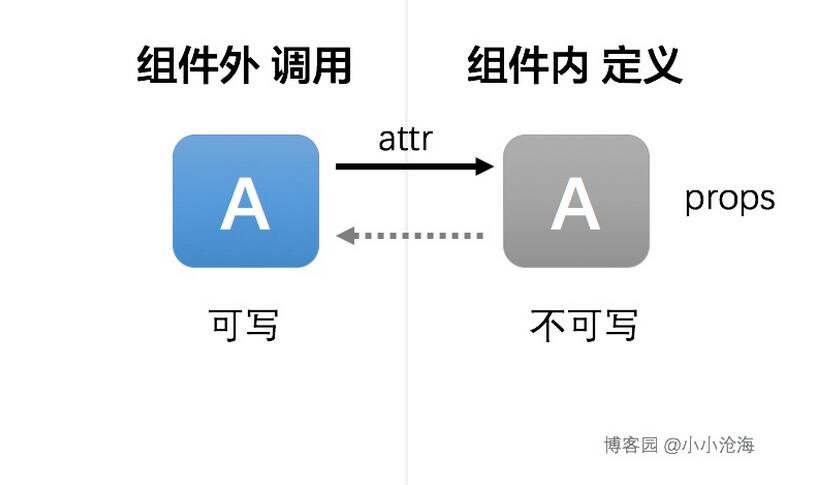
Vue2 的 props 是單向資料流
父元件透過 DOM attribute 把 props 傳進子元件,子元件被動接收,且不該直接改寫外層傳進來的值。官方給的理由是:單向綁定可以避免子元件意外改動父元件狀態,否則資料流會變得難以理解。
這個設計對整體專案是正確的,但實務上確實存在「元件內部需要改 props」的場景。
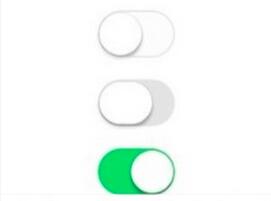
案例:iOS 風格開關
需求只有兩條:點擊按鈕切換開/關;不點擊時也能由外部資料改變狀態(例如做聯動開關)。
<div id="app">
  <switchbtn :result="result"></switchbtn>
  <input type="button" value="change" @click="change">
</div>
Vue.component("switchbtn", {
  template: "<div @click='change'>{{ result ? '開' : '關' }}</div>",
  props: ["result"],
  methods: {
    change() { this.result = !this.result; }
  }
});

new Vue({
  el: "#app",
  data: { result: true },
  methods: { change() { this.result = !this.result; } }
});
在 Vue 2 執行這段程式碼,點擊開關時會出現警告:
[Vue warn]: Avoid mutating a prop directly since the value will be overwritten whenever the parent component re-renders...
做法一:在 data 中建立 props 副本
既然 result 不可寫,就在 data 裡開一個 myResult,初始值取自 props,元件內部一律改用這個副本。
Vue.component("switchbtn", {
  template: "<div @click='change'>{{ myResult ? '開' : '關' }}</div>",
  props: ["result"],
  data: function () {
    return { myResult: this.result };
  },
  // ...
});
做法二:用 watch 監聽 props,把外部變更同步進來
父元件改了 props,子元件對應的 props 會更新,但 data 裡的副本不會自動跟著動,所以要補一個 watch。
watch: {
  result(val) {
    this.myResult = val; // 外部變更同步到內部副本
  }
}
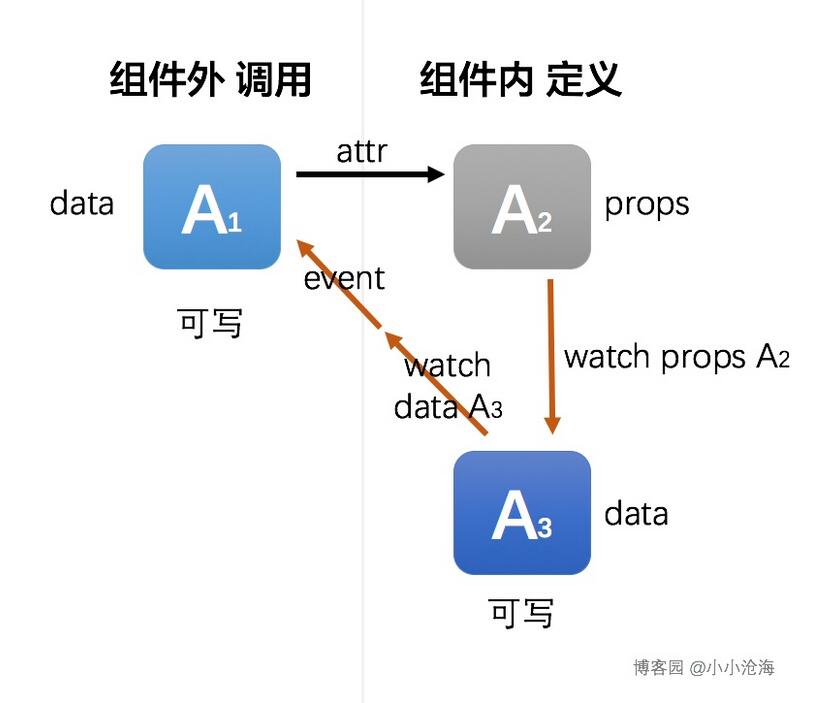
做法三:用 watch 監聽副本,向外發事件通知
內部改了 myResult,外部無從得知,於是再監聽副本,透過 $emit 拋事件,由父元件自己決定要不要同步。
完整程式碼
<div id="app">
  <switchbtn :result="result" @on-result-change="onResultChange"></switchbtn>
  <input type="button" value="change" @click="change">
</div>
Vue.component("switchbtn", {
  template: "<div @click='change'>{{ myResult ? '開' : '關' }}</div>",
  props: ["result"],
  data: function () {
    return { myResult: this.result };            // ① 建立副本
  },
  watch: {
    result(val) { this.myResult = val; },        // ② 外部 → 內部
    myResult(val) {
      this.$emit("on-result-change", val);       // ③ 內部 → 外部通知
    }
  },
  methods: {
    change() { this.myResult = !this.myResult; }
  }
});

new Vue({
  el: "#app",
  data: { result: true },
  methods: {
    change() { this.result = !this.result; },
    onResultChange(val) { this.result = val; }   // ④ 父元件決定是否同步
  }
});
一句話總結:元件內部自己變了要告訴外部,外部決定要不要跟著變。
什麼樣的 props 適合雙向綁定
雙向綁定不利於狀態管理,業務越複雜越應節制,複雜的資料流建議直接上 Vuex。判斷是否真的需要,我會看三個條件:
- 元件內部確實需要修改 props。
- 元件需要在執行期由外部動態控制,而不只是初始化。
- 外部需要讀取元件內部的狀態來做後續處理。
符合的例子就是這個 switch 開關,或 Tab 元件的 activeIndex——外部需要控制目前開啟哪一頁。
自動化處理:propsync mixin
如果有多個 props 都要雙向綁定,照上面的寫法會非常冗餘,所以我寫了一個 mixin 來自動化:
- 自動為每個 prop 產生對應的 data 屬性,方便內部修改。
- 外部修改 prop 時,自動同步到內部 data。
- 內部修改 data 時,自動對外拋出事件,由外部決定是否同步。
使用方式很簡單,引入 mixin 並宣告即可:
import propsync from './mixins/propsync';

export default {
  name: "tab",
  mixins: [propsync],   // 宣告使用
  props: {
    active: { type: [String, Number] },              // 自動產生 p_active
    width: { type: [Number, String], propsync: false } // 這支不做雙向綁定
  },
  methods: {
    setActive(page, index, e) {
      this.p_active = index;   // 直接用 p_active
    }
  }
}
命名規則是在 prop 名稱前加上 p_,可在原始碼開頭自行調整。呼叫端只要監聽 onPropsChange 事件,就能拿到「屬性名、新值、舊值」三個參數:
<tab :active="active" @onPropsChange="change"></tab>

change: function (propName, newVal, oldVal) {
  this[propName] = newVal;
  console.log("元件 tab 的 " + propName + " 屬性變更為 " + newVal);
}
原始碼已放在 GitHub:https://github.com/xxcanghai/cnblogsFiles/blob/master/vue-mixins/propsync.js
相關筆記
Vue 學習筆記-1(https://www.jb51.net/article/98869.htm)、Vue 學習筆記-2(https://www.jb51.net/article/98878.htm)、Vue 學習筆記-3(https://www.jb51.net/article/98881.htm)
相關文章
-
詳解 Vue 2.0 transition 在嵌套元素上的過渡設定 動手做 Vue2 + Vue Router + Webpack 單頁應用實例 JavaScript 用 mixin 模擬多重繼承 D 語言的混入(Mixin):在編譯期把程式碼「剪貼」到呼叫處 用 LESS 擴充 CSS:變數、mixin、巢狀與運算實戰 Less 混合(Mixin)語法詳解:從基本用法到模式匹配 你的 mixin 真的相容 ECMAScript 5 嗎? JS 控件的生命週期:初始化、渲染、同步與析構 用一個咖啡商城的例子看懂 JavaScript 函數式程式設計 從零搭建 Vue2 + Webpack 開發環境(含熱加載)