需求與思路
輪播是展示型網站的常見需求,付費免費的插件不計其數,多半還附帶一堆配置項與特效。但如果你的專案只要一個輕量輪播,而且本來就採用 Bootstrap,那麼官方內建的 Carousel 其實已經夠用,還能省下額外的載入。
這篇要做的,是在不換插件的前提下,為輪播內容加上進場動畫,並讓它能自由擴充、快速上手。
認識 Animate.css
為了不自己手刻 CSS3 動畫,這裡用開源的 Animate.css(作者 Dan Eden)。它讓開發重心回到「哪一幀要什麼效果」,而不是背 keyframes 語法。
使用只要兩步:一、在頁面引入 animate.min.css;二、在要動的元素上加上 animated 與效果類名,例如 animated bounceInLeft。
拆解 Bootstrap 輪播的三個部分
輪播指標:顯示目前第幾幀,提供視覺線索與可點擊的導航。
輪播項目:.carousel-inner 內每個 .item 就是一幀,可放圖片,也可加 .carousel-caption 標題(Bootstrap 自帶樣式)。動畫就加在這些元素上。
左右控制箭頭:讓使用者前後翻頁。
為了聚焦在動畫本身,範例不放圖片,只留框架與文字。
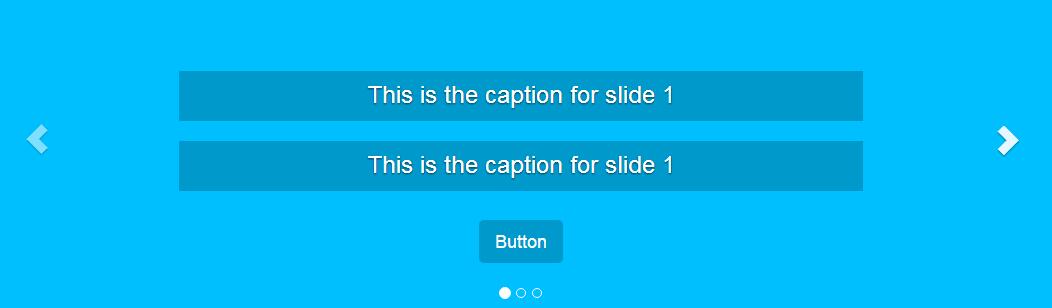
需要的資源
jQuery、Bootstrap 的 CSS 與 JS、Animate.css,以及你自己的樣式表與 JS 檔。範例直接引用 Bootstrap 官網的模板加速開發。
HTML 結構
 <div id="carousel-example-generic" class="carousel slide">
  <!-- Indicators -->
  <ol class="carousel-indicators">
    <li data-target="#carousel-example-generic" data-slide-to="0" class="active"></li>
    <li data-target="#carousel-example-generic" data-slide-to="1"></li>
    <li data-target="#carousel-example-generic" data-slide-to="2"></li>
  </ol>

  <!-- Wrapper for slides -->
  <div class="carousel-inner" role="listbox">

    <div class="item active">
      <div class="carousel-caption">
        <h3 data-animation="animated bounceInLeft">This is the caption for slide 1</h3>
        <h3 data-animation="animated bounceInRight">This is the caption for slide 1</h3>
        <button class="btn btn-primary btn-lg" data-animation="animated zoomInUp">Button</button>
      </div>
    </div><!-- /.item -->

    <div class="item">
      <div class="carousel-caption">
        <h3 class="icon-container" data-animation="animated bounceInDown">
          <span class="glyphicon glyphicon-heart"></span>
        </h3>
        <h3 data-animation="animated bounceInUp">This is the caption for slide 2</h3>
        <button class="btn btn-primary btn-lg" data-animation="animated zoomInRight">Button</button>
      </div>
    </div><!-- /.item -->

    <div class="item">
      <div class="carousel-caption">
        <h3 class="icon-container" data-animation="animated zoomInLeft">
          <span class="glyphicon glyphicon-glass"></span>
        </h3>
        <h3 data-animation="animated flipInX">This is the caption for slide 3</h3>
        <button class="btn btn-primary btn-lg" data-animation="animated lightSpeedIn">Button</button>
      </div>
    </div><!-- /.item -->

  </div><!-- /.carousel-inner -->

  <!-- Controls -->
  <a class="left carousel-control" href="#carousel-example-generic" role="button" data-slide="prev">
    <span class="glyphicon glyphicon-chevron-left" aria-hidden="true"></span>
    <span class="sr-only">Previous</span>
  </a>
  <a class="right carousel-control" href="#carousel-example-generic" role="button" data-slide="next">
    <span class="glyphicon glyphicon-chevron-right" aria-hidden="true"></span>
    <span class="sr-only">Next</span>
  </a>
</div><!-- /.carousel -->
仔細看會發現,這裡刻意沒有寫 data-ride="carousel"。因為我們打算用 JS 完全掌控播放時機,自動啟動反而是干擾。另外,若不使用圖片,別忘了在 CSS 給 .carousel .item 一個 min-height,否則容器會塌陷成零高度。
每個要動的元素都掛上 data-animation,值就是 Animate.css 的類名。想換效果,改這個屬性值即可。
用 CSS 控制動畫節奏
 .carousel-caption h3:first-child { animation-delay: 1s; }
.carousel-caption h3:nth-child(2) { animation-delay: 2s; }
.carousel-caption button { animation-delay: 3s; }
用 animation-delay 讓元素依序進場,而不是同時出現。你也可以讓前兩個標題同時進、按鈕稍後跟上,節奏完全由自己決定。
jQuery 部分
 var $myCarousel = $('#carousel-example-generic');

// 初始化輪播
$myCarousel.carousel();

function doAnimations(elems) {
  var animEndEv = 'webkitAnimationEnd animationend';

  elems.each(function () {
    var $this = $(this),
        $animationType = $this.data('animation');

    // 加上 animate.css 的類,動畫結束後移除
    $this.addClass($animationType).one(animEndEv, function () {
      $this.removeClass($animationType);
    });
  });
}

// 頁面載入時,讓第一幀的標題動起來
var $firstAnimatingElems = $myCarousel.find('.item:first')
  .find('[data-animation ^= "animated"]');

doAnimations($firstAnimatingElems);

// 暫停自動播放
$myCarousel.carousel('pause');

// 每次切換前觸發
$myCarousel.on('slide.bs.carousel', function (e) {
  var $animatingElems = $(e.relatedTarget)
    .find("[data-animation ^= 'animated']");
  doAnimations($animatingElems);
});
逐步解讀
doAnimations() 做什麼。先把 animationend 事件名存進變數(同時列出 webkit 前綴版本以相容舊 WebKit)。然後遍歷每個目標元素,取出 data-animation 的值,加類啟動動畫,並用 .one() 綁定一次性監聽,動畫一結束就把類移掉。
移除這一步是關鍵。若不移除,元素只會在第一次顯示時有動畫,之後再輪到該幀時類已存在,瀏覽器不會重跑動畫。你可以试着把這段註解掉,親眼確認差別。
第一幀的動畫。頁面載入完成後,用 .item:first 找出第一幀,再篩出帶 data-animation 的子元素,呼叫 doAnimations。
暫停自動播放。$myCarousel.carousel('pause') 讓輪播停下來。無限旋轉容易讓訪客分心,尤其在標題有動畫的情況下。若你希望它續播,記得把 interval 設得比動畫總長更寬裕:
$myCarousel.carousel({ interval: 4000 });
間隔太短會出現「上一幀動畫還沒播完就被切走」的突兀感。
後續各幀的動畫。在 slide.bs.carousel 上掛監聽,這個事件在切換開始時觸發。用 e.relatedTarget 取得「即將顯示的那一幀」,再從中找出待動元素,同樣交給 doAnimations 處理。用 relatedTarget 而非 :first,是因為每次切換的目標都不同。
可延伸的方向
這套結構很容易擴充:把 data-animation 換成任何 Animate.css 效果即可換風格;若要依裝置簡化,可在小螢幕時跳過 doAnimations,避免行動裝置上過多動畫影響流暢度。另外,為尊重系統的「減少動態效果」偏好,建議在 CSS 補上一段 prefers-reduced-motion 媒體查詢,把動畫關掉——這是無障礙設計裡常被忽略卻相當基本的一環。