自己動手做過一遍之後,收穫相當大。一旦理解了日曆背後的推算原理,想再往上加功能就自由多了。這裡把實作分享出來,有興趣的可以試著改改看。
效果預覽:
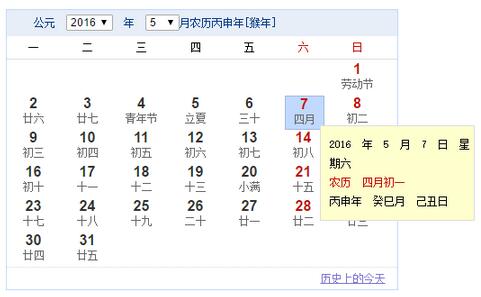
實作程式碼:
 <HTML>
<HEAD>
<TITLE>萬年歷</TITLE>
<META content="農歷; 陽歷; 月歷; 節日; 時區; 節氣; 八字; 干支; 生肖; gregorian solar; chinese lunar; calendar;" name=keywords>
<META content=All name=robots>
<META content="gregorian solar calendar and chinese lunar calendar" name=description>
<meta charset="UTF-8"/>
<style type="text/css">
body { margin: 0px; padding: 0px; }
</style>
</head>
<body>
<center><br>
<table cellpadding="0" cellspacing="0" id="1">
<tr>
<td>
<style>
#cal { width: 434px; border: 1px solid #c3d9ff; font-size: 12px; margin: 8px 0 0 15px; }
#cal #top { height: 29px; line-height: 29px; background: #e7eef8; color: #003784; padding-left: 30px; }
#cal #top select { font-size: 12px; }
#cal #top input { padding: 0; }
#cal ul#wk { margin: 0; padding: 0; height: 25px; }
#cal ul#wk li { float: left; width: 60px; text-align: center; line-height: 25px; list-style: none; }
#cal ul#wk li b { font-weight: normal; color: #c60b02; }
#cal #cm { clear: left; border-top: 1px solid #ddd; border-bottom: 1px dotted #ddd; position: relative; }
#cal #cm .cell { position: absolute; width: 42px; height: 36px; text-align: center; margin: 0 0 0 9px; }
#cal #cm .cell .so { font: bold 16px arial; }
#cal #bm { text-align: right; height: 24px; line-height: 24px; padding: 0 13px 0 0; }
#cal #bm a { color: 7977ce; }
#cal #fd { display: none; position: absolute; border: 1px solid #dddddf; background: #feffcd; padding: 10px; line-height: 21px; width: 150px; }
#cal #fd b { font-weight: normal; color: #c60a00; }
</style>
<!--[if IE]>
<style>#cal #top{padding-top:4px;}#cal #top input{width:65px;}#cal #fd{width:170px;}</style>
<![endif]-->
<div id="cal">
<div id="top">公元 <select></select> 年 <select></select>月農歷<span></span>年[<span></span>年]<input type="button" value="回到今天" title="點擊後跳轉回今天" style="padding:0px"></div>
<ul id="wk">
<li>一</li><li>二</li><li>三</li><li>四</li><li>五</li>
<li><b>六</b></li><li><b>日</b></li>
</ul>
<div id="cm"></div>
<div id="bm"><a target="_blank" href="javascript:void(0)">歷史上的今天</a></div>
</div>
</td>
</tr>
</table>
</center>
</body>
<script language="JavaScript"><!--
(function() {
var S = navigator.userAgent.indexOf("MSIE") != -1 && !window.opera;
function M(C) { return document.getElementById(C) }
function R(C) { return document.createElement(C) }

// 農曆年資料編碼表,每年一個十六進位數值
var P = [0x04bd8, 0x04ae0, 0x0a570, 0x054d5, 0x0d260, 0x0d950, 0x16554, 0x056a0, 0x09ad0, 0x055d2,
0x04ae0, 0x0a5b6, 0x0a4d0, 0x0d250, 0x1d255, 0x0b540, 0x0d6a0, 0x0ada2, 0x095b0, 0x14977,
0x04970, 0x0a4b0, 0x0b4b5, 0x06a50, 0x06d40, 0x1ab54, 0x02b60, 0x09570, 0x052f2, 0x04970,
0x06566, 0x0d4a0, 0x0ea50, 0x06e95, 0x05ad0, 0x02b60, 0x186e3, 0x092e0, 0x1c8d7, 0x0c950,
0x0d4a0, 0x1d8a6, 0x0b550, 0x056a0, 0x1a5b4, 0x025d0, 0x092d0, 0x0d2b2, 0x0a950, 0x0b557,
0x06ca0, 0x0b550, 0x15355, 0x04da0, 0x0a5b0, 0x14573, 0x052b0, 0x0a9a8, 0x0e950, 0x06aa0,
0x0aea6, 0x0ab50, 0x04b60, 0x0aae4, 0x0a570, 0x05260, 0x0f263, 0x0d950, 0x05b57, 0x056a0,
0x096d0, 0x04dd5, 0x04ad0, 0x0a4d0, 0x0d4d4, 0x0d250, 0x0d558, 0x0b540, 0x0b6a0, 0x195a6,
0x095b0, 0x049b0, 0x0a974, 0x0a4b0, 0x0b27a, 0x06a50, 0x06d40, 0x0af46, 0x0ab60, 0x09570,
0x04af5, 0x04970, 0x064b0, 0x074a3, 0x0ea50, 0x06b58, 0x055c0, 0x0ab60, 0x096d5, 0x092e0,
0x0c960, 0x0d954, 0x0d4a0, 0x0da50, 0x07552, 0x056a0, 0x0abb7, 0x025d0, 0x092d0, 0x0cab5,
0x0a950, 0x0b4a0, 0x0baa4, 0x0ad50, 0x055d9, 0x04ba0, 0x0a5b0, 0x15176, 0x052b0, 0x0a930,
0x07954, 0x06aa0, 0x0ad50, 0x05b52, 0x04b60, 0x0a6e6, 0x0a4e0, 0x0d260, 0x0ea65, 0x0d530,
0x05aa0, 0x076a3, 0x096d0, 0x04bd7, 0x04ad0, 0x0a4d0, 0x1d0b6, 0x0d250, 0x0d520, 0x0dd45,
0x0b5a0, 0x056d0, 0x055b2, 0x049b0, 0x0a577, 0x0a4b0, 0x0aa50, 0x1b255, 0x06d20, 0x0ada0, 0x14b63];

// 天干、地支、生肖
var K = "甲乙丙丁戊己庚辛壬癸";
var J = "子丑寅卯辰巳午未申酉戌亥";
var O = "鼠牛虎兔龍蛇馬羊猴雞狗豬";

// 二十四節氣名稱
var L = ["小寒", "大寒", "立春", "雨水", "驚蟄", "春分", "清明", "谷雨", "立夏", "小滿", "芒種", "夏至",
"小暑", "大暑", "立秋", "處暑", "白露", "秋分", "寒露", "霜降", "立冬", "小雪", "大雪", "冬至"];

// 節氣對應的時間常數(分鐘)
var D = [0, 21208, 43467, 63836, 85337, 107014, 128867, 150921, 173149, 195551, 218072, 240693,
263343, 285989, 308563, 331033, 353350, 375494, 397447, 419210, 440795, 462224, 483532, 504758];

var B = "日一二三四五六七八九十";
var H = ["正", "二", "三", "四", "五", "六", "七", "八", "九", "十", "十一", "臘"];
var E = "初十廿卅";

// 陽曆節日,*後的數字代表放假日數
var V = {
"0101": "*1元旦節", "0214": "情人節", "0305": "學雷鋒紀念日", "0308": "婦女節",
"0312": "植樹節", "0315": "消費者權益日", "0401": "愚人節", "0501": "*1勞動節",
"0504": "青年節", "0601": "國際兒童節", "0701": "中國共產黨誕辰", "0801": "建軍節",
"0910": "中國教師節", "1001": "*3國慶節", "1224": "平安夜", "1225": "聖誕節"
};

// 農曆節日
var T = {
"0101": "*2春節", "0115": "元宵節", "0505": "*1端午節", "0815": "*1中秋節",
"0909": "重陽節", "1208": "臘八節", "0100": "除夕"
};

// 核心:把 Date 物件轉為包含陽曆、農曆、干支、節氣、節日的資訊物件
function U(Y) {
    // 計算指定年份的某個節氣落在第幾天
    function c(j, i) {
        var h = new Date((31556925974.7 * (j - 1900) + D[i] * 60000) + Date.UTC(1900, 0, 6, 2, 5));
        return (h.getUTCDate());
    }
    // 計算某年農曆總天數
    function d(k) {
        var h, j = 348;
        for (h = 32768; h > 8; h >>= 1) { j += (P[k - 1900] & h) ? 1 : 0 }
        return (j + b(k));
    }
    // 由輪迴數字取得干支
    function a(h) { return (K.charAt(h % 10) + J.charAt(h % 12)) }
    // 閏月天數
    function b(h) {
        if (g(h)) { return ((P[h - 1900] & 65536) ? 30 : 29) } else { return (0) }
    }
    // 取得當年閏月月份,0 代表無閏月
    function g(h) { return (P[h - 1900] & 15) }
    // 某年某月天數
    function e(i, h) { return ((P[i - 1900] & (65536 >> h)) ? 30 : 29) }

    // 陽曆轉農曆
    function C(m) {
        var k, j = 0, h = 0;
        var l = new Date(1900, 0, 31);
        var n = (m - l) / 86400000;
        this.dayCyl = n + 40;
        this.monCyl = 14;
        for (k = 1900; k < 2050 && n > 0; k++) {
            h = d(k); n -= h; this.monCyl += 12;
        }
        if (n < 0) { n += h; k--; this.monCyl -= 12 }
        this.year = k;
        this.yearCyl = k - 1864;
        j = g(k);
        this.isLeap = false;
        for (k = 1; k < 13 && n > 0; k++) {
            if (j > 0 && k == (j + 1) && this.isLeap == false) {
                --k; this.isLeap = true; h = b(this.year);
            } else {
                h = e(this.year, k);
            }
            if (this.isLeap == true && k == (j + 1)) { this.isLeap = false }
            n -= h;
            if (this.isLeap == false) { this.monCyl++ }
        }
        if (n == 0 && j > 0 && k == j + 1) {
            if (this.isLeap) { this.isLeap = false } else { this.isLeap = true; --k; --this.monCyl }
        }
        if (n < 0) { n += h; --k; --this.monCyl }
        this.month = k;
        this.day = n + 1;
    }

    function G(h) { return h < 10 ? "0" + h : h }

    // 日期格式化
    function f(i, j) {
        var h = i;
        return j.replace(/dd?d?d?|MM?M?M?|yy?y?y?/g, function(k) {
            switch (k) {
                case "yyyy":
                    var l = "000" + h.getFullYear();
                    return l.substring(l.length - 4);
                case "dd": return G(h.getDate());
                case "d": return h.getDate().toString();
                case "MM": return G((h.getMonth() + 1));
                case "M": return h.getMonth() + 1;
            }
        });
    }

    // 農曆日期轉中文
    function Z(i, h) {
        var j;
        switch (i, h) {
            case 10: j = "初十"; break;
            case 20: j = "二十"; break;
            case 30: j = "三十"; break;
            default:
                j = E.charAt(Math.floor(h / 10));
                j += B.charAt(h % 10);
        }
        return (j);
    }

    this.date = Y;
    this.isToday = false;
    this.isRestDay = false;
    this.solarYear = f(Y, "yyyy");
    this.solarMonth = f(Y, "M");
    this.solarDate = f(Y, "d");
    this.solarWeekDay = Y.getDay();
    this.solarWeekDayInChinese = "星期" + B.charAt(this.solarWeekDay);

    var X = new C(Y);
    this.lunarYear = X.year;
    this.shengxiao = O.charAt((this.lunarYear - 4) % 12);
    this.lunarMonth = X.month;
    this.lunarIsLeapMonth = X.isLeap;
    this.lunarMonthInChinese = this.lunarIsLeapMonth ? "閏" + H[X.month - 1] : H[X.month - 1];
    this.lunarDate = X.day;
    this.showInLunar = this.lunarDateInChinese = Z(this.lunarMonth, this.lunarDate);
    if (this.lunarDate == 1) { this.showInLunar = this.lunarMonthInChinese + "月" }

    this.ganzhiYear = a(X.yearCyl);
    this.ganzhiMonth = a(X.monCyl);
    this.ganzhiDate = a(X.dayCyl++);
    this.jieqi = "";
    this.restDays = 0;

    // 判斷節氣
    if (c(this.solarYear, (this.solarMonth - 1) * 2) == f(Y, "d")) {
        this.showInLunar = this.jieqi = L[(this.solarMonth - 1) * 2];
    }
    if (c(this.solarYear, (this.solarMonth - 1) * 2 + 1) == f(Y, "d")) {
        this.showInLunar = this.jieqi = L[(this.solarMonth - 1) * 2 + 1];
    }
    if (this.showInLunar == "清明") {
        this.showInLunar = "清明節";
        this.restDays = 1;
    }

    // 陽曆節日
    this.solarFestival = V[f(Y, "MM") + f(Y, "dd")];
    if (typeof this.solarFestival == "undefined") {
        this.solarFestival = "";
    } else {
        if (/\*(\d)/.test(this.solarFestival)) {
            this.restDays = parseInt(RegExp.$1);
            this.solarFestival = this.solarFestival.replace(/\*\d/, "");
        }
    }
    this.showInLunar = (this.solarFestival == "") ? this.showInLunar : this.solarFestival;

    // 農曆節日
    this.lunarFestival = T[this.lunarIsLeapMonth ? "00" : G(this.lunarMonth) + G(this.lunarDate)];
    if (typeof this.lunarFestival == "undefined") {
        this.lunarFestival = "";
    } else {
        if (/\*(\d)/.test(this.lunarFestival)) {
            this.restDays = (this.restDays > parseInt(RegExp.$1)) ? this.restDays : parseInt(RegExp.$1);
            this.lunarFestival = this.lunarFestival.replace(/\*\d/, "");
        }
    }
    if (this.lunarMonth == 12 && this.lunarDate == e(this.lunarYear, 12)) {
        this.lunarFestival = T["0100"];
        this.restDays = 1;
    }
    this.showInLunar = (this.lunarFestival == "") ? this.showInLunar : this.lunarFestival;
    // 超過四字的顯示時截短
    this.showInLunar = (this.showInLunar.length > 4) ?
        this.showInLunar.substr(0, 2) + "..." : this.showInLunar;
}

// 月曆資料產生器
var Q = (function() {
    var X = {};
    X.lines = 0;
    X.dateArray = new Array(42);
    function Y(a) { return (((a % 4 === 0) && (a % 100 !== 0)) || (a % 400 === 0)) }
    function G(a, b) { return [31, (Y(a) ? 29 : 28), 31, 30, 31, 30, 31, 31, 30, 31, 30, 31][b] }
    function C(a, b) { a.setDate(a.getDate() + b); return a }
    function Z(a) {
        var f = 0;
        var c = new U(new Date(a.solarYear, a.solarMonth - 1, 1));
        var d = (c.solarWeekDay - 1 == -1) ? 6 : c.solarWeekDay - 1;
        X.lines = Math.ceil((d + G(a.solarYear, a.solarMonth - 1)) / 7);
        for (var e = 0; e < X.dateArray.length; e++) {
            if (c.restDays != 0) { f = c.restDays }
            if (f > 0) { c.isRest = true }
            if (d-- > 0 || c.solarMonth != a.solarMonth) { X.dateArray[e] = null; continue }
            var b = new U(new Date());
            if (c.solarYear == b.solarYear && c.solarMonth == b.solarMonth && c.solarDate == b.solarDate) {
                c.isToday = true;
            }
            X.dateArray[e] = c;
            c = new U(C(c.date, 1));
            f--;
        }
    }
    return {
        init: function(a) { Z(a) },
        getJson: function() { return X }
    }
})();

// 頂部年份、月份下拉選單與「回到今天」
var W = (function() {
    var C = M("top").getElementsByTagName("SELECT")[0];
    var X = M("top").getElementsByTagName("SELECT")[1];
    var G = M("top").getElementsByTagName("SPAN")[0];
    var c = M("top").getElementsByTagName("SPAN")[1];
    var Y = M("top").getElementsByTagName("INPUT")[0];
    function a(g) { G.innerHTML = g.ganzhiYear; c.innerHTML = g.shengxiao }
    function b(g) { C[g.solarYear - 1901].selected = true; X[g.solarMonth - 1].selected = true }
    function f() {
        var j = C.value;
        var g = X.value;
        var i = new U(new Date(j, g - 1, 1));
        Q.init(i);
        N.draw();
        if (this == C) {
            i = new U(new Date(j, 3, 1));
            G.innerHTML = i.ganzhiYear;
            c.innerHTML = i.shengxiao;
        }
        var h = new U(new Date());
        Y.style.visibility = (j == h.solarYear && g == h.solarMonth) ? "hidden" : "visible";
    }
    function Z() {
        var g = new U(new Date());
        a(g); b(g); Q.init(g); N.draw();
        Y.style.visibility = "hidden";
    }
    function d(k, g) {
        for (var j = 1901; j < 2050; j++) {
            var h = R("OPTION");
            h.value = j; h.innerHTML = j;
            if (j == k) { h.selected = "selected" }
            C.appendChild(h);
        }
        for (var j = 1; j < 13; j++) {
            var h = R("OPTION");
            h.value = j; h.innerHTML = j;
            if (j == g) { h.selected = "selected" }
            X.appendChild(h);
        }
        C.onchange = f;
        X.onchange = f;
    }
    function e(g) {
        d(g.solarYear, g.solarMonth);
        G.innerHTML = g.ganzhiYear;
        c.innerHTML = g.shengxiao;
        Y.onclick = Z;
        Y.style.visibility = "hidden";
    }
    return {
        init: function(g) { e(g) },
        reset: function(g) { b(g) }
    }
})();

// 日期格子的繪製
var N = (function() {
    function C() {
        var Z = Q.getJson();
        var c = Z.dateArray;
        M("cm").style.height = Z.lines * 38 + 2 + "px";
        M("cm").innerHTML = "";
        for (var a = 0; a < c.length; a++) {
            if (c[a] == null) { continue }
            var X = R("DIV");
            if (c[a].isToday) {
                X.style.border = "1px solid #a5b9da";
                X.style.background = "#c1d9ff";
            }
            X.className = "cell";
            X.style.left = (a % 7) * 60 + "px";
            X.style.top = Math.floor(a / 7) * 38 + 2 + "px";
            var b = R("DIV");
            b.className = "so";
            b.style.color = ((a % 7) > 4 || c[a].isRest) ? "#c60b02" : "#313131";
            b.innerHTML = c[a].solarDate;
            X.appendChild(b);
            var Y = R("DIV");
            Y.style.color = "#666";
            Y.innerHTML = c[a].showInLunar;
            X.appendChild(Y);
            X.onmouseover = (function(d) {
                return function(f) { F.show({ dateIndex: d, cell: this }) }
            })(a);
            X.onmouseout = function() { F.hide() };
            M("cm").appendChild(X);
        }
        var G = R("DIV");
        G.id = "fd";
        M("cm").appendChild(G);
        F.init(G);
    }
    return { draw: function(G) { C(G) } }
})();

// 滑入時的詳細資訊浮層
var F = (function() {
    var C;
    function Y(e, c) {
        if (arguments.length > 1) {
            var b = /([.*+?^=!:${}()|[\]\/\\])/g,
                Z = "{".replace(b, "\\$1"),
                d = "}".replace(b, "\\$1");
            var a = new RegExp("#" + Z + "([^" + Z + d + "]+)" + d, "g");
            if (typeof(c) == "object") {
                return e.replace(a, function(f, h) {
                    var g = c[h];
                    return typeof(g) == "undefined" ? "" : g;
                });
            }
        }
        return e;
    }
    function G(b) {
        var a = Q.getJson().dateArray[b.dateIndex];
        var Z = b.cell;
        var c = "#{solarYear} 年 #{solarMonth} 月 #{solarDate} 日 #{solarWeekDayInChinese}";
        c += "<br><b>農歷 #{lunarMonthInChinese}月#{lunarDateInChinese}</b>";
        c += "<br>#{ganzhiYear}年 #{ganzhiMonth}月 #{ganzhiDate}日";
        if (a.solarFestival != "" || a.lunarFestival != "" || a.jieqi != "") {
            c += "<br><b>#{lunarFestival} #{solarFestival} #{jieqi}</b>";
        }
        C.innerHTML = Y(c, a);
        C.style.top = Z.offsetTop + Z.offsetHeight - 5 + "px";
        C.style.left = Z.offsetLeft + Z.offsetWidth - 5 + "px";
        C.style.display = "block";
    }
    function X() { C.style.display = "none" }
    return {
        show: function(Z) { G(Z) },
        hide: function() { X() },
        init: function(Z) { C = Z }
    }
})();

// 底部「歷史上的今天」連結
var I = (function() {
    var G = M("bm").getElementsByTagName("A")[0];
    function C(X) {
        G.href = "https://zh.wikipedia.org/zh-cn/" + X.solarMonth + "%E6%9C%88" + X.solarDate + "%E6%97%A5";
    }
    return { setLink: function(X) { C(X) } }
})();

var A = new U(new Date());
if (S) { window.attachEvent("onload", function() { W.reset(A) }) }
W.init(A);
Q.init(A);
N.draw();
I.setLink(A);
})();
//--></script>
</html>
這份程式碼值得讀的幾個地方:
農曆資料表 P 是整個日曆的基礎。每個十六進位數值編碼了一整年的農曆資訊:低 4 位表示閏月在哪個月(0 為無閏月),第 16 位(0x10000)標示閏月是大月還是 小月,其餘各 bit 依序對應正月到十二月是大月(30 天)或小月(29 天)。理解了這個編碼規則,就能明白 d() 與 e() 為什麼這樣做位元運算。
節氣的計算走的是另一條路:以 1900 年小寒為基準,加上 D 陣列中每個節氣的時間常數(分鐘),再乘上年份差,用來推算該節氣落在當月第幾天。這是近似演算法,精度足以應付日常顯示。
干支由三個獨立的輪迴組成:年干支用 yearCyl、月干支用 monCyl、日干支用 dayCyl,各自對 10 或 12 取餘數後查表。生肖則是 (lunarYear - 4) % 12 對應到 O 陣列——減 4 是因為公元 4 年為甲子鼠年。
節日部分用 V(陽曆)與 T(農曆)兩個對照表,字串前的 *數字 代表放假日數,用正則抓出來後存入 restDays,繪製時再把連續假日標成紅字。
最後要留意,這份程式碼寫於 IE 仍為主流的年代,因此有 MSIE 偵測、attachEvent 與 <!--[if IE]> 條件註解。現代的話,日期運算可以直接交給 dayjs 或 date-fns,農曆換算則有 lunar-javascript 這類成熟套件;若要自行實作,把上面幾個核心函式抽出來即可,不必連帶搬運那些舊瀏覽器相容的程式碼。另外,程式中的「八字」部分僅以干支紀年、紀月、紀日呈現,並未含時柱,若需完整四柱還要再加上時辰推算。
- 上一篇文章: 移動端橫屏偵測的 JavaScript 實作(beta)
- 下一篇文章: 防止表單重複提交:按鈕禁用與提交攔截