Bootstrap 模態彈出框(Modal)快速上手
編輯:關於JavaScript
前面談過 Bootstrap 的 tab 用法,這次來看模態彈出窗。
效果:
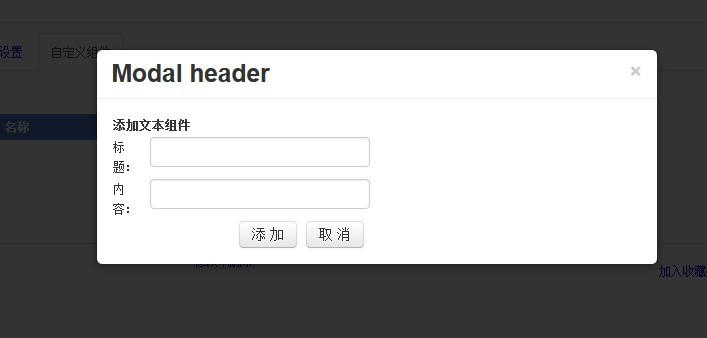
程式碼:
 <input id="btntext" type="button" value="添加文本組件" data-toggle="modal" data-target="#myModal" href="../SysManage/ZuJianManage.aspx"/>

<!-- Modal -->
<div class="modal hide fade" id="myModal" tabindex="-1" role="dialog">
 <div class="modal-header">
 <button class="close" type="button" data-dismiss="modal">×</button>
 <h3 id="myModalLabel">Modal header</h3>
 </div>
 <div class="modal-body"></div>
</div>
就這樣即可。關鍵是 data-target 指向 modal 的 id,點擊按鈕時對應的 modal 就會彈出來。
用 JS 控制
 // 顯示
$('#myModal').modal('show');
// 隱藏
$('#myModal').modal('hide');
// 開關切換
$('#myModal').modal('toggle');
事件
 $('#myModal').on('hidden', function () {
  // do something…
});
這裡我用了 href 屬性,讓 modal 去 remote 載入一個 URL;如果你不需要動態內容,直接把要顯示的東西寫在 modal-body 裡就好。
仔細看 modal 的 div 結構就會明白:modal-body 是內容區、modal-header 是標題區。若要在底部放兩個按鈕,就補上一段 footer:
 <div class="modal-footer">
 <a href="#" class="btn">關閉</a>
 <a href="#" class="btn btn-primary">保存</a>
</div>
調整寬度
要自訂 modal 的寬度,必須把它包進格線容器裡再設定寬度,例如:
<div class="container"></div>
並在 modal 上寫 style="width:500px"。注意不要試圖把 span 的格線類名直接塞到 modal 的 class 裡,那是不會生效的。
熱門推薦