學習 Bootstrap 基本元件:表格、表單與按鈕
編輯:關於JavaScript
Bootstrap 為我們提供了一套簡潔易用的樣式,只需極少的類名指定,就能做出簡約而優雅的頁面。本篇重點介紹三個最基礎的元件:table、form 和 button。
一、表格(table)
表格依然使用 <table><thead><tbody><tr><th><td> 的結構,Bootstrap 透過一系列類來控制外觀,且 table 默認會撐滿父容器。
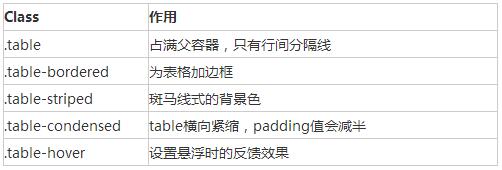
<table class="table table-bordered table-striped table-hover">
  <tr><th>標題一</th><th>標題二</th><th>標題三</th></tr>
  <tr><td>1</td><td>2</td><td>3</td></tr>
</table>
只要把任何 .table 包裹在 .table-responsive 中,就能建立響應式表格,它會在小螢幕裝置(寬度小於 768px)上出現水平滾動,螢幕變寬後滾動條自動消失。
二、表單 form

label 與控制項要用 form-group 類的 div 包起來,這是默認表單的寫法:
<form>
  <div class="form-group">
    <label for="exampleInputEmail1">Email address</label>
    <input type="email" class="form-control" id="exampleInputEmail1" placeholder="Enter email">
  </div>
  <button type="submit" class="btn btn-default">Submit</button>
</form>
內嵌表單:為 label 指定 sr-only 類可以隱藏標籤(但不可省略 label,以兼顧無障礙):
<form class="form-inline">
  <div class="form-group">
    <label for="email" class="sr-only">Email address</label>
    <input type="email" class="form-control" id="email" placeholder="Enter email">
  </div>
</form>
水平表單:需為 label 與控制項指定柵格寬度,label 右對齊、控制項左對齊:
<form class="form-horizontal">
  <div class="form-group">
    <label class="col-md-2 control-label">Email address</label>
    <div class="col-md-8"><input type="email" class="form-control"></div>
  </div>
</form>
表單驗證:Bootstrap 3 支援自訂驗證。加上 required 表示必填,並可透過 setCustomValidity 設定自訂提示:
function checkPassword() {
  var pwd1 = $("#password1").val();
  var pwd2 = $("#password2").val();
  if (pwd1 != pwd2) {
    document.getElementById("password1").setCustomValidity("兩次輸入的密碼不一致");
  } else {
    document.getElementById("password1").setCustomValidity("");
  }
}
三、按鈕 button
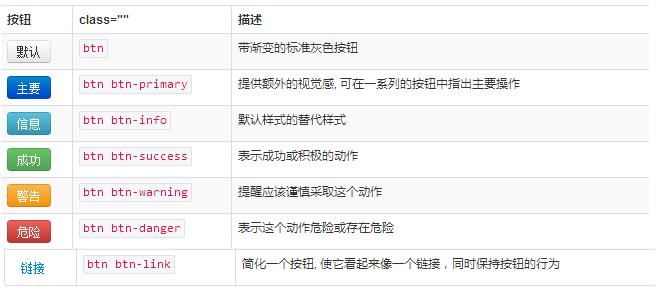
使用 .btn-lg、.btn-sm、.btn-xs 可獲得不同尺寸的按鈕;加上 .btn-block 可讓按鈕撐滿父節點 100% 寬度並變為區塊元素。按鈕樣式可加在 <a>、<button> 或 <input> 上。
<button type="button" class="btn btn-default btn-block">Default</button>
<button type="button" class="btn btn-primary">Primary</button>
<button type="button" class="btn btn-success">Success</button>
<button type="button" class="btn btn-danger">Danger</button>
<a class="btn btn-default" href="#" role="button">Link</a>
<input class="btn btn-default" type="submit" value="Submit">
以上就是 Bootstrap 三個基礎元件的用法梳理,希望對大家的學習有所幫助。
- 上一篇文章: JavaScript 陣列去重的幾種方法彙總推薦
- 下一篇文章: 如何高效去除 JS 陣列中的重複項