結合 easyUI 與 Bootstrap 打造後台工作站
編輯:關於JavaScript
後台管理系統的門面就是登錄頁與主框架。本文以「網絡醫院醫生工作站」為例,示範如何把 Bootstrap 的樣式能力與 easyUI 的 Tabs 組件結合起來,做出一套左側菜單、右側多頁籤的經典後台佈局。
一、登錄頁
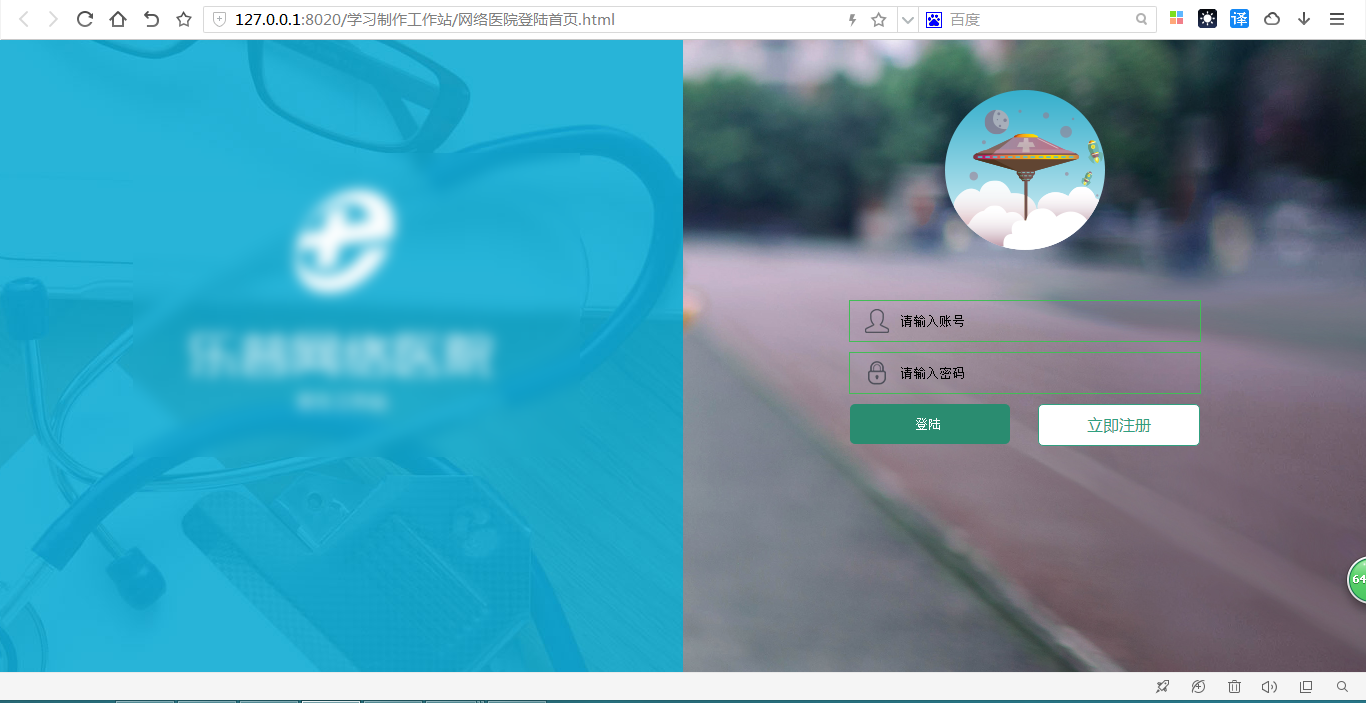
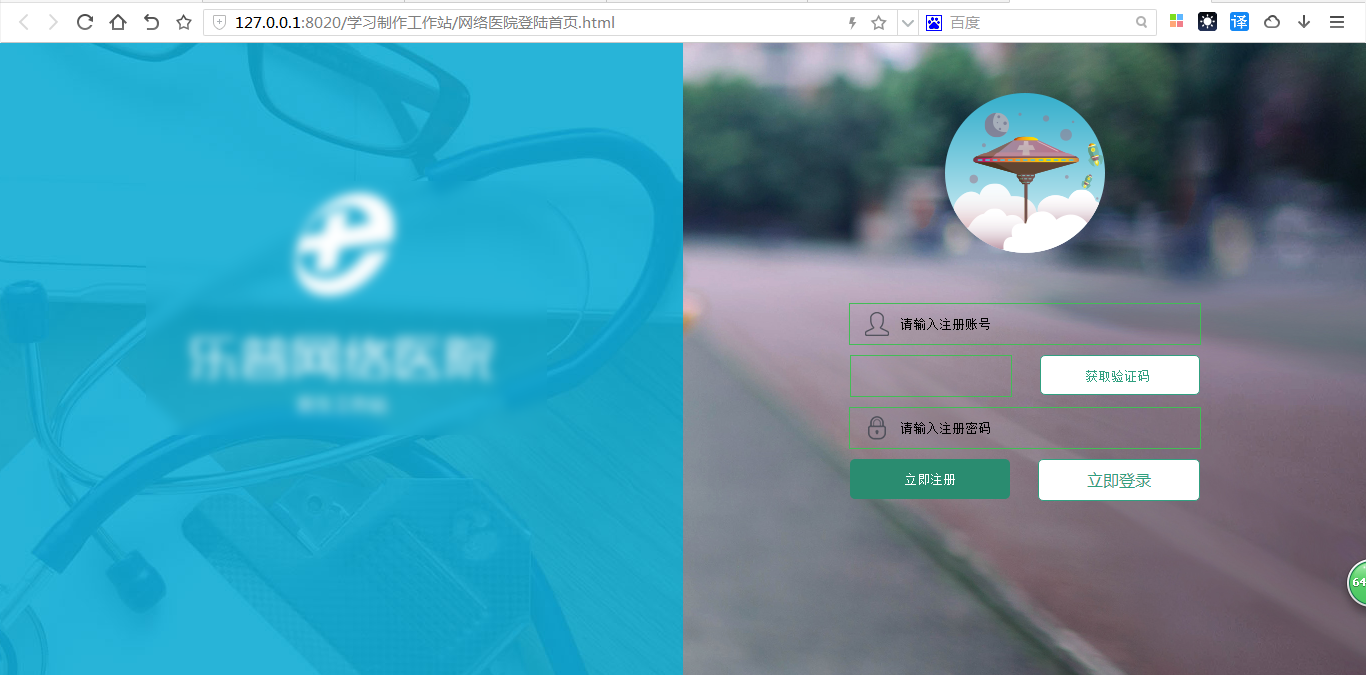
左側放品牌圖與標題,右側放登錄/註冊表單,兩塊各佔 50%。登錄與註冊通過切換顯示同一區域,並附上手機號與密碼的正則校驗、以及驗證碼倒計時。
<!DOCTYPE html>
<html>
<head>
<meta charset="UTF-8">
<title>網絡醫院登錄</title>
<style type="text/css">
* { margin: 0; padding: 0; }
html, body { height: 100%; width: 100%; overflow: hidden; font-family: "微軟雅黑"; font-size: 16px; }
.main-box {
  width: 100%; height: 100%; min-width: 960px; overflow: hidden;
  background: url(imges/bg.jpg) no-repeat center center;
}
.left-box, .right-box { width: 50%; height: 100%; float: left; position: relative; }
.left-box { background: url(imges/leftboxbg.jpg) no-repeat center center; z-index: 10; }
.left-title { width: 300px; margin: 150px auto; }
.left-title img { display: block; width: 300px; height: 186px; }
.left-title p { height: 50px; line-height: 50px; color: #fff; font-size: 18px; text-align: center; }
.loginavatar {
  width: 160px; height: 160px;
  background: url(imges/loginavatar.png) no-repeat;
  margin: 50px auto;
}
.right-title, .right-title-zhuce { width: 400px; margin: 0 auto; }
.login input {
  display: block; width: 350px; height: 40px;
  border: 1px solid #42BD56; margin: 10px auto;
}
input.username {
  text-indent: 50px; margin-top: 30px;
  background: url(imges/bg-loginid.png) no-repeat 0 -7px;
}
input.pwd {
  text-indent: 50px;
  background: url(imges/bg-loginpass.png) no-repeat 0 -7px;
}
input.sub {
  background: #2A8C70; border: none; color: #fff; border-radius: 5px;
}
.sub-ljzc, .sub-fsdx { width: 350px; margin: 10px auto; }
input.sub, input.msg { width: 160px; float: left; }
input.msg { background: none; text-align: center; }
.sub-ljzc .ljzc, .sub-ljzc .ljdl, .sub-fsdx .hqyzm {
  float: right; width: 160px; height: 40px; line-height: 40px;
  text-align: center; color: #30A080; background: #fff;
  border: 1px solid #30A080; border-radius: 5px;
}
</style>
<script type="text/javascript" src="js/jquery-1.11.1.min.js"></script>
<script type="text/javascript">
$(function () {
  var pwd = /^[a-zA-z]\w{3,15}$/;
  var phone_num = /^1\d{10}$/;

  // 登錄 / 註冊 表單切換
  $("#ljzc").click(function () {
    $("#right-title").hide();
    $("#right-title-zhuce").show();
  });
  $("#ljdl").click(function () {
    $("#right-title").show();
    $("#right-title-zhuce").hide();
  });

  // 登錄校驗
  $("#sub").click(function () {
    if ($(".username").val() === "") { alert("請輸入手機號碼!"); return false; }
    if (!phone_num.test($(".username").val().trim())) { alert("手機號碼有誤,請檢查"); return false; }
    if ($(".pwd").val() === "") { alert("請輸入密碼!"); return false; }
  });

  // 獲取驗證碼 + 倒計時
  $(".hqyzm").click(function () {
    if ($("#username").val() === "") { alert("請輸入手機號碼!"); return false; }
    if (!phone_num.test($("#username").val().trim())) { alert("手機號碼有誤,請重新填寫!"); return false; }

    $(this).css('color', 'red').prop("disabled", true);
    var i = 10;
    var n = setInterval(function () {
      $(this).val(i + 's');
    }, 1000);
  });

  // 註冊校驗
  $("#ljzc-tj").click(function () {
    if ($("#username").val() === "") { alert("請輸入手機號碼!"); return false; }
    if (!phone_num.test($("#username").val().trim())) { alert("手機號碼有誤,請重新填寫!"); return false; }
    if ($(".msg").val() === "") { alert("短信驗證碼為空!"); return false; }
    if ($("#pwd").val() === "") { alert("密碼為空!"); return false; }
    if (!pwd.test($("#pwd").val().trim())) { alert("密碼格式有誤,需 4-16 位,包含字母、數字、下劃線"); return false; }
  });
});
</script>
</head>
<body>
<div class="main-box">
  <div class="left-box">
    <div class="left-title">
      <img src="imges/loginlogo.png" />
      <p>醫生工作站</p>
    </div>
  </div>
  <div class="right-box">
    <div class="loginavatar"></div>
    <div class="right-title" id="right-title">
      <form action="#" method="post" class="login" autocomplete="off">
        <input type="text" class="username" placeholder="請輸入賬號" />
        <input type="password" class="pwd" placeholder="請輸入密碼" />
        <div class="sub-ljzc">
          <input type="submit" value="登陸" class="sub" id="sub" />
          <a class="ljzc" id="ljzc">立即注冊</a>
        </div>
      </form>
    </div>
    <div class="right-title-zhuce" id="right-title-zhuce" style="display: none;">
      <form action="#" method="post" class="login" autocomplete="off">
        <input type="text" class="username" id="username" placeholder="請輸入注冊賬號" />
        <div class="sub-fsdx">
          <input type="text" class="msg" />
          <input type="button" class="hqyzm" value="獲取驗證碼" />
        </div>
        <input type="password" placeholder="請輸入注冊密碼" class="pwd" id="pwd" />
        <div class="sub-ljzc">
          <input type="submit" value="立即注冊" class="sub" id="ljzc-tj" />
          <a class="ljdl" id="ljdl">立即登錄</a>
        </div>
      </form>
    </div>
  </div>
</div>
</body>
</html>
倒計時那段在原文里把 $(this) 寫在 setInterval 内部,this 指向會丟失,實作時需要先把 $(this) 存進臨時變量(例如 var $btn = $(this))再引用,並在計時結束時 clearInterval 恢復按鈕文案。
二、主框架頁
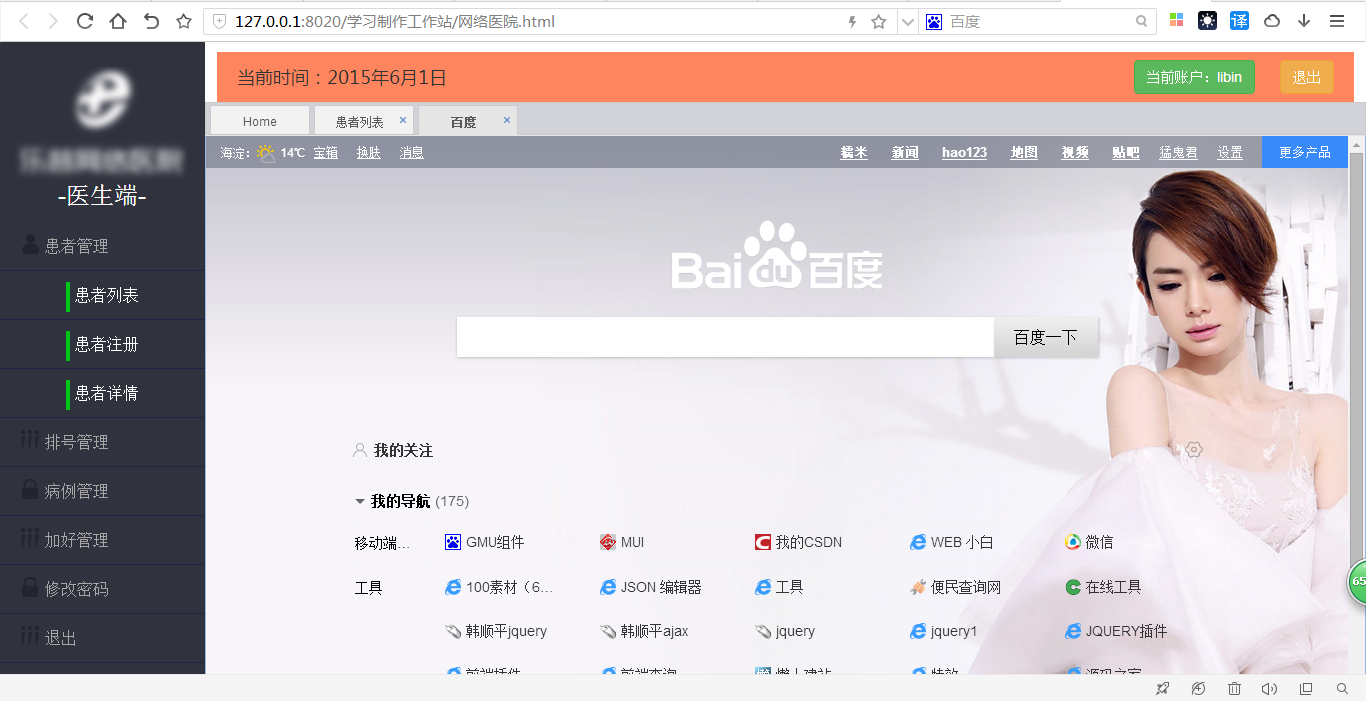
左側 15% 放菜單樹,右側 85% 放頂部信息欄與 Tabs 內容區。點擊菜單調用 addTabs(title, url),用 iframe 把對應頁面裝進新頁籤;若同名頁籤已存在則直接切換過去。
<!DOCTYPE html>
<html lang="en">
<head>
<meta charset="UTF-8">
<link rel="stylesheet" href="css/reset.css" />
<link rel="stylesheet" href="css/bootstrap.min.css" />
<link rel="stylesheet" href="jquery-easyui-1.4.3/themes/default/easyui.css">
<link rel="stylesheet" href="jquery-easyui-1.4.3/themes/icon.css">
<script src="js/jquery-1.11.1.min.js"></script>
<script src="jquery-easyui-1.4.3/jquery.easyui.min.js"></script>
<script src="jquery-easyui-1.4.3/easyui-lang-zh_CN.js"></script>
<title>網絡醫院主頁</title>
<style type="text/css">
* { padding: 0; margin: 0; }
html, body { width: 100%; height: 100%; font-size: 16px; overflow: hidden; }
a { text-decoration: none; }

.main { width: 100%; height: 100%; overflow: hidden; min-width: 1200px; }
.left-box { height: 100%; float: left; width: 15%; background: #30323e; }
.left-box-logo { width: 160px; height: 150px; margin: 30px auto 0; }
.left-box-logo img { width: 160px; height: 100px; }
.left-box-logo h3 { color: #fff; line-height: 50px; text-align: center; }

.tree-box { list-style: none; line-height: 48px; }
.tree-box li { border-bottom: 1px solid #232243; }
.tree-box li:hover, .tree-box li:focus { background: #005eac; }
.tree-box > li > a { color: #A6A6A6; margin-left: 20px; }
.tree-box a { display: block; height: 48px; width: 100%; }
.tree-box-two a { text-align: center; color: #fff; }

.right-box { height: 100%; float: left; width: 85%; position: relative; font-size: 18px; }
.time-now { margin-left: 20px; line-height: 50px; }
.right-title { width: 98%; margin: 10px auto 0; height: 50px; background: #FF855E; }
.right-title .user-info { float: right; }
.right-title .user-info button { margin-right: 20px; }

/* easyUI Tabs 主題微調 */
.tabs-header, .tabs-tool { background: green; }
.tabs li a.tabs-inner {
  background: #f2f2f2; color: #5a5a5a; border: 1px solid #cacacd;
  padding: 0 15px; border-radius: 0;
}
.tabs li a.tabs-inner:hover { background: #E6E6E6; }
.tabs li.tabs-selected a.tabs-inner { background: #E6E6E6; border-bottom: 1px solid #E6E6E6; }
</style>
<script type="text/javascript">
$(function () {
  // 初始化 Tabs
  $("#tab-page").tabs({
    tabWidth: 100,
    tabHeight: 30,
    closable: true,
    fit: true          // 鋪滿容器
  });
});

// 打開(或切換到)一個頁籤
function addTabs(title, url) {
  if ($('#tab-page').tabs('exists', title)) {
    $('#tab-page').tabs('select', title);   // 已存在則直接選中
  } else {
    var content = '<iframe class="tabIframe" style="width:100%;" scrolling="scroll" frameborder="0" src="' + url + '"></iframe>';
    $('#tab-page').tabs('add', {
      title: title,
      content: content,
      fit: true,
      closable: true
    });
  }
  // 讓 iframe 高度自適應剩餘空間
  var hC = $(".right-box").height() - 50;
  $(".panel-body .tabIframe").height(hC);
}
</script>
</head>
<body>
<div class="main">
  <div class="left-box">
    <div class="left-box-logo">
      <img src="imges/logo.png" />
      <h3>-醫生端-</h3>
    </div>
    <div class="tree">
      <ul class="tree-box">
        <li class="hzgl"><a href="#">患者管理</a></li>
        <ul class="tree-box-two">
          <li><a class="bg" onclick="addTabs('患者列表','articleList.html')">患者列表</a></li>
          <li><a class="bg" onclick="addTabs('患者注冊','https://www.baidu.com')">患者注冊</a></li>
          <li><a class="bg" onclick="addTabs('患者詳情','https://www.so.com/')">患者詳情</a></li>
        </ul>
        <li class="pzgl"><a href="">排號管理</a></li>
        <li class="xgmm"><a href="">病例管理</a></li>
        <li class="xgmm"><a href="">修改密碼</a></li>
        <li><a href="">退出</a></li>
      </ul>
    </div>
  </div>
  <div class="right-box">
    <div class="right-title">
      <span class="time-now">當前時間:2015年6月1日</span>
      <span class="user-info">
        <button type="button" class="btn btn-success">當前賬戶:libin</button>
        <button type="button" class="btn btn-warning">退出</button>
      </span>
    </div>
    <div id="tab-page" style="width:100%;">
      <div title="Home">
        <h1 style="margin:15% auto; text-align:center; font-size:80px; color:green;">歡迎使用網絡醫院</h1>
      </div>
    </div>
  </div>
</div>
</body>
</html>
三、要點小結
· 左側菜單本質是嵌套的 ul/li,二級菜單通過 onclick 把標題與地址傳給 addTabs,職責非常清晰。
· easyUI 的 tabs('exists', title) 與 tabs('select', title) 組合,能避免重複打開同一功能頁。
· iframe 高度需要在每次新增頁籤後重算一次,記得把頂部信息欄的高度(示例中是 50px)扣掉。
· 原文 addTabs 裡引用了未定義的 select 變量,已在此版本中移除,實作時注意別把無用分支帶進專案。
- 上一篇文章: Bootstrap 實現頁腳自動粘底的方案
- 下一篇文章: 用 HTML5 Canvas 繪製時鐘效果(二)