一個成熟的後台框架,日期控制項絕對少不了。網路上可用的選擇很多,但如果主框架已經採用 Bootstrap,那麼風格最一致的做法就是直接用它自家的 bootstrap-datetimepicker。
官方文件:https://www.bootcss.com/p/bootstrap-datetimepicker/index.htm
GitHub 專案:https://github.com/smalot/bootstrap-datetimepicker
步驟一、引用 JS 腳本
<script src="/Content/bootstraps/js/bootstrap.js"></script>
<script src="/Content/bootstraps/js/bootstrap-datetimepicker.js"></script>
<script src="/Content/bootstraps/js/bootstrap-datetimepicker.zh-CN.js"></script>
其中 bootstrap-datetimepicker.zh-CN.js 是中文語系包,引入之後控制項內的月份、星期與「今天」等文字才會顯示中文。
步驟二、引入 CSS 類別庫
<link href="/Content/bootstraps/css/bootstrap.css" rel="stylesheet"/>
<link href="/Content/bootstraps/css/bootstrap-datetimepicker.css" rel="stylesheet"/>
步驟三、定義 HTML 標籤
<input class="form_datetime form-control" type="text" value="2016-03-07" size="16">
步驟四、初始化 datetimepicker
<script type="text/javascript">
$(".form_datetime").datetimepicker({
  format: "yyyy-mm-dd",
  autoclose: true,
  todayBtn: true,
  todayHighlight: true,
  showMeridian: true,
  pickerPosition: "bottom-left",
  language: 'zh-CN',   // 中文,需先引入 zh-CN.js
  startView: 2,        // 月視圖
  minView: 2           // 所能提供的最精確時間選擇視圖
});
</script>
關鍵參數:minView
網路上很多人問「為什麼每次選日期都要一路點到時分秒,我只想要日期而已」。答案就在 minView 這個參數上,它控制的是「選擇器能提供的最精確粒度」:
0 表示分鐘(預設值),1 表示小時,2 表示天。把 minView 設為 2,就不會再出現選擇時數的頁面了。
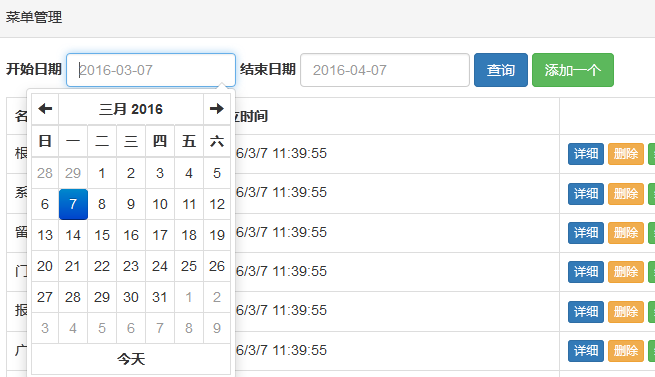
搭配使用的還有 startView,它決定「打開時預設停在這一層視圖」,常見值為 0(/decade)、1(year)、2(month)、3(day)、4(hour)。兩者一組,就能精準控制要讓使用者選到多細。
其他實務上常用的設定
autoclose: true 讓選完日期後自動關閉面板,省去多一次點擊。todayBtn: true 會在面板底部顯示「今天」按鈕,搭配 todayHighlight: true 把今天高亮。pickerPosition 決定面板彈出的方向,在頁面底部的欄位記得設成 bottom-left 或 top-left,否則面板會被視窗邊緣裁掉。
若要限制可選範圍,用 startDate 與 endDate;若要搭配起訖兩個欄位做連動(例如結束日期不能早於開始日期),則在兩邊的 onRender 或變更事件中互相設定對方的 endDate/startDate 即可。
以上就是本文的全部內容,希望對大家的學習有所幫助。
- 上一篇文章: JavaScript 字串與日期互轉、日期格式化完整實作
- 下一篇文章: JavaScript 過濾字串中的中文與空白字元:四種常用寫法