理解 JavaScript 檔案的動態加載與執行順序問題
編輯:關於JavaScript
JavaScript 檔案的動態加載一直是容易踩坑的環節。網上流傳較廣的做法如下:
function loadjs(fileurl){ var sct = document.createElement("script"); sct.src = fileurl; document.head.appendChild(sct); } 我們來測試一下結果:
<html> <head> <link rel="stylesheet" type="text/css" href="//maxcdn.bootstrapcdn.com/bootstrap/3.3.2/css/bootstrap.min.css" media="screen" /> </head> <body> <script> function loadjs(fileurl){ var sct = document.createElement("script"); sct.src = fileurl; document.head.appendChild(sct); } loadjs("https://code.jquery.com/jquery-1.12.0.js"); loadjs("https://maxcdn.bootstrapcdn.com/bootstrap/3.3.2/js/bootstrap.min.js") loadjs("https://bootboxjs.com/bootbox.js") </script> </body> </html> 載入完成後會出現下圖的錯誤:
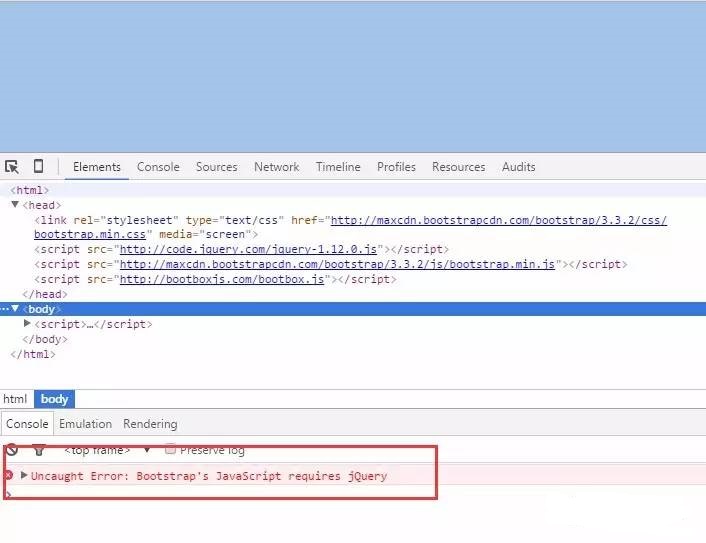
jQuery 明明放在第一個載入,為什麼還是報找不到 jQuery 物件?
因為這樣加載相當於開啟了三個執行緒,只是 jQuery 這個檔案先啟動執行緒,而它執行完的時間反而超過了後面兩個,於是後面先執行完的檔案可能找不到 jQuery 物件。
那這種方式該怎麼處理?
其實檔案的加載是有狀態可追蹤的。script 標籤有 onload 事件,可以監聽檔案是否加載完成。我們就用這個特性來達到依序加載的效果,改進後的程式碼如下:
<html> <head> <link rel="stylesheet" type="text/css" href="https://maxcdn.bootstrapcdn.com/bootstrap/3.3.2/css/bootstrap.min.css" media="screen" /> </head> <body> <script> function loadjs(fileurl, fn){ var sct = document.createElement("script"); sct.src = fileurl; if(fn){ sct.onload = fn; } document.head.appendChild(sct); } loadjs("https://code.jquery.com/jquery-1.12.0.js",function(){ loadjs("https://maxcdn.bootstrapcdn.com/bootstrap/3.3.2/js/bootstrap.min.js",function(){ loadjs("https://bootboxjs.com/bootbox.js") }) }); </script> </body> </html> 執行這段程式碼後,每個檔案都會在前一個加載完成後才開始加載,就不會出現找不到相依物件(如 jQuery)的問題了。
接著我們實作一個彈出框效果,其中用到 Bootbox.js 插件,加載程式碼如下:
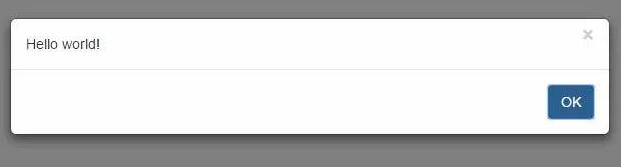
loadjs("https://code.jquery.com/jquery-1.12.0.js",function(){ loadjs("https://maxcdn.bootstrapcdn.com/bootstrap/3.3.2/js/bootstrap.min.js",function(){ loadjs("https://bootboxjs.com/bootbox.js",function(){ bootbox.alert("Hello world!", function() { Example.show("Hello world callback"); }); }) }) }); 重新整理頁面後,就會直接顯示彈出框:
動態加載往往容易在除錯上耗費大量時間,最好的辦法是先寫一個最簡單的例子理解成因。這裡的程式碼都可以進一步封裝,也能加入 CSS 檔案的加載,當作自己的外掛來使用。值得一提的是,這種「回呼串接」在檔案眾多時會形成回呼地獄,實務上也可改用 Promise 或 async/await 來讓依序加載的程式碼更清晰。