js 實現右下角滑出的提示框
編輯:關於JavaScript
很多網站會在瀏覽器右下角彈出一條新訊息提示,帶著一點向上滑出的動畫。本文示範如何用原生 JavaScript 實作這個效果。
先看效果:
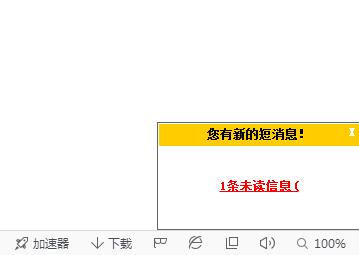
完整代碼:
<!DOCTYPE html> <html> <head> <meta charset="gb2312"> <title>網頁右下角的信息框</title> </head> <style type="text/css"> #winpop { width:200px; height:0px; position:absolute; right:0; bottom:0; border:1px solid #666; margin:0; padding:1px; overflow:hidden; display:none; } #winpop .title{ width:100%; height:22px; line-height:20px; background:#FFCC00; font-weight:bold; text-align:center; font-size:12px; } #winpop .con{ width:100%; height:90px; line-height:80px; font-weight:bold; font-size:12px; color:#FF0000; text-decoration:underline; text-align:center } #silu{ font-size:12px; color:#666; position:absolute; right:0; text-decoration:underline; line-height:22px; } .close{ position:absolute; right:4px; top:-1px; color:#FFF; cursor:pointer } </style> <script type="text/javascript"> function tips_pop(){ var MsgPop=document.getElementById("winpop"); var popH=parseInt(MsgPop.style.height);//將對象的高度轉化為數字 if(popH==0){ MsgPop.style.display="block";//顯示隱藏的窗口 show=setInterval("changeH('up')",2); } else{ hide=setInterval("changeH('down')",2); } } function changeH(str){ var MsgPop=document.getElementById("winpop"); var popH=parseInt(MsgPop.style.height); if(str=="up"){ if(popH<=100){ MsgPop.style.height=(popH+4).toString()+"px"; } else{ clearInterval(show); } } if(str=="down"){ if(popH>=4){ MsgPop.style.height=(popH-4).toString()+"px"; } else{ clearInterval(hide); MsgPop.style.display="none"; //隱藏DIV } } } window.onload=function(){ var oclose=document.getElementById("close"); var bt=document.getElementById("bt"); document.getElementById('winpop').style.height='0px'; setTimeout("tips_pop()",3000); oclose.onclick=function(){tips_pop()} bt.onclick=function(){tips_pop()} } </script> <body> <div id="silu"> <button id="bt">3秒後會在右下角自動彈出窗口,如果沒有彈出請點擊這個按鈕</button> </div> <div id="winpop"> <div class="title">您有新的短消息!<span class="close" id="close">X</span></div> <div class="con">1條未讀信息(</div> </div> </body> </html>
實現原理
1. 讓窗口貼在右下角
#winpop { width:200px; height:0px; position:absolute; right:0; bottom:0; border:1px solid #666; margin:0; padding:1px; overflow:hidden; display:none; }
絕對定位加上 right: 0 與 bottom: 0,元素自然貼齊右下角;height 從 0 開始並搭配 overflow: hidden,讓內容被裁掉,看起來就像還沒出現。
2. 顯示與隱藏
用 setInterval 每 2 毫秒呼叫一次 changeH(),每次把高度加減 4px,一路加到 100px 就停止,於是形成平滑的展開與收合動畫。要收起的時候反過來遞減,減到小於 4px 時清除計時器並把 display 設為 none。用同一個函數同時負責「開」與「關」,只是傳入不同參數,這樣的寫法比寫兩份邏輯乾淨得多。
實務上有兩點可以再優化:一是把 setInterval 的字串寫法改成直接傳函數參照,避免不必要的 eval;二是現在大陸 project 中更常用 CSS transition 搭配 class 切換來做動畫,效能與可控性都更好,不必靠計時器硬跳。