判斷是否為 IE,很多人會用 window.navigator.userAgent。但追蹤這個資訊會發現一個怪現象:同一份程式碼,在開發環境被辨識為 IE10,部署到伺服器上卻被辨識為 IE11——而 IE11 的 userAgent 裡根本沒有 MSIE 這個標記,問題就出在這裡。
改用下面的寫法即可:
function isIE() {
    // ie?
    if (!!window.ActiveXObject || "ActiveXObject" in window) return true;
    else return false;
}
為什麼舊寫法會失效
過去判斷 IE 的依據是:IE 支援 ActiveXObject,其他瀏覽器不支援。在 IE11 出現之前,這麼寫是夠用的:
function isIe() { return window.ActiveXObject ? true : false; }
但在 IE11 上它會回傳 false。實測以下程式碼:
alert(window.ActiveXObject);
alert(typeof window.ActiveXObject);
結果:
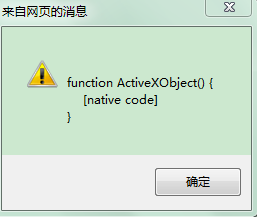
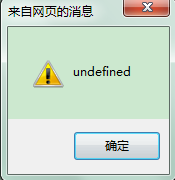
物件明明存在,typeof 卻是 undefined。微軟官方文件說明了 IE11 中 ActiveXObject 的行為差異,但並未解釋 typeof 的成因。改用 in 運算子則是可行的:
alert("ActiveXObject" in window); // IE11 下回傳 true
因此,相容 IE11 的判斷寫法是:
function isIe() { return ("ActiveXObject" in window); }
前提當然是別人的程式碼沒有覆蓋掉 ActiveXObject——一般不會有專案這麼做。
逐版本判斷
IE6:從 IE7 開始才支援 XMLHttpRequest,所以:
function isIe6() {
    return isIe() && !window.XMLHttpRequest;
}
IE7:IE8 開始才支援 document.documentMode,而 IE7 已支援 XMLHttpRequest:
function isIe7() {
    return isIe() && window.XMLHttpRequest && !document.documentMode;
}
IE8:從 IE9 起微軟開始靠攏標準。試著執行 alert(-[1,]):IE678 印出 NaN,標準瀏覽器印出 -1。利用這個差異:
function isIe8() {
    // !-[1,] 在 IE678 為 true(!NaN),在標準瀏覽器為 false(!-1)
    return isIe() && !-[1,] && document.documentMode;
}
IE9/IE10/IE11:IE8 起支援 JSON 內作物件,IE10 起支援 JS 嚴格模式;IE9+ 下 alert(!-[1,]) 為 false,且支援 addEventListener,但 IE11 已不再提供 IE 專屬的 attachEvent。依這些特徵即可逐版本區分。
其他瀏覽器的判斷
// 檢測函數
var check = function (r) { return r.test(navigator.userAgent.toLowerCase()); };

var statics = {
    /** 是否為 webkit 內核 */
    isWebkit: function () { return check(/webkit/); },
    /** 是否為火狐 */
    isFirefox: function () { return check(/firefox/); },
    /** 是否為 Chrome */
    isChrome: function () { return !statics.isOpera() && check(/chrome/); },
    /** 是否為 Opera */
    isOpera: function () { return check(/opr/); },
    /** 是否為 Safari(Chrome 的 UA 中也含 safari,需先排除) */
    isSafari: function () {
        return !statics.isChrome() && !statics.isOpera() && check(/safari/);
    }
};
一次取出瀏覽器名稱與版本
<!DOCTYPE html>
<html>
<head>
<meta charset="utf-8">
<title></title>
<script type="text/javascript">
var userAgent = navigator.userAgent,
    rMsie = /(msie\s|trident.*rv:)([\w.]+)/,
    rFirefox = /(firefox)\/([\w.]+)/,
    rOpera = /(opera).+version\/([\w.]+)/,
    rChrome = /(chrome)\/([\w.]+)/,
    rSafari = /version\/([\w.]+).*(safari)/;

var browser, version;

function uaMatch(ua) {
    var match = rMsie.exec(ua);
    if (match != null) { return { browser: "IE", version: match[2] || "0" }; }
    var match = rFirefox.exec(ua);
    if (match != null) { return { browser: match[1] || "", version: match[2] || "0" }; }
    match = rOpera.exec(ua);
    if (match != null) { return { browser: match[1] || "", version: match[2] || "0" }; }
    match = rChrome.exec(ua);
    if (match != null) { return { browser: match[1] || "", version: match[2] || "0" }; }
    match = rSafari.exec(ua);
    if (match != null) { return { browser: match[2] || "", version: match[1] || "0" }; }
    return { browser: "", version: "0" };
}

var browserMatch = uaMatch(userAgent.toLowerCase());
if (browserMatch.browser) {
    browser = browserMatch.browser;
    version = browserMatch.version;
}
document.write(browser + version);
</script>
</head>
<body></body>
</html>
原理就是先取出 navigator.userAgent,再用對應的正則去比對。IE11 與舊版本差別不小:舊版含 msie,IE11 則改為 trident 後面接版本號,這一點在寫正則時要特別注意。

最後提醒一句:userAgent 判斷本質上是不可靠的,它依賴的是瀏覽器自報的識別字串。若只是要區分功能是否存在,優先檢查該功能本身(例如 'addEventListener' in window)會比判斷版本號穩健得多。
- 上一篇文章: 深入 JavaScript 物件導向:繼承的三種實作方式
- 下一篇文章: JS 判斷是否為 IE 瀏覽器:為什麼 IE11 讓舊寫法失效