純 JavaScript 計算器:三種實作思路對照
編輯:關於JavaScript
計算器是前端練習的經典題目,寫法卻可以差很多。本文提供三個純 JavaScript 版本,難度與完整度依序遞進,從最直白的四則運算,到具備鍵盤區、退格與小數點處理的完整面板。這類元件在裝修預算、貸款試算等場景中很常被需要。
完成後的效果如下:
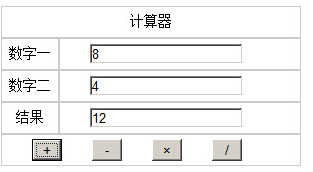

方法一:兩個輸入框+四個按鈕
最樸素的思路:兩個 input 放運算元,四個按鈕各自呼叫一個函式,用 parseInt 轉型後計算並寫回結果欄。
 <!DOCTYPE html PUBLIC "-//W3C//DTD XHTML 1.0 Transitional//EN" "https://www.w3.org/TR/xhtml1/DTD/xhtml1-transitional.dtd">
<html xmlns="https://www.w3.org/1999/xhtml">
<head>
<meta http-equiv="Content-Type" content="text/html; charset=utf-8" />
<title>計算器</title>
<style type="text/css">
*{margin:0px; padding:0px}
table{width:300px; margin:100px auto}
td{height:30px; text-align:center; line-height:30px; border:1px solid #ccc; font-size:14px}
input{float:left; margin-left:30px; display:inline}
#jia,#jian,#cheng,#chu{width:30px}
</style>
<script type="text/javascript">
// 加法
function jia(){
    var x = document.getElementById("num1").value;
    var y = document.getElementById("num2").value;
    var z = parseInt(x) + parseInt(y);
    document.getElementById("result").value = z;
}
// 減法
function jian(){
    var x = document.getElementById("num1").value;
    var y = document.getElementById("num2").value;
    document.getElementById("result").value = parseInt(x) - parseInt(y);
}
// 乘法
function cheng(){
    var x = document.getElementById("num1").value;
    var y = document.getElementById("num2").value;
    document.getElementById("result").value = parseInt(x) * parseInt(y);
}
// 除法
function chu(){
    var x = document.getElementById("num1").value;
    var y = document.getElementById("num2").value;
    document.getElementById("result").value = parseInt(x) / parseInt(y);
}
</script>
</head>
<body>
<table cellpadding="0" cellspacing="0">
 <tr><td colspan="2">計算器</td></tr>
 <tr>
  <td>數字一</td>
  <td><input type="text" id="num1" name="num1"></td>
 </tr>
 <tr>
  <td>數字二</td>
  <td><input type="text" id="num2" name="num2"></td>
 </tr>
 <tr>
  <td>結果</td>
  <td><input type="text" id="result" name="result"></td>
 </tr>
 <tr>
  <td colspan="2">
   <input type="button" id="jia" value="+" onclick="jia()">
   <input type="button" id="jian" value="-" onclick="jian()">
   <input type="button" id="cheng" value="×" onclick="cheng()">
   <input type="button" id="chu" value="/" onclick="chu()">
  </td>
 </tr>
</table>
</body>
</html>
缺點很明顯:只能算兩個整數,小數與連續運算都無法處理。但作為理解表單取值與事件綁定的起點,足夠了。
方法二:完整按鍵面板
第二版做成真正的計算機:只有一個顯示框,用三個全域變數記錄狀態——result 存第一個運算元、operator 存運算子、isPressEqualsKey 判斷是否剛按過等號(若是則清空重來)。
 var result;                     // 點擊運算符之前輸入框中的數值
var operator;                   // 保存運算符
var isPressEqualsKey = false;    // 記錄是否按下"="鍵

// 數字鍵/小數點
function connectionDigital(control) {
    var txt = document.getElementById('txtScream');
    if (isPressEqualsKey) { txt.value = ""; isPressEqualsKey = false; }
    // 已有小數點則不再接受第二個
    if (txt.value.indexOf('.') > -1 && control.value == '.') return false;
    txt.value += control.value;
}

// 退格
function backspace() {
    var txt = document.getElementById('txtScream');
    txt.value = txt.value.substring(0, txt.value.length - 1);
}

// CE:清空
function clearAll() {
    document.getElementById('txtScream').value = "";
    result = ""; operator = "";
}

// + - * /
function calculation(control) {
    operator = control.value;
    var txt = document.getElementById('txtScream');
    if (txt.value == "") return false;   // 未輸入數字不可按運算符
    result = txt.value;                  // 暫存第一個運算元
    txt.value = "";                      // 清空等待輸入第二個
}

// 計算結果
function getResult() {
    var opValue;
    var sourseValue = parseFloat(result);
    var txt = document.getElementById('txtScream');
    if (operator == '*') opValue = sourseValue * parseFloat(txt.value);
    else if (operator == '/') opValue = sourseValue / parseFloat(txt.value);
    else if (operator == '+') opValue = sourseValue + parseFloat(txt.value);
    else if (operator == '-') opValue = sourseValue - parseFloat(txt.value);
    txt.value = opValue;
    isPressEqualsKey = true;
    result = ""; opValue = "";
}
</script>
視覺部分用一個 4×5 的 table 排出手機計算機的樣子:
 <table id="tbCalculator" width="200" border="1" align="center" cellpadding="0" cellspacing="0" bordercolor="#0066FF">
 <tr>
  <td height="30" colspan="4" align="center">
   <input type="text" id="txtScream" style="width:180px; border-style:none; text-align:right;" readonly="readonly" />
  </td>
 </tr>
 <tr>
  <td colspan="2"><input type="button" value="C CE" onclick="clearAll();" /></td>
  <td colspan="2"><input type="button" value="Backspace" onclick="backspace();" /></td>
 </tr>
 <tr>
  <td><input type="button" value="7" onclick="connectionDigital(this);" /></td>
  <td><input type="button" value="8" onclick="connectionDigital(this);" /></td>
  <td><input type="button" value="9" onclick="connectionDigital(this);" /></td>
  <td><input type="button" value="/" onclick="calculation(this);" /></td>
 </tr>
 <tr>
  <td><input type="button" value="4" onclick="connectionDigital(this);" /></td>
  <td><input type="button" value="5" onclick="connectionDigital(this);" /></td>
  <td><input type="button" value="6" onclick="connectionDigital(this);" /></td>
  <td><input type="button" value="*" onclick="calculation(this);" /></td>
 </tr>
 <tr>
  <td><input type="button" value="1" onclick="connectionDigital(this);" /></td>
  <td><input type="button" value="2" onclick="connectionDigital(this);" /></td>
  <td><input type="button" value="3" onclick="connectionDigital(this);" /></td>
  <td><input type="button" value="-" onclick="calculation(this);" /></td>
 </tr>
 <tr>
  <td><input type="button" value="0" onclick="connectionDigital(this);" /></td>
  <td><input type="button" value="." onclick="connectionDigital(this);" /></td>
  <td><input type="button" value="=" onclick="getResult();" /></td>
  <td><input type="button" value="+" onclick="calculation(this);" /></td>
 </tr>
</table>
方法三:switch 集中式派發
第三版把運算集中到一個 getResult(type),用 switch 決定要做什麼運算,並在計算前先做輸入檢查,是最容易擴充的結構:
 <script type="text/javascript">
function getResult(type){
    if (!checkData()) { return; }
    var no1 = parseInt(document.jisuanqi.no1.value);
    var no2 = parseInt(document.jisuanqi.no2.value);
    var result;
    switch(type){
        case '+': result = no1 + no2; break;
        case '-': result = no1 - no2; break;
        case '*': result = no1 * no2; break;
        case '/': result = no1 / no2; break;
        case '%': result = no1 % no2; break;
    }
    document.jisuanqi.result.value = result;
}

function checkData(){
    if (document.jisuanqi.no1.value == "") { alert("第一個數字不能為空!請重新輸入"); return false; }
    if (document.jisuanqi.no2.value == "") { alert("第二個數字不能為空!請重新輸入"); return false; }
    if (isNaN(document.jisuanqi.no1.value)) { alert("第一個輸入不是數字!請重新輸入"); return false; }
    if (isNaN(document.jisuanqi.no2.value)) { alert("第二個輸入不是數字!請重新輸入"); return false; }
    if (type === '/' && no2 === 0) { alert("除數不可為零"); return false; }
    return true;
}
</script>
 <form name="jisuanqi">
 no1:<input name="no1" /><br>
 no2:<input name="no2" /><br>
 result:<input name="result" readonly /><br>
 <input type="button" value="+" onclick="getResult('+')" />
 <input type="button" value="-" onclick="getResult('-')" />
 <input type="button" value="*" onclick="getResult('*')" />
 <input type="button" value="/" onclick="getResult('/')" />
 <input type="button" value="%" onclick="getResult('%')" />
</form>
三個版本的取捨
- 方法一适合教學與極簡場景,但只能處理兩個整數。
- 方法二最接近真實計算機的操作體驗,代價是要自己管理輸入狀態。
- 方法三結構最清爽,新增運算子只要多一個 case,也最容易加上除零與型別檢查。
若要在正式專案使用,建議以方法三為骨架,再補上兩點:改用 parseFloat 支援小數,以及避免使用 eval 拼接運算式(有注入風險),改成自己實作的運算堆疊會安全得多。希望這三種思路對你的 JavaScript 開發有所幫助。
- 上一篇文章: JavaScript 全國省市三級連動下拉選單實作
- 下一篇文章: 仿 QQ 面板的折疊選單:用 JavaScript 做出緩衝動畫