React Native Modal 元件屬性與用法詳解
編輯:JavaScript技巧
Modal 元件可以用來覆蓋包含 React Native 根視圖的原生視圖(如 UIViewController、Activity),最常見的用途就是製作遮罩效果。
屬性
Modal 提供的屬性如下:
animationType(動畫類型) PropTypes.oneOf(['none', 'slide', 'fade']
- none:無動畫
- slide:從底部滑入
- fade:淡入
onRequestClose(銷毀時會呼叫此函式)
在 Android 平台必須實作這個函式。
onShow(模態顯示時呼叫)
transparent(透明度)bool
設為 true 時,會以透明背景渲染模態。
visible(可見性)bool
onOrientationChange(方向改變時呼叫)
在模態方向變化時觸發,回傳的方向值只有 "portrait" 或 "landscape"。初次渲染時也會被呼叫,但不會考慮當前方向。
supportedOrientations(允許旋轉到的指定取向) ['portrait', 'portrait-upside-down', 'landscape', 'landscape-left', 'landscape-right']
在 iOS 上,模態仍會受到 info.plist 中 UISupportedInterfaceOrientations 欄位的限制。
基本用法
Modal 的使用相當簡單,例如:
<Modal animationType='slide' // 從底部滑入 transparent={false} // 不透明 visible={this.state.isModal} // 根據isModal決定是否顯示 onRequestClose={() => {this.onRequestClose()}} // android必須實現 >
完整範例:
import React, { Component} from 'react'; import { AppRegistry, View, Modal, TouchableOpacity, Text } from 'react-native'; export default class ModalView extends Component { constructor(props) { super(props); this.state = { modalVisible: false, } } setModalVisible = (visible)=> { this.setState({ modalVisible: visible }) }; render(){ return( <View style={{flex: 1, justifyContent: 'center', alignItems: 'center', backgroundColor: '#ffaaff'}}> <Modal animationType={'none'} transparent={true} visible={this.state.modalVisible} onrequestclose={() => {alert("Modal has been closed.")}} onShow={() => {alert("Modal has been open.")}} supportedOrientations={['portrait', 'portrait-upside-down', 'landscape', 'landscape-left', 'landscape-right']} onOrientationChange={() => {alert("Modal has been OrientationChange.")}}> <View style={{flex:1, marginTop: 22, backgroundColor: '#aaaaaa', justifyContent: 'center', alignItems: 'center'}}> <View> <Text>Hello World!</Text> <TouchableOpacity onPress={() => { this.setModalVisible(false) }}> <Text>隱藏 Modal</Text> </TouchableOpacity> </View> </View> </Modal> <TouchableOpacity onPress={() => { this.setModalVisible(true) }}> <Text>顯示 Modal</Text> </TouchableOpacity> </View> ) } } AppRegistry.registerComponent('ModalView', ()=>ModalView);
執行效果:
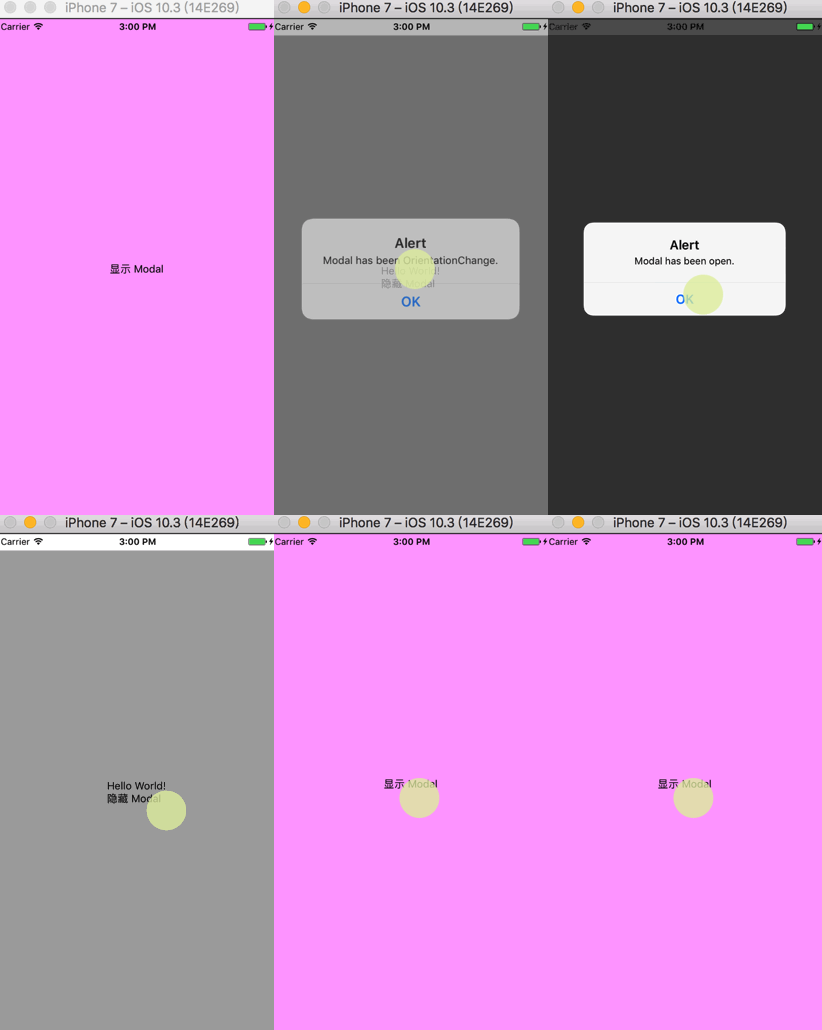
如果去看 Modal 的原始碼會發現,它其實就是靠絕對定位實作的。所以當內建的 Modal 無法滿足需求時,我們完全可以自己用絕對定位封裝一個替代品。
以上就是本次整理,希望對你的學習有幫助。
- 上一篇文章: React Native 仿美團下拉篩選選單實作分享
- 下一篇文章: 使用 JavaScript 製作簡易計算器