微信小程序 rich-text 元件用法完整解析
編輯:JavaScript技巧
微信小程序 rich-text 元件詳解
當我們需要在小程序中渲染一段 HTML 字串時,rich-text 就是官方提供的解決方案。以下整理它的屬性規則與使用方式。
屬性與限制
- 屬性:
nodes,類型為 Array 或 String,代表節點列表或 HTML String。 - 全域支援
class與style屬性,但不支援id。 - 節點類型
type = node:name為標籤名(String,必填),支援部分受信任的 HTML 節點;attrs為屬性(Object,可選),支援部分受信任的屬性並遵循 Pascal 命名法;children為子節點列表(Array,可選),結構與 nodes 一致。 - 節點類型
type = text:text為文字內容(String,必填),支援 entities。 - 官方不建議
nodes使用 String 類型,效能會有所下降。 - rich-text 元件內部的所有節點事件都會被屏蔽。
attrs不支援id,但支援class。name屬性大小寫不敏感。- 若使用了不受信任的 HTML 節點,該節點及其所有子節點都會被移除。
img標籤僅支援網路圖片。
基本用法
<rich-text nodes="{{nodes}}" /> <rich-text nodes="{{nodes1}}" /> <rich-text nodes="{{nodes2}}" />
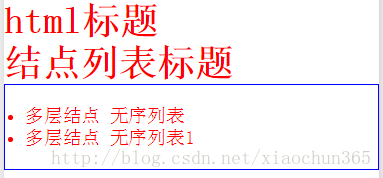
資料設定
下面示範三種不同的傳入方式:直接給 HTML 字串、給單層節點物件、以及給多層嵌套的節點結構。
this.setData({ nodes: "<h1 style='color:red;'>html標題</h1>", nodes1: [{ name: "h1", attrs: { style: "color:red", class: "red" }, children: [{ type: "text", text: '結點列表標題' }] }], nodes2: [{ name: "ul", attrs: { style: "padding:20px;border:1px solid blue;", class: "red" }, children: [ { name: "li", attrs: { style: "color:red", class: "red" }, children: [{ type: "text", text: '多層結點 無序列表' }], }, { name: "li", attrs: { style: "color:red", class: "red" }, children: [{ type: "text", text: '多層結點 無序列表1' }], }] }] })
選擇建議
如果資料來源本身就是 HTML 字串(例如後端回傳的富文本內容),用 String 形式最省事;若資料是自己在程式中組出來的,建議直接用 Array 節點結構,效能表現更好,也更便於動態增減節點。要注意的是,因為元件內事件被屏蔽,若需要點擊互動,得在外層另外想辦法處理。
以上就是 rich-text 的介紹,有疑問歡迎留言或到社群交流討論。
- 上一篇文章: 純 JavaScript 分頁功能實作與後端請求串接教學
- 下一篇文章: 用 CSS media query 打造響應式版面配置