用 jQuery 做一個可滑動的開關按鈕
編輯:JQuery入門技巧
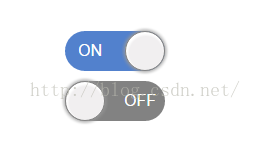
滑動式開關在設定頁、篩選列裡隨處可見。它比核取方塊更能表達「開啟/關閉」的二元狀態,製作起來其實不難:一個底層軌道、一個滑塊,再用 animate 移動滑塊並切換 class 換色即可。
先看成品:
完整程式碼
<!DOCTYPE html>
<html lang="en">
<head>
<meta charset="UTF-8">
<title>jquery做的滑動按鈕開關</title>
<link rel="stylesheet" type="text/css" href="bootstrap/bootstrap.min.css"/>
</head>
<style>
.switch{ width: 100px; margin: 100px 0px 0 100px; }
.btn_fath{ margin-top: 10px; position: relative; border-radius: 20px; }
.btn1{ float: left; }
.btn2{ float: right; }
.btnSwitch{
    height: 40px; width: 50px; border: none; color: #fff;
    line-height: 40px; font-size: 16px; text-align: center; z-index: 1;
}
.move{
    z-index: 100; width: 40px; border-radius: 20px; height: 40px;
    position: absolute; cursor: pointer;
    border: 1px solid #828282; background-color: #f1eff0;
    box-shadow: 1px 2px 2px 1px #fff inset, 0 0 5px 1px #999;
}
.on .move{ left: 60px; }
.on.btn_fath{ background-color: #5281cd; }
.off.btn_fath{ background-color: #828282; }
</style>
<body>
<div class="switch">
    <div class="btn_fath clearfix on" onclick="toogle(this)">
        <div class="move" data-state="on"></div>
        <div class="btnSwitch btn1">ON</div>
        <div class="btnSwitch btn2">OFF</div>
    </div>
    <div class="btn_fath clearfix off" onclick="toogle(this)">
        <div class="move" data-state="off"></div>
        <div class="btnSwitch btn1">ON</div>
        <div class="btnSwitch btn2">OFF</div>
    </div>
</div>
<script type="text/javascript" src="jquery/jquery.min.js"></script>
<script type="text/javascript">
function toogle(th){
    var ele = $(th).children(".move");
    if (ele.attr("data-state") == "on") {
        ele.animate({ left: "0" }, 300, function(){
            ele.attr("data-state", "off");
            alert("關!");
        });
        $(th).removeClass("on").addClass("off");
    } else if (ele.attr("data-state") == "off") {
        ele.animate({ left: '60px' }, 300, function(){
            $(this).attr("data-state", "on");
            alert("開!");
        });
        $(th).removeClass("off").addClass("on");
    }
}
</script>
</body>
</html>
幾個實作要點
狀態記錄在 data 屬性上。用 data-state 標記滑塊目前在哪一端,點擊時只需判斷這個值再決定要往哪邊滑,不必另外維護變數。實際專案中建議改用 $(ele).data('state') 讀寫,比 attr() 更合適。
動畫時間 300 毫秒。這個速度看起來接近等速。若想要像 CSS3 ease 那樣先快後慢的手感,可以搭配 jQuery Easing 插件,或在 animate() 的第三個參數指定 easing 名稱。
animate 的第三個參數是回呼。也就是動畫播完之後才執行的函式。把狀態更新放在回呼裡,可以確保視覺動畫跑完才切換邏輯狀態,避免中途再點擊時出現狀態與畫面不一致。
軌道與滑塊靠 class 換色。.on 與 .off 分別控制背景色,滑塊位置則由 .on .move { left: 60px } 決定。若日後要調整尺寸,改這幾個數值即可。
- 上一篇文章: jQuery 學習筆記(上):從選擇器到鏈式編程的入門路徑
- 下一篇文章: 用 jQuery 做一個假的載入動畫,改善等待體驗