用 Bootstrap 折疊元件做簡易樹狀目錄
編輯:JQuery入門技巧
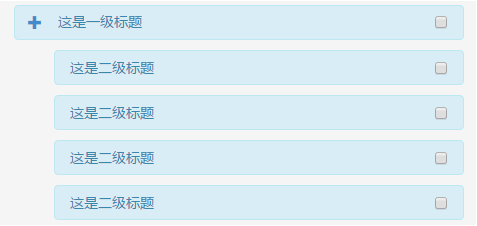
借用 Bootstrap 的 collapse 元件,可以很快做出一個兩層的樹狀結構,拿來呈現簡單的目錄或權限選單剛好合用。右側的核取方塊可以再改造成其他控制項,例如滑桿。
先載入樣式:
<meta charset="utf-8" /> <meta name="viewport" content="width=device-width, initial-scale=1.0"> <title>@ViewBag.Title - 騰實信績效管理系統</title> <link rel="stylesheet" type="text/css" href="~/Content/bootstrap.min.css" />
結構如下:
<div class=" alert alert-info" style=" width:450px;height:35px;padding-top:0px;padding-left:0;margin-bottom:0;margin-top:10px"> <button type="button" class=" btn btn-link" data-toggle="collapse" data-target="#demo1"><span class=" glyphicon glyphicon-plus"></span></button> <span>這是一級標題</span> <input type="checkbox" name=" pageid" value=""style=" float:right; margin-top:10px"> </div> <div id="demo1" class="collapse in" style=" margin-left:40px;margin-bottom:10px;margin-top:0px"> <div class=" alert alert-info" style=" margin-top:10px; width:410px; height:35px; padding-top:7px; padding-left:15px; margin-bottom:0"> <span>這是二級標題</span> <input type="checkbox" name=" pageid" value="" style=" float:right;"> </div> <div class=" alert alert-info" style=" margin-top:10px; width:410px; height:35px; padding-top:7px; padding-left:15px; margin-bottom:0"> <span>這是二級標題</span> <input type="checkbox" name=" pageid" value="" style=" float:right;"> </div> <div class=" alert alert-info" style=" margin-top:10px; width:410px; height:35px; padding-top:7px; padding-left:15px; margin-bottom:0"> <span>這是二級標題</span> <input type="checkbox" name=" pageid" value="" style=" float:right;"> </div> <div class=" alert alert-info" style=" margin-top:10px; width:410px; height:35px; padding-top:7px; padding-left:15px; margin-bottom:0"> <span>這是二級標題</span> <input type="checkbox" name=" pageid" value="" style=" float:right;"> </div> </div>
原理全在兩個 data 屬性上:data-toggle="collapse" 指定觸發行為,data-target="#demo1" 指向要收合的容器;容器上的 collapse in 類別中,in 代表目前展開,拿掉它就會收合。二層的縮排則靠 margin-left 拉開層級感。
若要讓 plus 圖示在展開時變成 minus,監聽 collapse 的 show.bs.collapse 與 hide.bs.collapse 事件切換 glyphicon 類別即可。另外提醒,這裡每個核取方塊都用了相同的 name,若目的是多選,正式環境仍應給每個項目唯一的 value,後端才分辨得出使用者勾了哪些。
- 上一篇文章: 用 jQuery 打造仿模態彈出視窗
- 下一篇文章: Bootstrap 3 打造多層級下拉選單