本文分享一個用 jQuery 模擬 select 下拉選擇效果的實例,適合需要高度自定義樣式的場景。
說實話,HTML 裡能任由 CSS 隨心所欲打扮的元素並不多,原生 select 就是其中一個「不聽話」傢伙。可偏偏設計師和客戶就想要那種各瀏覽器都一致的漂亮效果,這可讓前端工程師們頗為頭疼。與其被原生 select 的樣式限制束縛,不如動手模擬一個出來。
模擬的好處很直白:樣式可以隨心定製,做出五花八門的效果,而且各瀏覽器表現統一,足以滿足客戶各種苛刻要求。缺點也同樣存在——當網絡極慢或客戶端禁用腳本時,模擬的組件可能會失效(雖然禁用腳本的情況少見,一般只出現在服務器版浏覽器上)。
其實這種做法早已廣泛應用,翻開稍新一點的網站都能找到它的身影,淘寶、拍拍都採用過模擬 select。下面分別是淘寶和拍拍的截圖。
淘寶模擬 select:

拍拍模擬 select:

本例的最終效果:
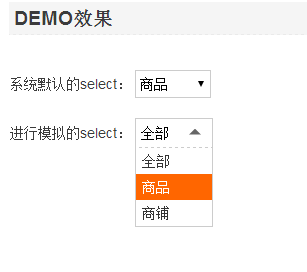
實現思路(僅兩步)
1. 當鼠標移入並點擊目標元素時,彈出一個浮層,層裡裝著各個待選項。
2. 點擊浮層裡的某個選項時,把它的文本回填到目標元素,同時把對應的參數值寫進一個隱藏域用於後續取值。
於是就有了下面的 HTML、CSS 和 JS:
HTML
<span class="selectType"> <a title="" href="#" class="ipt" id="selectTypeText">全部</a> <span id="selectTypeMenu"> <a rel="0" title="" href="#">全部</a> <a rel="1" title="" href="#">商品</a> <a rel="2" title="" href="#">商鋪</a> </span> <input type="hidden" name="" class="ipt" value="" id="selectTypeRel"> <em class="searchArrow hh abs">下拉選擇</em> </span>
CSS
.sysSelect{width:76px; height:28px; line-height:28px; border:1px solid #CCC; font-size:14px;} .sysSelect option{height:28px; line-height:28px;} .selectType{position:relative; width:78px; height:30px; line-height:30px; font-size:14px;} .selectType .ipt{width:76px; height:28px; line-height:28px; border:1px solid #CCC; display:inline-block; text-decoration:none; color:#000; text-indent:5px; outline:none;} .selectType span{position:absolute; width:76px; background-color:#fff; border:1px solid #CCC; border-top-style:dashed; left:0px; top:22px; text-indent:6px; line-height:26px; display:none;} .selectType span a{color:#333; display:block; text-decoration:none;} .selectType span a:hover{background-color:#f60; color:#fff;} .selectType .searchArrow{border-top:6px solid #666; border-left:6px solid #FFF; border-right:6px solid #FFF; position:absolute; width:0; height:0; top:6px; right:12px; cursor:pointer; -webkit-transition:-webkit-transform 0.2s ease-in; -moz-transition:-moz-transform 0.2s ease-in; -o-transition:-o-transform 0.2s ease-in; transition:transform 0.2s ease-in; overflow:hidden; text-indent:-2000px;} .selectType .searchArrowRote{-moz-transform:rotate(180deg); -moz-transform-origin:50% 30%; -webkit-transform:rotate(180deg); -webkit-transform-origin:50% 30%; -o-transform:rotate(180deg); -o-transform-origin:50% 30%; transform:rotate(180deg);transform-origin:50% 30%; filter: progid:DXImageTransform.Microsoft.BasicImage(rotation=2); top:-9px/9;}
JS
$("#selectTypeText").click(function () { $(this).next("span").slideDown(200); $(".searchArrow").addClass("searchArrowRote"); }); $("#selectTypeText").blur(function () { $(this).next("span").slideUp(200); $(".searchArrow").removeClass("searchArrowRote"); }); $("#selectTypeMenu>a").click(function () { $("#selectTypeText").text($(this).text()); $("#selectTypeRel").attr("value", $(this).attr("rel")); $(this).parent().slideUp(200); $(".searchArrow").removeClass("searchArrowRote"); return false; });
是不是沒想到這麼簡單?幾行代碼一看就懂。如果還有疑惑,直接看 DEMO 運行一遍就明白了。
完整 demo 源碼可點擊本站下載獲取。
更多 jQuery 相關內容,感興趣的讀者可以查看本站專題:《jQuery 窗口操作技巧總結》、《jQuery 拖拽特效與技巧總結》、《jQuery 常用插件及用法總結》、《jquery 中 Ajax 用法總結》、《jQuery 表格(table)操作技巧匯總》、《jQuery 擴展技巧總結》、《jQuery 常見經典特效匯總》、《jQuery 動畫與特效用法總結》及《jquery 選擇器用法總結》。
希望本文所述對大家 jQuery 程序設計有所幫助。