用 jQuery progressbar 搭配 Ajax 實現後台進度即時更新
編輯:JQuery入門技巧
本文以一個完整範例,示範如何使用 jQuery EasyUI 的 progressbar 元件,透過 Ajax 向後端即時取得進度值,並在頁面上呈現動態進度條效果。範例的設計思路是:後端把進度值存放在 Cookie 中,每次前端請求時讓進度值增加 2,以此模擬進度的即時推進。
前台 index.jsp
<%@ page language="java" import="java.util.*" pageEncoding="UTF-8"%>
<% String path = request.getContextPath();
   String basePath = request.getScheme()+"://"+request.getServerName()+":"+request.getServerPort()+path+"/"; %>
<!DOCTYPE html>
<html>
<head>
<base href="<%=basePath%>">
<title>My JSP 'index.jsp' starting page</title>
<link rel="stylesheet" type="text/css" href="js/themes/default/easyui.css">
<link rel="stylesheet" type="text/css" href="js/themes/icon.css">
<link rel="stylesheet" type="text/css" href="js/demo/demo.css">
<script type="text/javascript" src="js/jquery.min.js"></script>
<script type="text/javascript" src="js/jquery.easyui.min.js"></script>
<script type='text/javascript'>
var timerId;
$(function(){
    // 每隔 0.5 秒自動呼叫一次,實現進度條的即時更新
    timerId = window.setInterval(getForm, 500);
});
function getForm(){
    // 使用 jQuery 從後台取得 JSON 格式資料
    $.ajax({
        type: "post",
        url: "getProgressValueByJson",  // 請求位址
        timeout: 30000,                 // 逾時時間:30 秒
        dataType: "json",               // 回傳資料格式
        success: function(data){
            if(data.progressValue >= 100){
                window.clearInterval(timerId);
            }
            $('#p').progressbar('setValue', data.progressValue);
        },
        error: function(){
            window.clearInterval(timerId);
            alert("請求出錯");
        }
    });
}
</script>
</head>
<body>
<div style="margin:100px 0;"></div>
<div id="p" class="easyui-progressbar" style="width: 400px;"></div>
</body>
</html>
struts.xml 設定
<?xml version="1.0" encoding="UTF-8" ?>
<!DOCTYPE struts PUBLIC "-//Apache Software Foundation//DTD Struts Configuration 2.0//EN" "https://struts.apache.org/dtds/struts-2.0.dtd">
<struts>
  <constant name="struts.devMode" value="true" />
  <package name="front" extends="struts-default" namespace="/">
    <action name="getProgressValueByJson" class="edu.njupt.zhb.test.TestAction" method="getProgressValueByJson">
      <result name="success"></result>
    </action>
    <action name="TestAction" class="edu.njupt.zhb.test.TestAction">
      <result type="httpheader"></result>
    </action>
  </package>
</struts>
後台 Java 程式碼
package edu.njupt.zhb.test;

import java.io.IOException;
import java.io.PrintWriter;
import javax.servlet.http.Cookie;
import javax.servlet.http.HttpServletRequest;
import javax.servlet.http.HttpServletResponse;
import org.apache.struts2.ServletActionContext;
import com.opensymphony.xwork2.ActionSupport;

/*
 * @author: ZhengHaibo
 * web: https://blog.csdn.net/nuptboyzhb
 * mail: zhb931706659@126.com
 */
public class TestAction extends ActionSupport {
    private static final long serialVersionUID = -8697049781798812644L;

    /** 透過 Ajax 取得 json 格式的 ProgressBar 值 */
    public void getProgressValueByJson(){
        String progressValueString = getCookie(getRequest(), "progressValue");
        int progressValue = Integer.parseInt(progressValueString);
        if(progressValue > 100){
            progressValue = 0;
        }
        System.out.println(" getCookie:---progressValue=" + progressValue);
        writeJsonString("{\"progressValue\":\"" + progressValue + "\"}");
        progressValue += 2;
        setCookie(getResponse(), "progressValue", progressValue + "", 365*24*60*60);
    }

    public HttpServletRequest getRequest(){
        return ServletActionContext.getRequest();
    }

    protected HttpServletResponse getResponse(){
        return ServletActionContext.getResponse();
    }

    protected PrintWriter getWriter() throws IOException{
        return this.getResponse().getWriter();
    }

    protected void writeJsonString(String json){
        try {
            getResponse().setContentType("text/html;charset=UTF-8");
            this.getWriter().write(json);
        } catch (IOException e) {
            e.printStackTrace();
        }
    }

    public static String getCookie(HttpServletRequest request, String name){
        String value = null;
        try {
            for (Cookie c : request.getCookies()) {
                if (c.getName().equals(name)) {
                    value = c.getValue();
                }
            }
        } catch (Exception e) {
            e.printStackTrace();
        }
        return value;
    }

    public static void setCookie(HttpServletResponse response, String name, String value, int period){
        try {
            Cookie div = new Cookie(name, value);
            div.setMaxAge(period);
            response.addCookie(div);
        } catch (Exception e) {
            e.printStackTrace();
        }
    }
}
執行結果
將專案部署到 Tomcat 後,在瀏覽器中輸入網址,即可看到進度條隨請求而不斷推進的效果。
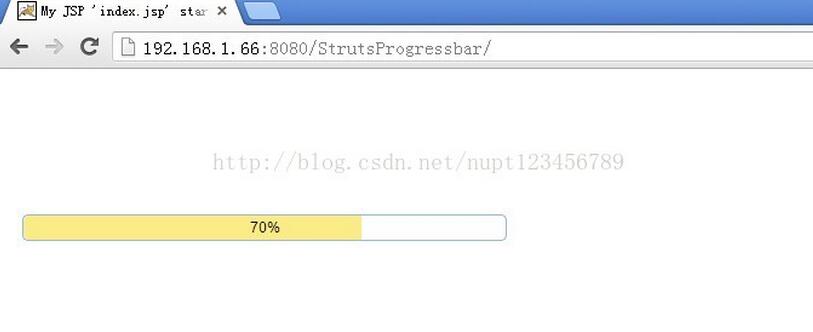
以上即為 jQuery progressbar 搭配 Ajax 實現後台進度即時更新的完整範例,希望對大家的學習有所幫助。
- 上一篇文章: 用 Ajax 實現 form 表單無刷新提交的實作教學
- 下一篇文章: 最基礎的 jQuery 註冊表單驗證寫法(純提交驗證)