多種解法對付 360 瀏覽器亂填帳號密碼的困擾
編輯:JQuery特效代碼
做專案時遇到一個相當惱人的狀況:登入頁輸入帳號密碼並勾選「記住密碼」之後,內容頁裡的 <input type="text" id="userName" /> 與 <input type="password" id="password" /> 竟會被自動填入登入頁的帳號密碼。而內容頁這兩個欄位的用途,是要建立一組全新的子帳號——這下問題就大了。
在 Firefox、IE8 以上這些較正規的瀏覽器中不會發生,問題集中在 360。以下是我試過的四條路,前三條都失敗了。
嘗試一:關掉瀏覽器的自動填密碼
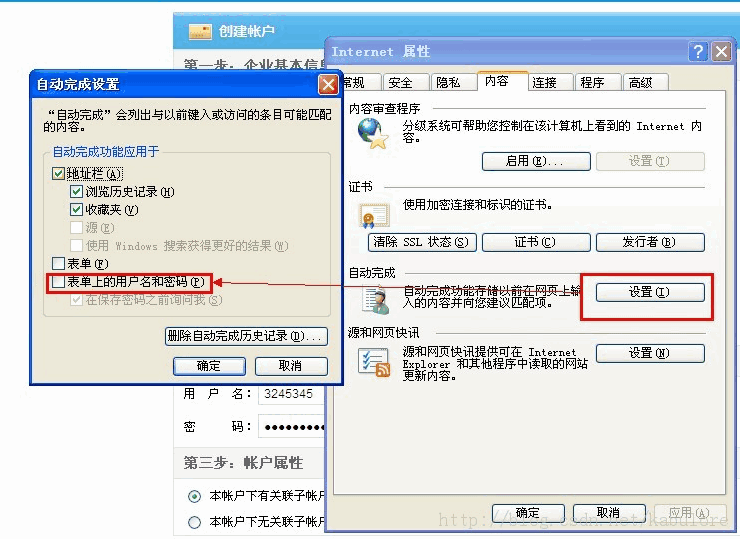
對 360 完全沒反應。何況就算有效,我們也不能要求所有使用者去改瀏覽器設定。
嘗試二:加上 autocomplete="off"
一樣被 360 免疫。
嘗試三:用 JS 動態改寫 input 的 type
<input type="text" id="password" onfocus="this.type='password'" />
這回 360 直接把密碼明文顯示出來了,代表 onfocus 根本沒執行。查證後發現 jQuery 拋出 uncaught exception: type property can't be changed——IE 不允許修改 input 的 type 屬性。此路不通。
嘗試四:既然不能改,那就藏起來
硬改不行,只好用障眼法:準備兩個外觀完全相同的欄位,一個是「假的」用來接收使用者輸入,一個是「真的」負責提交。點擊假欄位時把它隱藏,讓真欄位浮上來接手。
$(function(){
 $("#PWD").focus(function(){
  $(this).hide();
  $("#password").val("").show().css("backgroundColor","#fff").focus();
 });
 $("#password").blur(function(){
  $(this).show().css("backgroundColor","#fff");
  $("#PWD").hide();
 });
 $("#UN").focus(function(){
  $(this).hide();
  $("#userName").val("").show().css("backgroundColor","#fff").focus();
 });
 $("#userName").blur(function(){
  $(this).show().css("backgroundColor","#fff");
  $("#UN").hide();
 });
});
把 background-color 強制設為 #fff,是因為 360 預設會給一個刺眼的屎黃色背景,得把它蓋掉。
HTML 的部分,注意假的欄位 id 不能叫 userName 或 password,樣式則要和真欄位完全一致:
<input id="UN" maxlength="26" type="text" title="請輸入用戶名" />
<input id="userName" name="user.userName" maxlength="26" style="display:none;" type="text" title="請輸入用戶名" />

<input id="PWD" maxlength="20" type="text" title="請輸入密碼" />
<input id="password" name="user.password" maxlength="20" style="display:none;" type="password" title="請輸入密碼" />
大功告成。這招屬於 workaround 而非正解,但至少能在不改變使用者習慣的前提下把畫面穩住。若日後 360 的填表行為有變,記得回來重新驗證一次。
- 上一篇文章: 用核取方塊實作單選效果:四行 jQuery 就搞定
- 下一篇文章: 自訂 $(id) 與 jQuery 選擇器衝突怎麼辦