電商或購物車頁面常見數量加減器。以下用 jQuery 實作一個可透過 +/- 按鈕或直接輸入來調整數量,並即時計算總價的範例。
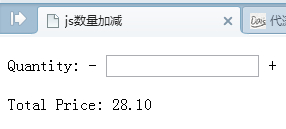
核心邏輯在於監聽輸入框的 keyup 事件以即時更新總價,並提供 numAdd、numDec 兩個函式處理加減:
$(function(){
$("#quantity").keyup(function(){
if(isNaN($(this).val()) || parseInt($(this).val())<1){
$(this).val("1");
$("#totalPrice").html($("#price").val());
return;
}
var total = parseFloat($("#price").val())*parseInt($(this).val());
$("#totalPrice").html(total.toFixed(2));
})
})
/*商品數量+1*/
function numAdd(){
var num_add = parseInt($("#quantity").val())+1;
if($("#quantity").val()==""){ num_add = 1; }
$("#quantity").val(num_add);
var total = parseFloat($("#price").val())*parseInt($("#quantity").val());
$("#totalPrice").html(total.toFixed(2));
}
/*商品數量-1*/
function numDec(){
var num_dec = parseInt($("#quantity").val())-1;
if(num_dec<1){
alert("not lt 1");//購買數量必須大於或等於1
}else{
$("#quantity").val(num_dec);
var total = parseFloat($("#price").val())*parseInt($("#quantity").val());
$("#totalPrice").html(total.toFixed(2));
}
}
頁面結構如下,單價放在隱藏欄位中:
<body>
<p>Quantity: <span onclick="numDec()">-</span> <input type="text" id="quantity" /> <span onclick="numAdd()">+</span></p>
<p class="sdsd">Total Price: <span id="totalPrice">28.10</span></p>
<input type="hidden" value="28.1" id="price" /><!--單價-->
</body>
透過 toFixed(2) 保持兩位小數,並限制數量不得小於 1,就能打造一個貼心又準確的數量調整器。
- 上一篇文章: 用 jQuery 操作 JS 陣列與物件的增刪改查範例
- 下一篇文章: 詳解 jQuery animate 動畫的 stop 方法用法