jQuery 實戰片段大集合:後台常用技巧整理
編輯:JQuery特效代碼
把日常後台開發反覆用到的 jQuery 片段整理成一份備忘錄,需要的時候直接抄。
1. 用 Ajax 把子頁面載入某個 div
$.ajax({
  url: url,
  data: parameters,
  type: "GET",
  dataType: "html",
  success: function (html) {
    $(renderContainer).attr("title", title);
    $(renderContainer).html(html);
    $(renderContainer).dialog({
      autoOpen: true, width: 590, height: 720,
      modal: true, resizable: false, draggable: true
    });
  }
});
2. 依屬性值刪除特定表格列
$(".tbl_checked tr[userid='" + idArray[i] + "']").remove();
3. 收集所有被勾選的 checkbox
$("#authorize_reset").live('click', function () {
  var idArray = [];
  $(":checkbox[id^='userid']").each(function () {
    if ($(this).attr("checked") == "checked") {
      idArray.push(parseInt($(this).val()));
    }
  });
});

// 也可以把條件直接寫進選擇器,更精簡
$(":checkbox[id^='userid'][checked]").each(function () {
  selectedRoleIdArray.push(parseInt($(this).val()));
});
4. 點擊切換樣式
$(function () {
  $(".tbl_checked tr").live('click', function () {
    var target = $(this);
    if (target.attr("class") == "tr_checked") {
      target.removeClass("tr_checked");
    } else {
      target.addClass("tr_checked");
    }
  })
});
5. 日期字串比較大小
「2012-12-21」這種格式不能直接相減,要先轉成時間戳:
var compareTime = Date.parse(setTime.replace(/-/g, "/"));
6. 取得格式化後的日期
(function ($) {
  $.FormatDateTime = function (days) {
    var myDate = new Date();
    myDate.setDate(myDate.getDate() + days);
    var year = myDate.getFullYear();
    var month = ("0" + (myDate.getMonth() + 1)).slice(-2);
    var day = ("0" + myDate.getDate()).slice(-2);
    return year + "-" + month + "-" + day;
  }
})(jQuery);
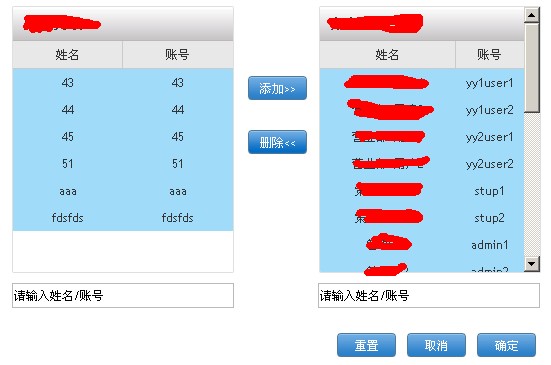
最後還實作了一個可左右搬移內容的雙向清單:點擊列進行選中高亮,再按「添加/刪除」鈕用 insertAfter 把 tr 搬到另一側表格,並在目標表格為空時自動補上表頭。
需要更新的地方
這份程式碼寫於 jQuery 1.x 時代,.live() 自 1.9 起已移除,請改用 $(document).on('click', selector, handler) 的委派寫法;判斷勾選狀態也建議改用 .prop("checked"),並以 toggleClass("tr_checked") 取代 if/else 的樣式切換。
- 上一篇文章: 用 show/hide 實作伸縮式二層選單
- 下一篇文章: jQuery 雙向列表選擇器進化版:改用 select 支援 Shift 多選