jQuery 雙向列表選擇器進化版:改用 select 支援 Shift 多選
編輯:JQuery特效代碼
先前寫過一篇《jQuery 簡單應用總結》,最後附的那個雙向列表選擇器自己看著有點粗糙,昨天有空就改了一版:把元素從 table 換成 select multiple,於是原生支援 Shift 與 Ctrl 多選,程式碼也精簡不少。
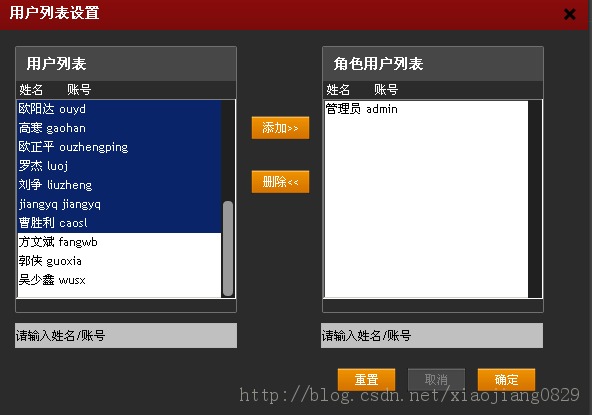
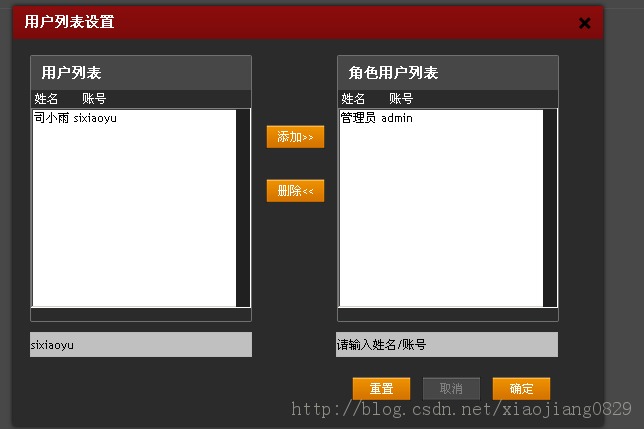
這一版除了批量轉移,還支援關鍵字查詢角色。
頁面結構
<div class="checked_list">
  <h3 class="h3_title">用戶列表</h3>
  <select id="selectL" name="selectL" multiple="multiple" style="width:220px;height:200px">
    #{list items:activedUserList, as:'items'}
    <option param_id="#{emVF items.id/}" param_name="#{emVF items.name/}">#{emVF items.name/}</option>
    #{/list}
  </select>
</div>
<div class="role_user_control">
  <input type="button" value="添加>>" id="addThisRole">
  <input type="button" value="刪除<<" id="deleteThisRole">
</div>
<div class="belong_role_list">
  <h3 class="h3_title">角色用戶列表</h3>
  <select id="selectR" name="selectR" multiple="multiple" style="width:220px;height:200px">
    #{list items:roleList, as:'items'}
    <option param_id="#{emVF items.id/}" param_name="#{emVF items.name/}">#{emVF items.name/}</option>
    #{/list}
  </select>
</div>
核心的搬移邏輯
改用 option 之後,左右移動只需要 remove 再 prependTo,一行就完事:
var leftSel = $("#selectL");
var rightSel = $("#selectR");

$("#addThisRole").live("click", function () {
  $("#selectL option:selected").each(function () {
    $(this).remove().prependTo("#selectR");
  });
});

$("#deleteThisRole").live("click", function () {
  $("#selectR option:selected").each(function () {
    $(this).remove().prependTo("#selectL");
  });
});

// 也支援雙擊單項搬移
leftSel.live('dblclick', function () {
  $(this).find("option:selected").each(function () {
    $(this).remove().prependTo("#selectR");
  });
});
搜尋與送出
兩個查詢輸入框在 keypress 遇到 Enter(keyCode 13)時發出 Ajax,以 dataType: "json" 取回 [{_1:id, _2:name, _3:account}] 形式的陣列,清空原本的 option 後重新 append;若結果為空,則放進一個「沒有匹配的查詢結果」提示項。
按下確定時,分別走過左右兩個 select,把帶有 param_id 的 option 收集進 uid / urid 兩個陣列,再隨表單一起 POST 給後端:
$("#selectL option").each(function () {
  if ($(this).attr("param_id") != undefined) {
    uid.push($(this).attr("param_id"));
  }
});
$.ajax({
  url: changeUserRoleRount.url(),
  data: form.serialize() + "&urid=" + urid + "&uids=" + uid + "&rid=" + rid,
  type: "post",
  dataType: "json",
  success: function (data) { /* 依 data.flag 顯示成功或失敗提示 */ }
});
其餘重置、取消、關閉 dialog 都只需重新呼叫載入函式或 dialog("close")。
可以再加強的點
一是 .live() 在 jQuery 1.9 之後已移除,請全面替換為 $(document).on() 委派;二是自訂屬性 param_id 建議改用 data-id 並以 .data() 讀取,HTML5 下更合規;三是把 id 以字串串接進 query string 時應 encodeURIComponent() 編碼,避免特殊字元弄壞參數。
- 上一篇文章: jQuery 實戰片段大集合:後台常用技巧整理
- 下一篇文章: jQuery 物件與 DOM 物件到底差在哪