社群分享功能是網站推廣不可或缺的一環。傳統的百度、加網分享外掛樣式單調、外觀不夠吸睛,使用者體驗稍嫌不足。本文分享的這款 jQuery 外掛,不僅具備完整的分享功能,還加入了遮罩層與動畫效果,大幅提升了互動質感。由於使用了 CSS3,建議用 Chrome、Firefox 等現代瀏覽器觀看以獲得最佳效果。
功能特色
- 彈出層
- 遮罩層
- 動畫效果
- CSS3 樣式
效果預覽
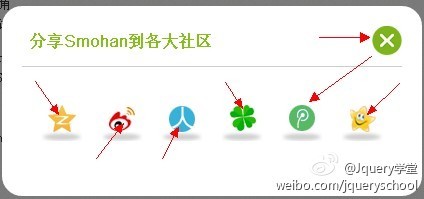
核心程式碼
外掛首先動態組出分享圖示的 HTML,掛載到 body 上,再透過 SmohanPopLayer 呼叫彈出層,並為每個分享圖示綁定 hover 動畫:
$(document).ready(function(e) {

 var share_html = "";

 share_html += '<div id="Share"><ul>';

 share_html += '<li title="分享到QQ空間"><a href="javascript:void(0)" class="share1"></a><span></span></li>';

 share_html += '<li title="分享到新浪微博"><a href="javascript:void(0)" class="share2"></a><span></span></li>';

 share_html += '<li title="分享到人人網"><a href="javascript:void(0)" class="share3"></a><span></span></li>';

  ...

 share_html += '</ul></div>';

 $('body').prepend(share_html);

 $('.share').SmohanPopLayer({Shade : true, Event:'click', Content : 'Share', Title : '分享Smohan到各大社區'});

 // 為分享圖示加上 hover 動畫

 $('#Share li').each(function() {

  $(this).hover(function(e) {

    $(this).find('a').animate({ marginTop: 2}, 'easeInOutExpo');

    $(this).find('span').animate({opacity:0.2},'easeInOutExpo');

  },function(){

    $(this).find('a').animate({ marginTop: 12}, 'easeInOutExpo');

    $(this).find('span').animate({opacity:1},'easeInOutExpo');

  });

 });
// 各平台的分享跳轉
var share_url = encodeURIComponent(location.href);
var share_title = encodeURIComponent(document.title);
var share_pic = "https://www.smohan.net/images/smohan.png"; // 默認分享圖片
var share_from = encodeURIComponent("水墨寒個人官方網站");
// Qzone
$('#Share li a.share1').click(function(e) {
window.open("https://sns.qzone.qq.com/cgi-bin/qzshare/cgi_qzshare_onekey?url="+share_url+"&title="+share_title+"&pics="+share_pic+"&site="+share_from+"","newwindow");
});
// Sina Weibo
$('#Share li a.share2').click(function(e) {
var param = { url:share_url, appkey:'678438995', title:share_title, pic:share_pic, ralateUid:'3061825921', rnd:new Date().valueOf() };
var temp = [];
for( var p in param ){ temp.push(p + '=' + encodeURIComponent( param[p] || '' ) ) }
window.open('https://v.t.sina.com.cn/share/share.php?' + temp.join('&'));
});
...// 人人網、朋友網、騰訊微博、開心網依此類推
});
加入收藏
此外還附帶了一個加入書籤的函式,相容 IE 與 Firefox 的不同寫法:
function addfavorite(){

 var Url = "https://www.smohan.net";

 var Title = "水墨寒個人官網";

 if(document.all){

  window.external.addFavorite(Url,Title);

 }else if(window.sidebar){

  window.sidebar.addPanel(Title,Url,"");

 }else{

  alert("請使用Ctrl+D鍵導入書簽!");

 }

}
小結
這款外掛把彈出層、遮罩、動畫與多平台分享整合在一起,透過 SmohanPopLayer 呼叫彈窗、animate 做出 hover 動態,再為每個社群平台綁定對應的分享網址。整體設計兼顧了實用性與視覺美感,是相當值得參考的分享插件範例。