passwordStrength:以 jQuery 實作註冊表單的密碼強度提示
編輯:JQuery特效代碼
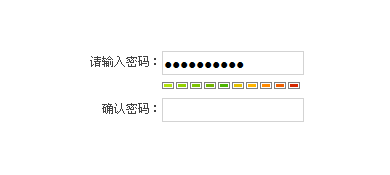
密碼強度提示已是註冊頁的標準配備。passwordStrength 這個小外掛把判斷規則與視覺呈現都包起來,只要指定輸入框,就能在下方即時顯示強度條。
HTML 結構
<p><label>請輸入密碼:</label>
<input type="password" id="pass" class="input" /></p>

<div id="passwordStrengthDiv" class="is0"></div>

<p><label>確認密碼:</label>
<input type="password" id="repass" class="input" /></p>
其中 #passwordStrengthDiv 是用來承載強度圖示的容器,class 由外掛動態切換(is0、is1…),因此強度等級的樣式都在 CSS 中定義。
載入資源並呼叫
<link rel="stylesheet" type="text/css" href="style/main.css" />
<script type="text/javascript" src="jquery.js"></script>
<script type="text/javascript" src="jquery.passwordStrength.js"></script>
<script type="text/javascript">
$(function(){
    $('#pass').passwordStrength();
});
</script>
自訂容器
若不使用預設的 id,可在呼叫時指定要載入圖示的元素:
$('#pass').passwordStrength({
    targetDiv: '#myStrengthBox'   // 自訂載入圖示的元素
});
整合到表單驗證
強度提示屬於「引導」性質,不能取代真正的驗證。實務上通常搭配兩層處理:前端攔截表單送出並檢查強度是否達標,後端再獨立驗一次。也就是說,即使使用者繞過了前端腳本,伺服器端仍應拒絕不符合規則的密碼。
此外,若要實作「兩次輸入必須一致」,可監聽 repass 欄位的 input 事件,即時比對兩者內容並切換提示樣式,比在送出時才跳出錯誤訊息友善得多。
- 上一篇文章: jQuery inArray 用法解析:為什麼字串陣列找不到數字
- 下一篇文章: 用 jQuery 實作頁面版面切換:清單與方塊雙模式