用 jQuery 實作 marquee 效果(文字或圖片水平/垂直滾動)
編輯:JQuery特效代碼
以前在 HTML 中要讓文字或圖片水平、垂直滾動,都是直接用 marquee 標籤;但基於瀏覽器相容性與符合 W3C 標準的考量,後來還是改用 JavaScript 來實作。加上後來喜歡上 jQuery,就把做法整理出來,希望對初學者有些幫助(高手勿噴,但歡迎指教)。
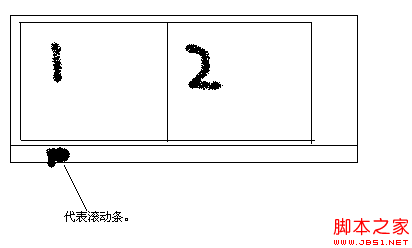
原理:無縫滾動的核心,就是用兩個內容完全相同的容器,製造視覺上的「接不過去」錯覺,再透過外層大容器滾動條的左右(或上下)移動來實現滾動。下圖大致說明了原理。
我們的目標是讓框 1 中的內容水平向左滾動(向右、上下滾動原理相同,懂得一種其他都不是問題)。做法是在頁面載入時用 JS 把框 2 的內容設成和框 1 一樣,然後讓滾動條慢慢往右移動,就能營造出向左滾動的效果。原理說完,下面附上帶註解的程式碼。
1、HTML 程式碼
<!DOCTYPE html PUBLIC "-//W3C//DTD XHTML 1.0 Transitional//EN" "https://www.w3.org/TR/xhtml1/DTD/xhtml1-transitional.dtd">
<html xmlns="https://www.w3.org/1999/xhtml">
<head>
<title>jquery 實現 marquee 的效果</title>
<script src="jquery-1.4.2.js" type="text/javascript"></script>
<style type="text/css">
#container /*最外層容器,關鍵是 overflow:hidden 隱藏溢出*/
{
width:600px;
height:80px;
overflow:hidden;
}
#longwidth
{
height:80px;
width:1000%; /*要夠大,才能同時容納 div1 與 div2,否則 float:left 會換行*/
}
.kuang
{
float:left;
height:80px;
}
</style>
<script type="text/javascript">
$(function () {
    $("#div2").html($("#div1").html()); //把 div2 的內容設成和 div1 一樣
    var mar = function () {
        if ($("#container").scrollLeft() > $("#div1").width()) { //滾動超過 div1 寬度時歸零
            $("#container").scrollLeft(0);
        }
        else {
            $("#container").scrollLeft($("#container").scrollLeft() + 5); //每次右移 5px
        }
    };
    var vid = setInterval(mar, 1);
    $("#container").mouseenter(function () {
        clearInterval(vid); //滑鼠移入暫停
    }).mouseleave(function () {
        vid = setInterval(mar, 1); //移出繼續
    });
});
</script>
</head>
<body>
<div id="container">
<div id="longwidth">
<div id="div1" class="kuang">
<img src="04.jpg" width="120px" height="80px" />
<img src="04.jpg" width="120px" height="80px" />
<img src="04.jpg" width="120px" height="80px" />
<img src="04.jpg" width="120px" height="80px" />
<img src="04.jpg" width="120px" height="80px" />
<img src="04.jpg" width="120px" height="80px" />
<img src="04.jpg" width="120px" height="80px" />
</div>
<div id="div2" class="kuang"></div>
</div>
</div>
</body>
</html>
這裡用 div 搭配 float:left 讓兩個方塊並排,再用 setInterval 定時推進 scrollLeft 達成無縫滾動,並加上 hover 暫停的小巧思。若對 CSS 不熟悉,也可以改用 table 的 td 來達到同樣的並排效果。
熱門推薦
jQuery 表單操作實戰:radio、checkbox、select
jQuery 实现两个 Select 列表项互相转移的示例
40 款實用 jQuery 外掛推薦(系列二)
jQuery 控制文字長度並顯示省略號的實作
jQuery 入門關鍵:$(document).ready()、window.onload 與 $(window).load() 的差別
jQuery Tab 的一種新寫法:id 自動生成與索引驅動切換
jQuery 製作帶滾動線條的導航選單
AeroWindow:仿 Windows Aero 玻璃質感的 jQuery 彈出視窗插件
Ext JS 與 jQuery 的取舍:七個面向的實際比較