先說明一下:這套插件仍有不少問題,我會陸續修正,也歡迎大家提出建議。
一、表單驗證的基本分類
做 Web 開發會遇到各種各樣的驗證需求,歸納起來大致四類:
(1) 是否為必填項 (最基礎的一種)
(2) 輸入值的範圍校驗
(3) 與另一個控件的值做比較
(4) 正則表達式驗證
二、必填項驗證
這類驗證有三種常見的呈現時機:
(1)輸入框獲得焦點時給提示
(2)輸入框失去焦點、驗證失敗時給提示
(3)輸入框失去焦點、驗證通過時給提示
於是參數可以定為:
· required:是否為必填項,true / false,true 表示必填(*)
· onFocus:獲得焦點的文字提示
· onBlur:失去焦點的文字提示(驗證失敗提示)
· onSucces:驗證成功的文字提示
· tipId:用於顯示提示資訊的控件 id(*)
其中一項設計是:若提示內容要套用樣式,在樣式名前加 @,因此文字提示的首字母不能是 @。
組合範例:{required:true, onFocus:"Required", onBlur:"@error", onSucces:"Success", tipId:"tipid"}
需要注意的是,上面定義的部分規則尚未完全實作,會在後續版本逐步補齊。
/**
 * 檢查輸入框是否為必填項
 * 輸入參數:
 * required : 是否為必填項,true 和 false,true 表示必填 (*)
 * onFocus : 獲得焦點的文字提示(指定樣式則在樣式名前加 @)
 * onBlur : 失去焦點的文字提示(驗證失敗提示)
 * onSucces : 驗證成功的文字提示
 * tipId : 用於顯示提示資訊的控件 id (*)
 * 組合例子 : {required:true,onFocus:"Required",onBlur:"@error",onSucces:"Success",tipId:"tipid"}
 */
$.fn.extend({
    checkRequired: function(inputArg){
        if (inputArg.required){
            if ($(this).is("input") || $(this).is("textarea")){
                //綁定獲得焦點事件
                $(this).bind("focus", function(){
                    if (inputArg.onFocus != undefined){
                        $("#" + inputArg.tipId).html(inputArg.onFocus);
                    }
                });
                //綁定失去焦點事件
                $(this).bind("blur", function(){
                    if ($(this).val() != undefined && $(this).val() != ""){
                        $("#" + inputArg.tipId).html(inputArg.onSucces);
                    } else {
                        $("#" + inputArg.tipId).html(inputArg.onBlur);
                    }
                });
            }
        }
    }
});
測試程式:
<script language="JavaScript" src="jquery-1.3.2.min.js" type="text/javascript"></script>
<script language="JavaScript" src="jquery-extend-1.0.0.js" type="text/javascript"></script>
<script language="JavaScript" type="text/javascript">
$(document).ready(function(){
    $("#txtName").checkRequired({
        required: true,
        onFocus: "這個為必填項",
        onBlur: "必須填寫啊",
        onSucces: "恭喜,你輸入了",
        tipId: "txtNameTip"
    });
});
</script>
獲得焦點時:

失去焦點且未輸入時:

輸入內容後:

三、範圍校驗
這比必填驗證複雜一些,因為涉及值的區間。實作上把輸入型別分成三種:字串、數字、時間。字串比長度,數字與時間比大小(時間部分尚未完善)。
參數如下:
· onFocus / onEmpty / onSucces / onBlur:各階段的提示文字
· dataType:資料型別(text、number、date)
· min / max:允許的下限與上限
· tipId:顯示提示的控件 id(*)
/**
 * 檢查輸入項的範圍
 * dataType : 資料型別參數(text, number, date)
 * min : 輸入的最小值
 * max : 輸入的最大值
 * tipId : 用於顯示提示資訊的控件 id (*)
 */
$.fn.extend({
    checkRange: function(inputArg){
        if ($(this).is("input") || $(this).is("textarea")) {
            //獲得焦點綁定
            $(this).bind("focus", function(){
                if (inputArg.onFocus != undefined){
                    $("#" + inputArg.tipId).html(inputArg.onFocus);
                }
            });
            //失去焦點綁定
            $(this).bind("blur", function(){
                if ($(this).val() == undefined || $(this).val() == ""){
                    $("#" + inputArg.tipId).html(inputArg.onEmpty);
                } else {
                    switch (inputArg.dataType){
                        case "text":
                            if ($(this).val().length >= parseInt(inputArg.min) && $(this).val().length < parseInt(inputArg.max)){
                                $("#" + inputArg.tipId).html(inputArg.onSucces);
                            } else {
                                $("#" + inputArg.tipId).html(inputArg.onBlur);
                            }
                            break;
                        case "number":
                            if (!isNaN($(this).val())){
                                if (parseInt($(this).val()) > parseInt(inputArg.min) && parseInt($(this).val()) < parseInt(inputArg.max)){
                                    $("#" + inputArg.tipId).html(inputArg.onSucces);
                                } else {
                                    $("#" + inputArg.tipId).html(inputArg.onBlur);
                                }
                            }
                            break;
                        case "date":
                            break;
                    }
                }
            });
        }
    }
});
測試程式:
$("#txtAge").checkRange({
    onFocus: "年齡為數字",
    onEmpty: "不能為空啊",
    onSucces: "驗證成功",
    onBlur: "驗證失敗,請認真輸入",
    dataType: "number",
    min: "10",
    max: "100",
    tipId: "txtAgeTip"
});

<p>
<label>年齡:</label><input type="text" id="txtAge" value=""/><span id="txtAgeTip"></span>
</p>
 (年齡約定為數字)
 (輸入不在約定範圍內)
 (驗證成功)
四、與另一個控件的值做比較
和上面的差異在於要多指定「比較目標控件的 id」,以及「比較運算子」。
新增參數:comType(=、>、>=、<、<=、!=)與 targetId。
/**
 * 控件值之間的比較
 * comType : 比較的類型(=, >, >=, <, <=, !=)
 * targetId : 比較的目標控件 Id
 */
$.fn.extend({
    checkCompare: function(inputArg){
        if ($(this).is("input") || $(this).is("textarea")){
            //獲得焦點綁定
            $(this).bind("focus", function(){
                if (inputArg.onFocus != undefined){
                    $("#" + inputArg.tipId).html(inputArg.onFocus);
                }
            });
            //失去焦點綁定
            $(this).bind("blur", function(){
                var targetValue = $("#" + inputArg.targetId).val();
                if (targetValue != undefined && targetValue != null){
                    if ($(this).val() != undefined && $(this).val() != ""){
                        if (inputArg.dataType == "text"){
                            switch (inputArg.comType){
                                case "=":
                                    if (targetValue == $(this).val()) { $("#" + inputArg.tipId).html(inputArg.onSucces); }
                                    else { $("#" + inputArg.tipId).html(inputArg.onBlur); }
                                    break;
                                case "!=":
                                    if (targetValue != $(this).val()) { $("#" + inputArg.tipId).html(inputArg.onSucces); }
                                    else { $("#" + inputArg.tipId).html(inputArg.onBlur); }
                                    break;
                            }
                        } else if (inputArg.dataType == "number"){
                            if (isNaN(targetValue) == false && isNaN($(this).val()) == false) {
                                switch (inputArg.comType) {
                                    case "=":
                                        if (targetValue == $(this).val()) { $("#" + inputArg.tipId).html(inputArg.onSucces); }
                                        else { $("#" + inputArg.tipId).html(inputArg.onBlur); }
                                        break;
                                    case "!=":
                                        if (targetValue != $(this).val()) { $("#" + inputArg.tipId).html(inputArg.onSucces); }
                                        else { $("#" + inputArg.tipId).html(inputArg.onBlur); }
                                        break;
                                    case ">":
                                        if ($(this).val() > targetValue) { $("#" + inputArg.tipId).html(inputArg.onSucces); }
                                        else { $("#" + inputArg.tipId).html(inputArg.onBlur); }
                                        break;
                                    case ">=":
                                        if ($(this).val() >= targetValue) { $("#" + inputArg.tipId).html(inputArg.onSucces); }
                                        else { $("#" + inputArg.tipId).html(inputArg.onBlur); }
                                        break;
                                    case "<":
                                        if ($(this).val() < targetValue) { $("#" + inputArg.tipId).html(inputArg.onSucces); }
                                        else { $("#" + inputArg.tipId).html(inputArg.onBlur); }
                                        break;
                                    case "<=":
                                        if ($(this).val() <= targetValue) { $("#" + inputArg.tipId).html(inputArg.onSucces); }
                                        else { $("#" + inputArg.tipId).html(inputArg.onBlur); }
                                        break;
                                }
                            } else {
                                $("#" + inputArg.tipId).html(inputArg.onBlur);
                            }
                        } else if (inputArg.dataType == "date"){
                        }
                    } else {
                        $("#" + inputArg.tipId).html(inputArg.onEmpty);
                    }
                }
            });
        }
    }
});
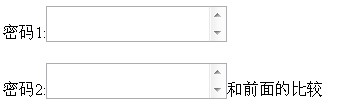
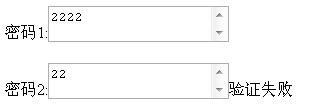
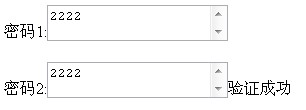
測試程式(以「密碼再輸入一次」為例):
$("#txtPass2").checkCompare({
    onFocus: "和前面的比較",
    onEmpty: "輸入的不能為空",
    onSucces: "驗證成功",
    onBlur: "驗證失敗",
    dataType: "number",
    comType: ">=",
    tipId: "txtPass2Tip",
    targetId: "txtPass1"
});

<p>
<label>密碼1:</label><textarea id="txtPass1"></textarea><span id="txtPass1Tip"></span>
</p>
<p>
<label>密碼2:</label><textarea id="txtPass2"></textarea><span id="txtPass2Tip"></span>
</p>
五、正則表達式驗證
這一種反而最簡單,因為不必自己枚舉各種輸入情形,只要給一條正則就好。
參數:onFocus、onEmpty、onSucces、onBlur、regExp、tipId。
/**
 * 正則表達式的驗證
 * regExp : 正則表達式
 * tipId : 用於顯示提示資訊的控件 id (*)
 */
$.fn.extend({
    checkRegExp: function(inputArg){
        if ($(this).is("input") || $(this).is("textarea")) {
            //獲得焦點綁定
            $(this).bind("focus", function(){
                if (inputArg.onFocus != undefined) {
                    $("#" + inputArg.tipId).html(inputArg.onFocus);
                }
            });
            //失去焦點綁定
            $(this).bind("blur", function(){
                if ($(this).val() != undefined && $(this).val() != ""){
                    if ($(this).val().match(inputArg.regExp) == null) {
                        $("#" + inputArg.tipId).html(inputArg.onSucces);
                    } else {
                        $("#" + inputArg.tipId).html(inputArg.onBlur);
                    }
                } else {
                    $("#" + inputArg.tipId).html(inputArg.onEmpty);
                }
            });
        }
    }
});
測試程式:
$("#txtAge").checkRegExp({
    onFocus: "年齡必須為數字",
    onEmpty: "輸入的不能為空",
    onSucces: "驗證成功",
    onBlur: "驗證失敗",
    regExp: /\D/,
    tipId: "txtAgeTip"
});

<label>年齡:</label><input type="text" id="txtAge" value=""/><span id="txtAgeTip"></span>
 (輸入非數字)
 (輸入數字)
這裡要留意 match() 的判斷方向:match 回傳 null 代表「沒有匹配到」,而範例中 /\D/ 匹配的是「非數字字元」,所以「沒匹配到」等於「全部是數字」,也就是驗證通過。正則的匹配方向很容易寫反,實作時建議逐一測試邊界情況。
以上就是驗證插件的一個基本雛形,後續會持續更新。