以 jQuery 實作即時密碼強度檢測元件
編輯:JQuery特效代碼
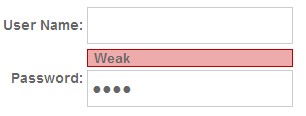
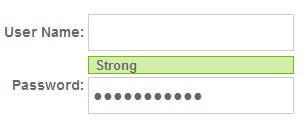
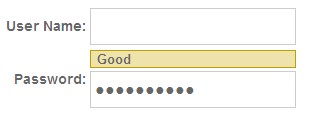
這個元件是基於 jQuery 的,因此需要 jQuery 本體加上這個插件的 JS。jQuery 可至官網下載:
https://code.jquery.com/jquery-1.4.2.min.js
password_strength_plugin.js
(function ($) {
    $.fn.shortPass      = 'Too short';
    $.fn.badPass        = 'Weak';
    $.fn.goodPass       = 'Good';
    $.fn.strongPass     = 'Strong';
    $.fn.samePassword   = 'Username and Password identical.';
    $.fn.resultStyle    = "";

    $.fn.passStrength = function (options) {
        var defaults = {
            shortPass : "shortPass",   // 可選:自訂樣式
            badPass   : "badPass",
            goodPass  : "goodPass",
            strongPass: "strongPass",
            baseStyle : "testresult",
            userid    : "",            // 必填:比對用的帳號欄位
            messageloc: 1               // 0 = 顯示在前,1 = 顯示在後
        };
        var opts = $.extend(defaults, options);

        return this.each(function () {
            var obj = $(this);

            $(obj).unbind().keyup(function () {
                var results = $.fn.teststrength(
                    $(this).val(), $(opts.userid).val(), opts
                );

                if (opts.messageloc === 1) {
                    $(this).next("." + opts.baseStyle).remove();
                    $(this).after("<span class=\"" + opts.baseStyle + "\"><span></span></span>");
                    $(this).next("." + opts.baseStyle)
                           .addClass($(this).resultStyle)
                           .find("span").text(results);
                } else {
                    $(this).prev("." + opts.baseStyle).remove();
                    $(this).before("<span class=\"" + opts.baseStyle + "\"><span></span></span>");
                    $(this).prev("." + opts.baseStyle)
                           .addClass($(this).resultStyle)
                           .find("span").text(results);
                }
            });

            // ===== 評分核心 =====
            $.fn.teststrength = function (password, username, option) {
                var score = 0;

                // 太短
                if (password.length < 4) {
                    this.resultStyle = option.shortPass;
                    return $(this).shortPass;
                }

                // 與帳號相同
                if (password.toLowerCase() == username.toLowerCase()) {
                    this.resultStyle = option.badPass;
                    return $(this).samePassword;
                }

                // 長度得分
                score += password.length * 4;

                // 重複字元扣分(1~4 連續重複都檢查)
                score += ($.fn.checkRepetition(1, password).length - password.length) * 1;
                score += ($.fn.checkRepetition(2, password).length - password.length) * 1;
                score += ($.fn.checkRepetition(3, password).length - password.length) * 1;
                score += ($.fn.checkRepetition(4, password).length - password.length) * 1;

                // 含三個以上數字
                if (password.match(/(.*[0-9].*[0-9].*[0-9])/)) { score += 5; }

                // 含兩個以上符號
                if (password.match(/(.*[!,@,#,$,%,^,&,*,?,_,~].*[!,@,#,$,%,^,&,*,?,_,~])/)) { score += 5; }

                // 大小寫混合
                if (password.match(/([a-z].*[A-Z])|([A-Z].*[a-z])/)) { score += 10; }

                // 字母 + 數字
                if (password.match(/([a-zA-Z])/) && password.match(/([0-9])/)) { score += 15; }

                // 數字 + 符號
                if (password.match(/([!,@,#,$,%,^,&,*,?,_,~])/) && password.match(/([0-9])/)) { score += 15; }

                // 字母 + 符號
                if (password.match(/([!,@,#,$,%,^,&,*,?,_,~])/) && password.match(/([a-zA-Z])/)) { score += 15; }

                // 純數字或純字母,扣分
                if (password.match(/^\w+$/) || password.match(/^\d+$/)) { score -= 10; }

                // 限制在 0~100
                if (score < 0)   { score = 0;   }
                if (score > 100) { score = 100; }

                if (score < 34) { this.resultStyle = option.badPass;   return $(this).badPass;   }
                if (score < 68) { this.resultStyle = option.goodPass;  return $(this).goodPass;  }

                this.resultStyle = option.strongPass;
                return $(this).strongPass;
            };
        });
    };

    // 檢查連續重複字元,回傳去除重複後的結果
    $.fn.checkRepetition = function (pLen, str) {
        var res = "";
        for (var i = 0; i < str.length; i++) {
            var repeated = true;
            for (var j = 0; j < pLen && (j + i + pLen) < str.length; j++) {
                repeated = repeated && (str.charAt(j + i) == str.charAt(j + i + pLen));
            }
            if (j < pLen) { repeated = false; }

            if (repeated) {
                i += pLen - 1;
                repeated = false;
            } else {
                res += str.charAt(i);
            }
        }
        return res;
    };
})(jQuery);
style.css
td label {
    font-size: 14px; font-weight: bold; color: #666;
    font-family: arial, helvetica, sans-serif;
}
input {
    height: 28px; width: 200px; border: 1px solid #ccc;
    font-size: 16px; font-weight: bold; color: #666;
    padding: 7px 0 0 4px;
}

/* 進階樣式:顯示在欄位上方 */
.top_testresult {
    font-weight: bold; font-size: 13px;
    font-family: arial, helvetica, sans-serif;
    color: #666; padding: 0; margin: 0 0 2px 0;
}
.top_testresult span { padding: 6px; margin: 0; }

.top_shortPass { background: #edabab; border: 1px solid #bc0000; display: block; }
.top_badPass   { background: #edabab; border: 1px solid #bc0000; display: block; }
.top_goodPass  { background: #ede3ab; border: 1px solid #bc9f00; display: block; }
.top_strongPass{ background: #d3edab; border: 1px solid #73bc00; display: block; }

/* 基本樣式:顯示在欄位下方 */
.testresult {
    font-weight: bold; font-size: 13px;
    font-family: arial, helvetica, sans-serif;
    color: #666; padding: 0px 0px 12px 10px;
    margin-left: 10px; display: block;
    height: 28px; float: left;
}
.testresult span {
    padding: 10px 20px 12px 10px;
    margin: 0px 0px 0px 20px;
    display: block; float: right; white-space: nowrap;
}

.shortPass { background: url(../images/red.png)    no-repeat 0 0; }
.shortPass span { background: url(../images/red.png)    no-repeat top right; }
.badPass   { background: url(../images/red.png)    no-repeat 0 0; }
.badPass span   { background: url(../images/red.png)    no-repeat top right; }
.goodPass  { background: url(../images/yellow.png) no-repeat 0 0; }
.goodPass span  { background: url(../images/yellow.png) no-repeat top right; }
.strongPass{ background: url(../images/green.png)  no-repeat 0 0; }
.strongPass span{ background: url(../images/green.png)  no-repeat top right; }
head 部分
<title>無標題頁</title>
<script type="text/javascript" src="js/jquery-1.4.2.min.js"></script>
<script type="text/javascript" src="js/password_strength_plugin.js"></script>
<link rel="stylesheet" type="text/css" href="css/style.css">

<script>
$(document).ready(function () {
    // 基本用法:提示顯示在欄位下方
    $(".password_test").passStrength({
        userid: "#user_id"
    });

    // 進階用法:提示顯示在欄位上方,並自訂樣式
    $(".password_adv").passStrength({
        shortPass : "top_shortPass",
        badPass   : "top_badPass",
        goodPass  : "top_goodPass",
        strongPass: "top_strongPass",
        baseStyle : "top_testresult",
        userid    : "#user_id_adv",
        messageloc: 0
    });
});
</script>
body 部分
<body>
<table cellpadding="2" cellspacing="0" border="0">
  <tr>
    <td align="right"><label>User Name:</label></td>
    <td><input type="text" name="user_name" id="user_id_adv" /></td>
  </tr>
  <tr>
    <td align="right"><label>Password:</label></td>
    <td><input type="password" name="pass_word" class="password_adv" /></td>
  </tr>
</table>
</body>
評分邏輯看懂了,就能自己調
這個元件的核心是一套加分制:長度每個字元 4 分;包含三個以上數字、兩個以上符號、大小寫混合各給 5 至 10 分;字母混數字、數字混符號、字母混符號各給 15 分;純數字或純字母扣 10 分;重複字元(如 aaa、abab)也會扣分。最後把分數鎖在 0 到 100,34 分以下算弱、68 分以下算普通、以上算強。
這套權重全寫在 teststrength 裡,想調整標準直接改分數即可。要注意的是,這终究是前端提示,真正的強度檢驗一定要在後端再做一次,否則繞過 JS 就能送出任何密碼。