如果您已經掌握內容發布的基本概念,也了解 RSS 2.0 與 Atom 1.0 的格式規範,那麼下一步就是動手做一套新聞聯播(syndication)系統。這篇文章可以當成一份快速參考。
RSS 與 Atom 的聯播機制
RSS 與 Atom 都是基於 XML 的檔案格式,用來描述一份稱為 feed(摘要)的相關資訊清單。每份 feed 由多個項目組成,每個項目各自帶有一組可擴充的元資料,例如標題。它們最主要的用途是 Web 內容聯播——無論是供應給網站,還是直接送到使用者的 user agent,用於部落格或新聞頭條。
清單 1. RSS 2.0 feed 範例
<?xml version="1.0"?>
<rss version="2.0">

  <channel>
    <title>Feed Title</title>
    <link>https://yourwebsite.com/</link>
    <description>Feed Description</description>
    <language>en-us</language>
    <pubDate>Mon, 03 Jan 2005 12:00:00 GMT</pubDate>

    <item>
      <title>Article Title</title>
      <link>https://yourwebsite.com/articlelink.html</link>
      <description>Your content included here.</description>
    </item>
    <item>
      <title>Sports</title>
      <link>https://yourwebsite.com/sportslink.html</link>
      <description>Your content included here.</description>
    </item>

  </channel>
</rss>
清單 2. Atom 1.0 feed 範例
<?xml version="1.0" encoding="utf-8"?>
<feed xmlns="https://www.w3.org/2005/Atom">

  <title>Feed Title</title>
  <link href="https://yourwebsite.com/"/>
  <updated>2003-12-13T18:30:02Z</updated>
  <author>
    <name>Your Name</name>
  </author>
  <id>urn:uuid:60a76c80-d399-11d9-b93c-0003939e0af6</id>

  <entry>
    <title>Article Title</title>
    <link href="https://yourwebsite.com/articlelink.html"/>
    <id>urn:uuid:1225c695-cfb8-4ebb-aaaa-80da344efa6a</id>
    <updated>2003-12-13T18:30:02Z</updated>
    <summary>Some text.</summary>
  </entry>
  <entry>
    <title>Sports</title>
    <link href="https://yourwebsite.com/sportslink.html"/>
    <id>urn:uuid:1225c695-cfb8-4ebb-aaaa-80da344e45ab90</id>
    <updated>2003-12-14T13:30:55Z</updated>
    <summary>Some text.</summary>
  </entry>

</feed>
相似之處
從上面兩個範例不難看出,兩者的 XML 結構基本相同,差別只在節點的寫法上。每份 feed 文件實際上代表一個通道(channel),包含標題、連結、描述、作者等資訊,用來交代這份 feed 的基本背景;通道資訊之後則是一連串項目,每個項目對應一篇可透過閱讀器讀取的真實新聞或文章,通常帶有標題、連結、更新時間與摘要。
差異所在
表 1. RSS 2.0 與 Atom 1.0 比較
- 部署情況:RSS 2.0 已被廣泛部署;Atom 1.0 尚未普及。
- 規範治理:RSS 2.0 的版權歸哈佛大學所有且已凍結;Atom 1.0 由 IETF 的 Atompub 工作小組共識形成,未來仍可能修訂。
- 必要內容:RSS 2.0 在 feed 層級要求標題、連結與描述,但不要求任何個別項目的欄位;Atom 1.0 則要求 feed 與 entry 都具備標題(可為空)、唯一識別碼與最後更新的時間戳。
- 內容承載:RSS 2.0 可承載純文字或轉義後的 HTML,但無法分辨究竟是哪一種;Atom 1.0 提供明確的內容容器。
- 全文或節錄:RSS 2.0 只有一個
<description>元素,可能放全文也可能只放大綱,且沒有內建方式標明內容是否完整;Atom 1.0 將<summary>與<content>分開,若內容非文字或不在本地,摘要元素便格外有用。 - 自動探索:RSS 2.0 的做法各家不同;Atom 1.0 將自動探索標準化。
- 擷取與聚合:RSS 2.0 只有一種形式,就是
<rss>文件;Atom 1.0 允許獨立的 Atom Entry 文件,可用任何網路協定傳輸(例如 XMPP),也支援聚合型 feed,讓條目指回自己原本的來源 feed。
通用架構
隨著兩種規範日益成熟,能承載的 Web 應用也越來越多,其中最典型的就是新聞發布系統。以下架構由三個子系統組成:
- feed 產生器子系統:負責生成基於 XML 的 feed 文件。
- feed 執行子系統:提供操作 feed 的各種函式。
- 自動發布子系統:以計時器驅動整個流程。
feed 產生器
核心類別是 FeedFileManager,負責產出與特定 feed 相關的 XML 文件。feed 有兩種具體型別:AtomFeed 與 RssFeed,兩者都包含一個 feed channel 類別與一個 feed item 類別,實作方式依各自的構造而異。
圖 1. feed 產生器的類別圖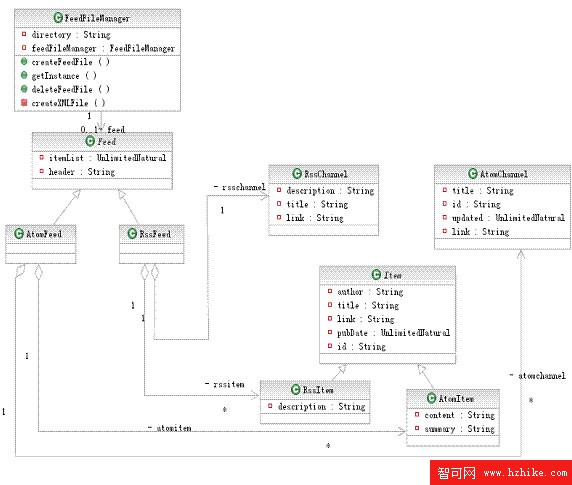
圖片看不清楚?請點擊這裡查看原圖(大圖)。
feed 執行子系統
它提供 insertItem()、deleteItem()、updateItem() 等函式,用來操作兩種 feed 文件。首先由抽象工廠 PublisherFactory 產生其中一種 feed 發布者,再由發布者透過 DataCollection 類別從資料庫取數。
圖 2. feed 執行子系統的類別圖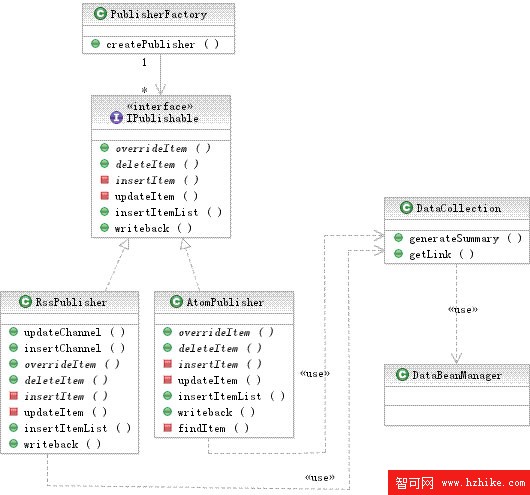
自動發布子系統
它是一個在固定時間點更新 feed 文件的計時器,串起前兩個子系統,讓整套發布流程持續運轉。
圖 3. 自動發布子系統的類別圖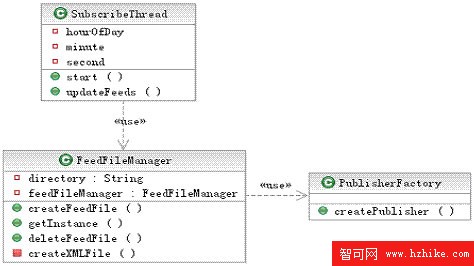
逐步實作
圖 4 先給出整體實作流程的概覽,說明各主要積木之間的關係。
圖 4. 實作流程概覽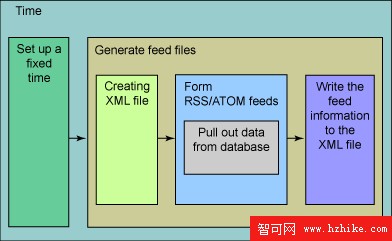
整個應用程式本身就是一個大計時器,可以在其中設定固定的啟動時間。時間一到,計時器開始執行既定工作:產生 feed 文件。流程是這樣的——先建立一個 XML 文件,接著在其中形成 RSS 與 Atom feed,最後把內容寫回該 XML 文件。資料來源可以是資料庫、檔案或其他資源。
計時器
計時器是發布系統的心臟,依使用者指定的時間或每天的固定時段觸發 feed 產生。在 Java 應用程式中,這類重複執行的排程任務通常用標準的 Timer 與 TimerTask 來實作。
清單 3. Timer 啟動方法範例
public void start() {
    SchedulerTask st = new SchedulerTask(){
        public void run() {
            try {
                updateNewsFeeds();  // concrete method of update feed files.
                updateBooksFeeds();
                ...
            } catch (Exception e) {
                e.printStackTrace();
            }
        }
    };
}
產生基於 XML 的 feed 文件
由於 RSS 與 Atom feed 都建立在 XML 之上,生成這些檔案是實作過程中的關鍵一步,這項工作由 feed 產生器子系統中的 FeedFileManager 承擔。
圖 5. FeedFileManager 類別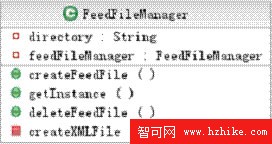
這個類別通常會提供一個 createFeedFile() 方法,需要做三件事:
- 建立一個 XML 文件,可由靜態方法
createXMLFile()完成。 - 與「feed 執行子系統」互動,建立相關的通道與項目資訊。
- 把所有資訊寫回 XML 文件。
清單 4. createFeedFile 方法範例
public String createFeedFile(String channelid, String name, String type)
        throws Exception {
    ...
    createXMLFile(file, type);

    IPublishable publisher = PublisherFactory.createPublisher(type, file);
    Feed feed = getFeed(type);

    Channel channel = feed.getChannel();
    ArrayList itemlist = feed.getItemList();

    publisher.insertChannel(channel);
    publisher.insertItemList(itemlist);
    publisher.writeback(file);

    return file;
}
組出 RSS/Atom feed
在上一個步驟中,發布工廠已建立發布者,並把相關的通道資訊與項目清單插入特定的 feed。
清單 5. 插入通道與項目清單
publisher.insertChannel(channel);
publisher.insertItemList(itemlist);
為了讓通道與項目清單正確成形,必須從資料庫取數,再填入 feed 的資料結構中。以下示範如何取數並寫入對應的 data bean:
清單 6. feed 組裝範例
...
NewsBeanManager newsmanager = new NewsBeanManager();
newslist = newsmanager.getAllNews();  // interact with database
...
for (int i = 0; i < newslist.size(); i++) {
    NewsBean news = (NewsBean) newslist.get(i);

    title = "News " + i + ": " + news.getTitle();
    link = news.getLink();
    author = news.getAuthor();
    timestamp = news.getPublishTime();
    id = String.valueOf(news.getNewsID());
    description = news.getSummary();
    content = news.getContent();

    RssItem rssitem = new RssItem(title, link, author, timestamp, id, description);
    rssitemlist.add(i, rssitem);

    AtomItem atomitem = new AtomItem(title, link, author, timestamp, id, description, content);
    atomitemlist.add(i, atomitem);
}
實作技巧
系統上線之後,以下幾個部署要點值得留意。
兼顧主流閱讀器
要在 XML 檔頭標明 RSS 與 Atom 的版本資訊,如清單 7:
清單 7. 標註版本資訊
<?xml version="1.0" encoding="utf-8"?>
<rss version="2.0">
...

<?xml version="1.0" encoding="utf-8"?>
<feed xmlns="https://www.w3.org/2005/Atom">
此外,也應為 feed 提供連結資訊。在 RSS 2.0 中連結是一個節點,在 Atom 1.0 中則是屬性。雖然 Atom 不強制要求連結,但為通道部分補上連結仍是良好做法(見清單 8)。
清單 8. 為通道提供連結資訊
<?xml version="1.0" encoding="utf-8"?>
<rss version="2.0">
  <channel>
    <title>News Syndication</title>
    <link>https://www.newssyndication.com</link>
    <description>this is a news feed</description>
    ...

<?xml version="1.0" encoding="utf-8"?>
<feed xmlns="https://www.w3.org/2005/Atom">
  <title>News Syndication</title>
  <link href="https://www.newssyndication.com" />
  <updated>2006-07-06T10:26:30Z</updated>
  <id>urn:uuid:60a76c80-d399-11d9-b93c-0003939e0af6</id>
多語言支援
別忘了在 XML 檔頭宣告編碼:
清單 9. 宣告編碼
<?xml version="1.0" encoding="utf-8"?>實作寫檔函式時,建議用 OutputStreamWriter 取代 FileWriter,把編碼明確設為 UTF-8——FileWriter 的預設編碼在許多環境下並非 UTF-8,容易釀成亂碼。
清單 10. 以 OutputStreamWriter 指定 UTF-8
OutputStreamWriter writer = new OutputStreamWriter(outputstream, "utf-8");結語
本文先回顧了 RSS 與 Atom feed 的異同,接著拆解了同時支援兩種格式的發布系統架構——三個子系統彼此協作,再透過計時器把流程串接起來。搭配前面的逐步實作與部署技巧,您已經具備打造自動化新聞聯播的完整拼圖了。