前面介紹 XSLT 時,我們看過樣板的基本用法,也知道怎麼取出元素節點的值,例如 <xsl:value-of select="."/> 中的 . 代表當前節點。但如果想取的是父節點、爺爺節點,或是兄弟節點的值呢?這就要靠 XPath 的「節點軸」了。
1. child 軸
songs.XML 的內容如下:
<?XML version="1.0" encoding="gb2312"?>
<?XML-stylesheet type="text/xsl" href="songs.xslt"?>
<歌曲列表>
 這個歌曲列表有兩首歌
 <名稱>周懂專輯</名稱>
 <!--第一首歌曲 -->
 <歌曲 日期="2003-11-12">
 月亮代表我的心
 <名稱>夏天裡的一把雨</名稱>
 <作曲家>張三</作曲家>
 <長度>4:20</長度>
 <藝術家>小天王</藝術家>
 月亮代表你的心
 </歌曲>
 <!--第二首歌曲 -->
 <歌曲 日期="2005-12-30">
 月亮代表他的心
 <名稱>冬天裡的一把雪</名稱>
 <作曲家>王五</作曲家>
 <作曲家>李四</作曲家>
 <藝術家>周董</藝術家>
 月亮代表她的心
 </歌曲>
</歌曲列表>
songs.xslt 如下:
<?XML version="1.0" encoding="gb2312"?>
<xsl:stylesheet version="1.0" XMLns:xsl="https://www.w3.org/1999/XSL/Transform">
 <xsl:template match="/歌曲列表">
 <Html>
 <head><title>練習使用child軸</title></head>
 <body>
 <xsl:apply-templates select="歌曲"/>
 </body>
 </Html>
 </xsl:template>
 <xsl:template match="歌曲">
 <xsl:apply-templates select="child::名稱"/><br/>
 </xsl:template>
</xsl:stylesheet>
child 軸的常見寫法(以下例子中的上下文節點都是「歌曲」節點):
child::名稱:上下文節點的名稱子節點child::*:上下文節點的所有元素子節點child::text():上下文節點的所有文字子節點child::node():上下文節點的所有子節點child::comment():上下文節點的所有註解子節點child::processing-instruction():上下文節點的所有處理指令子節點
補充:child:: 可以省略,直接寫節點名稱即可,這也是它最常出現的形式。
2. descendant 軸
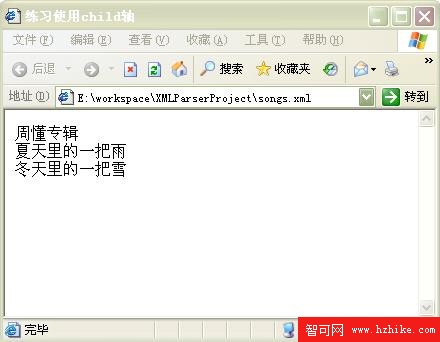
descendant 軸代表「所有層級的子孫」。以下示範 descendant::名稱:
<xsl:template match="歌曲列表">
 <xsl:apply-templates select="descendant::名稱"/>
</xsl:template>
<xsl:template match="名稱">
 <xsl:value-of select="."/><br/>
</xsl:template>
descendant::名稱 的意義是:持續處理上下文節點(歌曲列表節點)的名稱子節點、其子節點的名稱子節點、再下一層的名稱子節點……一路往下直到最深處。執行結果如下圖:
把選取條件換成 descendant::*:
<xsl:template match="歌曲列表">
 <xsl:apply-templates select="descendant::*"/>
</xsl:template>
<xsl:template match="*">
 元素節點開始:<xsl:value-of select="."/>:元素節點結束<br/>
</xsl:template>
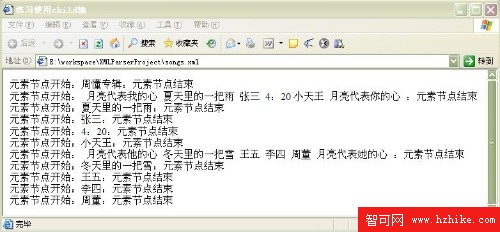
它會處理上下文節點的所有子節點、子節點的所有子節點……一直到最後一層,結果如下圖:
改成 descendant::text():
<xsl:template match="歌曲列表">
 <xsl:apply-templates select="descendant::text()"/>
</xsl:template>
<xsl:template match="text()">
 文本節點開始:<xsl:value-of select="."/>:文本節點結束<br/>
</xsl:template>
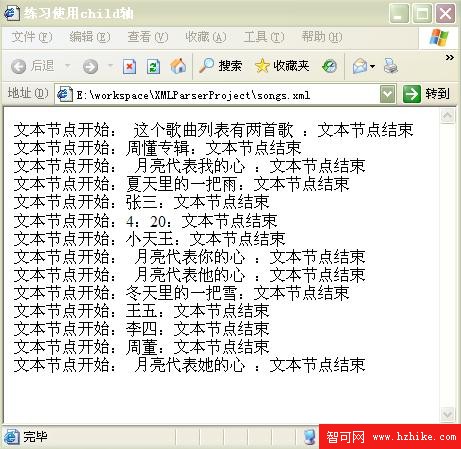
它會取出各個層級上的所有文字節點,結果如下圖:
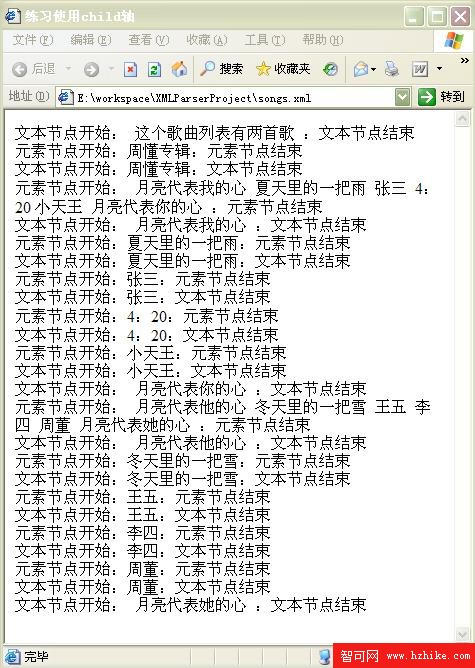
改成 descendant::node() 則涵蓋所有型別的節點(元素、文字等):
<xsl:template match="歌曲列表">
 <xsl:apply-templates select="descendant::node()"/>
</xsl:template>
結果如下圖:
理解上述幾個範例之後,descendant::comment() 與 descendant::processing-instruction() 應該就不難推断了。
3. descendant-or-self 軸
顧名思義,這個軸的內容等於 descendant 軸的結果,再加上上下文節點本身。
4. ancestor 軸
ancestor::* 代表上下文節點的父元素節點、父元素的父元素節點,一路類推到根元素節點。示範如下:
<xsl:template match="名稱">
<xsl:for-each select="ancestor::*">
<xsl:value-of select="."/><br/>
</xsl:for-each>
</xsl:template>結果如下圖:
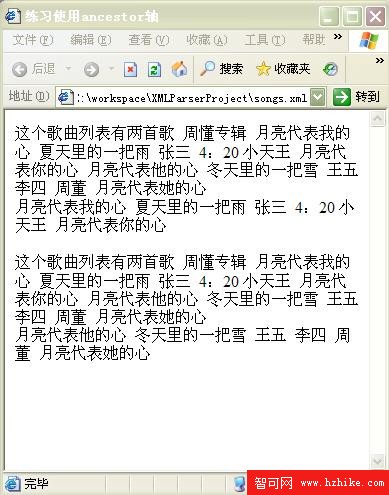
這裡有個容易忽略的細節:輸出節點值時,因為 ancestor 軸會回傳多個節點,必須用 for-each 迴圈逐一輸出;否則只會印出根元素節點的值。
5. ancestor-or-self 軸
這個軸除了包含 ancestor 軸的全部內容之外,還多包含上下文節點本身。
掌握 child 與 descendant 這組「向下」的軸、ancestor 這組「向上」的軸,再加上下一篇要談的 following/preceding 與 attribute,你就能在 XML 樹上精準定位任何一個節點了。
- 上一篇文章: XPath 軸(Axis)語法詳解(下):self、following 與 attribute
- 下一篇文章: 用 DOM 解析 company.xml:把 employee 節點封裝成物件