XAML 實例演練之七:Resources 與 Transformations
編輯:XML詳解
本文提供示例源碼與素材下載。
Resources 為 XAML 提供了一套定義並共享物件的方法。我們可以在 Page、Window,甚至整個應用程式層級上共享 Resources。下面的語句示範了如何在單一視窗的範圍內定義資源:
<Window.Resources>
<SolidColorBrush x:Key="GreenBrush" Color="Green" />
<SolidColorBrush x:Key="WhiteBrush" Color="White" />
</Window.Resources>
接著,下面的語句把剛才定義的資源套用到 Button 按鈕上。這裡的 StaticResource 關鍵字代表資源在編譯期間就已完成設定,因此無法在運行階段改綁到不同的資源。
<Button Content="Top Button" Opacity="1" Background="{StaticResource GreenBrush}" Foreground="{StaticResource WhiteBrush}" />
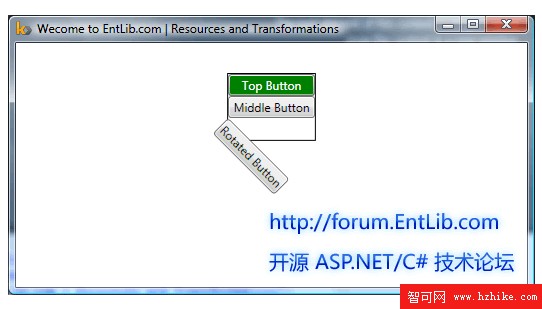
WPF 讓製作簡單的轉換變得輕而易舉。本範例的 XAML 建立了三個按鈕,其中第三個按鈕套用了 RenderTransform;它的子元素 RotateTransform 把 Angle 屬性設為順時針 45 度。
<Button Content="Rotated Button">
<Button.RenderTransform>
<RotateTransform Angle="45" />
</Button.RenderTransform>
</Button>
在 Kaxaml 工具中的運行成果如下:
- 上一篇文章: XAML 實例演練之八:讓按鈕緩緩旋轉的動畫
- 下一篇文章: 微笑頭像:用 XAML 打造的可愛圖示