XAML 實例演示之三:Grid 控件的欄列配置技巧
編輯:XML詳解
Grid 的基本結構
Grid 是 XAML 中最常用的版面配置容器之一。它先宣告列與欄,再把子元素放入指定儲存格。Grid 本身不負責顏色或樣式,只定義結構。
範例程式碼
<Window
    xmlns="https://schemas.microsoft.com/winfx/2006/xaml/presentation"
    xmlns:x="https://schemas.microsoft.com/winfx/2006/xaml"
    Title="Programming .Net 3.5 - Understanding Grids">
    <Grid>
        <Grid.RowDefinitions>
            <RowDefinition />
            <RowDefinition />
            <RowDefinition />
        </Grid.RowDefinitions>
        <Grid.ColumnDefinitions>
            <ColumnDefinition />
            <ColumnDefinition />
            <ColumnDefinition />
        </Grid.ColumnDefinitions>

        <TextBlock FontSize="36" Foreground="White" Background="Blue"
                   Grid.Column="0" Grid.Row="0" Grid.RowSpan="2">1</TextBlock>

        <TextBlock FontSize="36" Background="Gold"
                   Grid.Column="1" Grid.Row="0">2</TextBlock>

        <TextBlock FontSize="36" Foreground="White" Background="Crimson"
                   Grid.Column="2" Grid.Row="0">3</TextBlock>

        <TextBlock FontSize="36" Background="White"
                   Grid.Column="1" Grid.Row="1" Grid.ColumnSpan="2">4</TextBlock>

        <TextBlock FontSize="36" Foreground="White" Background="Purple"
                   Grid.Column="0" Grid.Row="2">5</TextBlock>

        <TextBlock FontSize="36" Foreground="White" Background="Green"
                   Grid.Column="1" Grid.Row="2">6</TextBlock>

        <TextBlock FontSize="36" Foreground="White" Background="Black"
                   Grid.Column="2" Grid.Row="2">7</TextBlock>
    </Grid>
</Window>
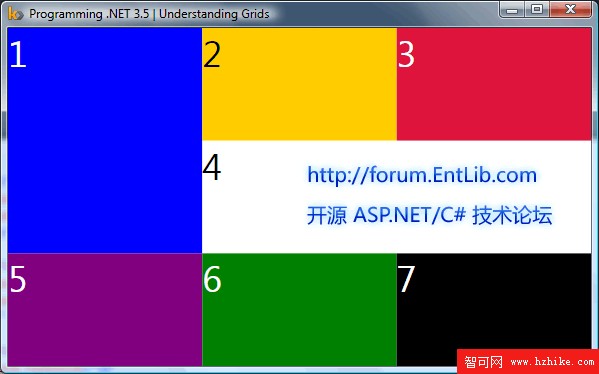
在 Kaxaml 工具中的呈現效果如下:
程式碼解析
這個範例先定義一個 Grid,接著宣告三個 RowDefinition 與三個 ColumnDefinition,形成三列三欄的網格。之後每個 TextBlock 透過 Grid.Column 與 Grid.Row 指定所在位置。
屬性含義如下:
- FontSize:指定文字大小。
- Foreground:指定文字顏色。
- Background:指定背景顏色。
- Grid.Column:指定欄位。
- Grid.Row:指定列位。
- Grid.RowSpan:指定佔用的列數。
- Grid.ColumnSpan:指定佔用的欄數。
值得注意的是,Grid 本身沒有顏色,畫面上看到的色彩來自 TextBlock 等子元素。Grid 只提供結構定義,讓子元素在網格中排列。
- 上一篇文章: XAML 實例演練之四:StackPanel 與 FlowDocumentReader 控制項的使用
- 下一篇文章: XAML 實例演練之二:以 DockPanel 與 Border 進行頁面配置